
Sep 4, 2026
What Makes Explainer Videos Work for ESG?
ESG Strategy
In This Article
How short, plain-language explainer videos make ESG clear: runtimes, data display tips, and where to publish for each audience.
What Makes Explainer Videos Work for ESG?
Most people will not read a 100-page ESG report, but many will watch a 60-second video. That is why explainer videos work: they make dense topics easier to follow, keep attention longer, and help people find the few numbers that matter.
If I had to sum up the article in plain terms, I’d put it this way:
Use a simple story: problem, plan, result
Keep the language plain: define technical terms only after the viewer has context
Match length to audience:
15–45 seconds for social posts
60–90 seconds for homepages and ESG pages
2–5 minutes for staff
5–10 minutes for boards, investors, and reporting use
Lead with top metrics first: do not crowd the screen with too much data
Publish where intent is high: website, ESG hub, report pages, intranet, and short clips on LinkedIn or YouTube
A few numbers from the article stand out: videos under 30 seconds can see completion rates up to 200% higher than longer cuts, and viewer retention can drop from 70% at 60 seconds to about 50% by 90 seconds. Those figures point to one thing: focus matters.
Audience | Best Length | Main Job |
|---|---|---|
Public | 15–45 sec. | Awareness |
Website visitors | 60–90 sec. | Overview |
Employees | 2–5 min. | Team alignment |
Board / investors | 5–10 min. | Context for decisions |
I see the core idea as simple: ESG videos work when they are short, clear, data-light on screen, and placed where people already look for information.
Ultimate Guide to ESG for Businesses
Why Explainer Videos Work for ESG
ESG explainer videos turn dense information into something people can follow fast. With animation and motion graphics, a complex system - like a decarbonization timeline - can be boiled down to the key milestones and metrics. The point lands, even if someone only watches for a moment. In practice, that kind of clarity usually comes down to two things: structure and language.
A Simple Structure Makes ESG Easier to Follow
Structure is what keeps the message moving instead of drifting. The strongest ESG explainers tend to follow a simple arc: problem, framework, outcome. It’s a clean way to guide the viewer from “What’s happening?” to “What are we doing about it?” to “What does this lead to?”
That flow lines up with how people take in new information. Context comes first, then detail. When the order feels natural, viewers don’t have to work as hard to keep up, which lowers cognitive load and helps hold attention.
Plain Language Builds Trust With Mixed Audiences
Language matters because ESG explainers almost never speak to just one group. A single video may reach employees, investors, customers, and communities at the same time. Plain language gives each viewer a way in.
Start with simple wording, then define terms like materiality or decarbonization once the viewer has some context. That’s not dumbing the message down. It’s about sequence. You make the idea easy to enter first, then add the technical layer, so more people stay with you long enough to take in the substance.
How Long an ESG Explainer Video Should Be
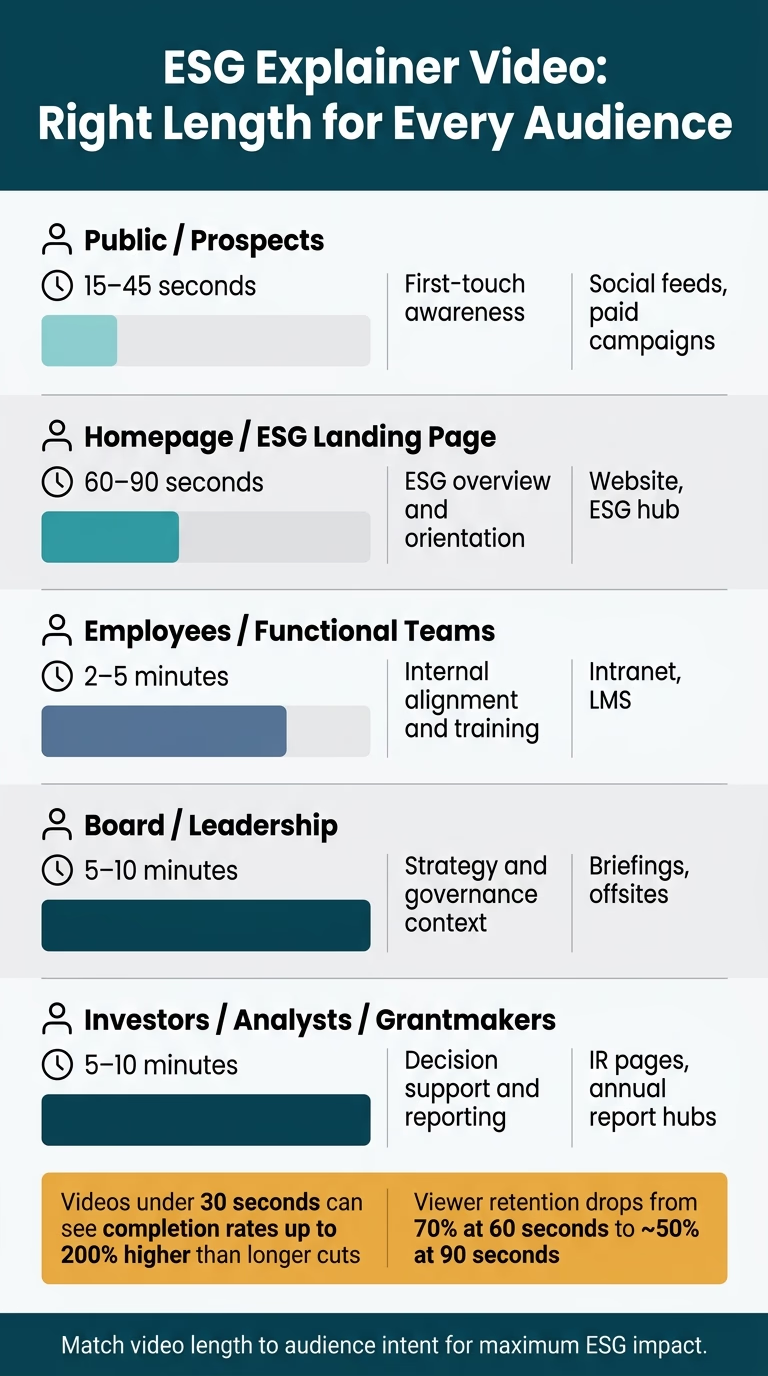
ESG Explainer Video Length by Audience: The Complete Guide
Once the story is set, the next call is runtime. This isn’t a style choice. It affects how much people grasp and whether they stay with you. A person scrolling LinkedIn wants something very different from a board member sitting in a briefing. Length should match that goal.
Use audience intent to pick the right cut.
Audience | Recommended Runtime | Primary Purpose | Primary Channel |
|---|---|---|---|
Public/prospects | 15–45 seconds | First-touch awareness | Social feeds, paid campaigns |
Homepage/ESG landing page | 60–90 seconds | ESG overview and orientation | Website, ESG hub |
Employees / functional teams | 2–5 minutes | Internal alignment and training | Intranet, LMS |
Board/leadership | 5–10 minutes | Strategy and governance context | Briefings, offsites |
Investors / analysts / grantmakers | 5–10 minutes | Decision support and reporting | IR pages, annual report hubs, foundation briefings |
Short Versions for Awareness and Social Distribution
For LinkedIn and similar platforms, 15–45 seconds is the safest window: one message, one hook in the first 3–5 seconds, and one clear next step. Completion rates for videos under 30 seconds can run up to 200% higher than longer cuts.[2][3] That’s a big gap, and it tells you something simple: short videos work best when they stay focused.
At this length, the job is narrow. Send people to the ESG hub, point them to the full explainer, or prompt a report download. Pick one. If you try to squeeze all three ESG pillars into less than a minute, the result often turns into soft, slogan-heavy copy that says a lot without saying much.
Standard Versions for Website and ESG Landing Pages
For most homepage and ESG landing page explainers, 60–90 seconds is a strong fit.[4] B2B retention data shows that 70% of viewers stay through the first 60 seconds, but that figure drops to around 50% by 90 seconds.[4] That drop matters. It’s the difference between a clean overview and a video that starts to lose people right before the finish.
If the page calls for more depth, 2–3 minutes can still work with a tight story. In that span, a well-structured video can explain why ESG matters to the organization, lay out three to five core priorities as commitments, and add a few concrete proof points. That gives viewers enough to understand the direction without burying them in detail. Full methodology and detailed metrics are better placed in linked reports or dashboards.
Longer Versions for Internal, Investor, and Reporting Audiences
Longer runtimes make sense when the audience is already invested in the topic. For employees and functional teams, 2–5 minutes gives enough room to show how ESG frameworks connect to day-to-day work without drifting into a full training module.
For board, investor, grantmaker, and reporting audiences, 5–10 minutes is a solid range when the goal is decision support. At that point, the video needs to connect ESG strategy to material risks, capital allocation, and performance trends. That audience isn’t looking for a brand reel. They want context they can use.
Using chapter markers or clear visual "acts" helps viewers navigate to the sections most relevant to them, whether that's climate resilience, social, or governance.
How to Present ESG Data Without Losing the Audience
Even in longer videos, ESG data has to land fast. Put the focus on the metrics that matter most, and use size and placement to steer the viewer’s eye so the story stays clear [1]. If a chart looks crowded, strip it back. Each graphic should stay honest: avoid deceptive scaling, and label data sources and reporting periods in plain view [1]. The simplest way to do that is to start with the summary.
Show Summary Metrics First, Then Link to Source Detail
Open with the headline metrics, then add short captions that explain what each number means in practice [1]. That gives people the point right away without forcing them to decode a dense slide.
Full methodology and detailed figures belong in linked reports or dashboards, not on screen [1].
What to Avoid in ESG Data Scenes
A clear ESG scene depends as much on what you remove as what you show. Avoid deceptive scaling. Test each graphic with a non-expert to make sure the story reads clearly without technical expertise [1].
Where to Publish ESG Explainer Videos for the Best Reach
Once your data is in good shape, the next step is simple: put the video where people already go to find ESG information. The distribution plan should begin with one question: what does the viewer expect at this moment? A person on an investor relations page is already doing homework. A person scrolling LinkedIn usually isn't. That difference matters. When the format matches the viewer's intent, the video feels useful instead of easy to skip.
Core Placements: Website, ESG Pages, and Report Hubs
Your owned pages should do the heavy lifting because they meet people right when they're searching or researching. A homepage video can serve as a broad introduction. A dedicated sustainability or ESG landing page gives first-time visitors a clear story before they dig into the details. For analysts, investors, and journalists, a report hub or annual report page makes the most sense, especially when a longer video sits alongside PDFs, methodology notes, and dashboards.
Place the video above the fold or near a call to action, like reading the report, exploring targets, or reviewing methodology. The video should support the page, not take its place.
Use owned pages for the full story. Use video platforms and social cutdowns to push that story farther.
Extended Reach: Video Platforms and Social Cutdowns
Platforms like YouTube and Vimeo are useful for hosting and embedding because they handle captions, chapters, and playback well. That makes them a good fit for reuse across your website, email campaigns, and press materials.
LinkedIn is a strong channel for ESG communication aimed at investors, analysts, and other B2B stakeholders. Short cutdowns work best when each clip sticks to one point at a time: one target, one metric, or one benefit. Each one should end with a clear prompt that sends viewers to the full ESG page or report hub.
Placement | Typical Length | Viewing Context |
|---|---|---|
Homepage | 60–90 seconds | Broad awareness, first-time visitors |
ESG / Sustainability landing page | 60–120 seconds | Topic-specific context, general stakeholders |
Investor relations / Report hub | 2–4 minutes | Due diligence, analysts, formal disclosure |
LinkedIn / X and other social platforms | 15–45 seconds | Discovery, awareness, traffic driving |
Conclusion: What Strong ESG Explainer Videos Consistently Include
Strong ESG explainer videos put the viewer first.
Every scene should make the message easier to grasp, not harder. That means simple visuals, a clear layout, and a tight focus on the small set of metrics that matter most. Accessibility matters too. Use strong visual contrast and on-screen text that people can read without strain.
Placement matters just as much as production. Publish the full video where stakeholders already go for ESG information, such as your website, ESG hub, annual report, or intranet.
For teams working to turn ESG strategy into clear stakeholder messaging, Council Fire helps make complexity easier to communicate in practical terms.
When ESG videos are short, clear, light on data, and placed in the right spots, they earn attention instead of fighting for it.
FAQs
How do ESG explainer videos build trust?
ESG explainer videos help build trust by turning dense sustainability data into clear, relatable stories. Instead of burying people in jargon, they use plain language, simple visuals, and human-centered storytelling to show what ESG goals mean in practice.
When organizations share both progress and challenges alongside verified data, they show transparency and accountability. That kind of honest, steady communication helps people connect the dots between stated goals and actual impact, which strengthens stakeholder relationships over time.
What ESG metrics should a video highlight first?
Highlight metrics that are easy to grasp, measurable, and tied to what your audience cares about most. Start with the key performance indicators that best support your goal, whether you're showing a win or pointing to steady progress.
Context matters just as much as the number itself. Add a short explanation of what drove the result and why it matters. If emissions went down, say what changed. If energy use dropped, connect that drop to something people can picture, like the carbon savings from taking cars off the road.
How do I repurpose one ESG video for different audiences?
Keep the main story the same, but shape the delivery for each audience and channel. The message doesn’t change; the angle does.
For instance, highlight financial results or risk reduction for investors, local environmental effects for community members, and career wins for employees. You can also turn the story into short social clips or include the full video in digital reports.
Related Blog Posts
Latest Articles
©2026

Narrative Change and Power Building: The Missing Half of Advocacy
Narrative change is the process of disrupting dominant narratives that normalize inequity and advancing new narratives from historically marginalized communities.

Funding Resilience Without Federal Grants
BRIC is unreliable and FEMA is shrinking. Here's how cities fund climate resilience with dedicated revenue, blended finance, and a coordinating authority.

The ESG Blind Spot: How AI Is Finding Risks in Companies Nobody Else Is Watching
Norway's sovereign wealth fund uses AI to screen 7,200 portfolio companies for forced labor and corruption within 24 hours. The real story is the emerging-market coverage gap that traditional ESG data vendors miss — and what it means for any company with a global supply chain.
Narrative Change and Power Building: The Missing Half of Advocacy
Narrative change is the process of disrupting dominant narratives that normalize inequity and advancing new narratives from historically marginalized communities.
Funding Resilience Without Federal Grants
BRIC is unreliable and FEMA is shrinking. Here's how cities fund climate resilience with dedicated revenue, blended finance, and a coordinating authority.
The ESG Blind Spot: How AI Is Finding Risks in Companies Nobody Else Is Watching
Norway's sovereign wealth fund uses AI to screen 7,200 portfolio companies for forced labor and corruption within 24 hours. The real story is the emerging-market coverage gap that traditional ESG data vendors miss — and what it means for any company with a global supply chain.
FAQ
01
What does it really mean to “redefine profit”?
02
What makes Council Fire different?
03
Who does Council Fire work with?
04
What does working with Council Fire actually look like?
05
How does Council Fire help organizations turn big goals into action?
06
How does Council Fire define and measure success?
07
How does technology fit into Council Fire’s work?
Sep 4, 2026
What Makes Explainer Videos Work for ESG?
ESG Strategy
In This Article
How short, plain-language explainer videos make ESG clear: runtimes, data display tips, and where to publish for each audience.
What Makes Explainer Videos Work for ESG?
Most people will not read a 100-page ESG report, but many will watch a 60-second video. That is why explainer videos work: they make dense topics easier to follow, keep attention longer, and help people find the few numbers that matter.
If I had to sum up the article in plain terms, I’d put it this way:
Use a simple story: problem, plan, result
Keep the language plain: define technical terms only after the viewer has context
Match length to audience:
15–45 seconds for social posts
60–90 seconds for homepages and ESG pages
2–5 minutes for staff
5–10 minutes for boards, investors, and reporting use
Lead with top metrics first: do not crowd the screen with too much data
Publish where intent is high: website, ESG hub, report pages, intranet, and short clips on LinkedIn or YouTube
A few numbers from the article stand out: videos under 30 seconds can see completion rates up to 200% higher than longer cuts, and viewer retention can drop from 70% at 60 seconds to about 50% by 90 seconds. Those figures point to one thing: focus matters.
Audience | Best Length | Main Job |
|---|---|---|
Public | 15–45 sec. | Awareness |
Website visitors | 60–90 sec. | Overview |
Employees | 2–5 min. | Team alignment |
Board / investors | 5–10 min. | Context for decisions |
I see the core idea as simple: ESG videos work when they are short, clear, data-light on screen, and placed where people already look for information.
Ultimate Guide to ESG for Businesses
Why Explainer Videos Work for ESG
ESG explainer videos turn dense information into something people can follow fast. With animation and motion graphics, a complex system - like a decarbonization timeline - can be boiled down to the key milestones and metrics. The point lands, even if someone only watches for a moment. In practice, that kind of clarity usually comes down to two things: structure and language.
A Simple Structure Makes ESG Easier to Follow
Structure is what keeps the message moving instead of drifting. The strongest ESG explainers tend to follow a simple arc: problem, framework, outcome. It’s a clean way to guide the viewer from “What’s happening?” to “What are we doing about it?” to “What does this lead to?”
That flow lines up with how people take in new information. Context comes first, then detail. When the order feels natural, viewers don’t have to work as hard to keep up, which lowers cognitive load and helps hold attention.
Plain Language Builds Trust With Mixed Audiences
Language matters because ESG explainers almost never speak to just one group. A single video may reach employees, investors, customers, and communities at the same time. Plain language gives each viewer a way in.
Start with simple wording, then define terms like materiality or decarbonization once the viewer has some context. That’s not dumbing the message down. It’s about sequence. You make the idea easy to enter first, then add the technical layer, so more people stay with you long enough to take in the substance.
How Long an ESG Explainer Video Should Be
ESG Explainer Video Length by Audience: The Complete Guide
Once the story is set, the next call is runtime. This isn’t a style choice. It affects how much people grasp and whether they stay with you. A person scrolling LinkedIn wants something very different from a board member sitting in a briefing. Length should match that goal.
Use audience intent to pick the right cut.
Audience | Recommended Runtime | Primary Purpose | Primary Channel |
|---|---|---|---|
Public/prospects | 15–45 seconds | First-touch awareness | Social feeds, paid campaigns |
Homepage/ESG landing page | 60–90 seconds | ESG overview and orientation | Website, ESG hub |
Employees / functional teams | 2–5 minutes | Internal alignment and training | Intranet, LMS |
Board/leadership | 5–10 minutes | Strategy and governance context | Briefings, offsites |
Investors / analysts / grantmakers | 5–10 minutes | Decision support and reporting | IR pages, annual report hubs, foundation briefings |
Short Versions for Awareness and Social Distribution
For LinkedIn and similar platforms, 15–45 seconds is the safest window: one message, one hook in the first 3–5 seconds, and one clear next step. Completion rates for videos under 30 seconds can run up to 200% higher than longer cuts.[2][3] That’s a big gap, and it tells you something simple: short videos work best when they stay focused.
At this length, the job is narrow. Send people to the ESG hub, point them to the full explainer, or prompt a report download. Pick one. If you try to squeeze all three ESG pillars into less than a minute, the result often turns into soft, slogan-heavy copy that says a lot without saying much.
Standard Versions for Website and ESG Landing Pages
For most homepage and ESG landing page explainers, 60–90 seconds is a strong fit.[4] B2B retention data shows that 70% of viewers stay through the first 60 seconds, but that figure drops to around 50% by 90 seconds.[4] That drop matters. It’s the difference between a clean overview and a video that starts to lose people right before the finish.
If the page calls for more depth, 2–3 minutes can still work with a tight story. In that span, a well-structured video can explain why ESG matters to the organization, lay out three to five core priorities as commitments, and add a few concrete proof points. That gives viewers enough to understand the direction without burying them in detail. Full methodology and detailed metrics are better placed in linked reports or dashboards.
Longer Versions for Internal, Investor, and Reporting Audiences
Longer runtimes make sense when the audience is already invested in the topic. For employees and functional teams, 2–5 minutes gives enough room to show how ESG frameworks connect to day-to-day work without drifting into a full training module.
For board, investor, grantmaker, and reporting audiences, 5–10 minutes is a solid range when the goal is decision support. At that point, the video needs to connect ESG strategy to material risks, capital allocation, and performance trends. That audience isn’t looking for a brand reel. They want context they can use.
Using chapter markers or clear visual "acts" helps viewers navigate to the sections most relevant to them, whether that's climate resilience, social, or governance.
How to Present ESG Data Without Losing the Audience
Even in longer videos, ESG data has to land fast. Put the focus on the metrics that matter most, and use size and placement to steer the viewer’s eye so the story stays clear [1]. If a chart looks crowded, strip it back. Each graphic should stay honest: avoid deceptive scaling, and label data sources and reporting periods in plain view [1]. The simplest way to do that is to start with the summary.
Show Summary Metrics First, Then Link to Source Detail
Open with the headline metrics, then add short captions that explain what each number means in practice [1]. That gives people the point right away without forcing them to decode a dense slide.
Full methodology and detailed figures belong in linked reports or dashboards, not on screen [1].
What to Avoid in ESG Data Scenes
A clear ESG scene depends as much on what you remove as what you show. Avoid deceptive scaling. Test each graphic with a non-expert to make sure the story reads clearly without technical expertise [1].
Where to Publish ESG Explainer Videos for the Best Reach
Once your data is in good shape, the next step is simple: put the video where people already go to find ESG information. The distribution plan should begin with one question: what does the viewer expect at this moment? A person on an investor relations page is already doing homework. A person scrolling LinkedIn usually isn't. That difference matters. When the format matches the viewer's intent, the video feels useful instead of easy to skip.
Core Placements: Website, ESG Pages, and Report Hubs
Your owned pages should do the heavy lifting because they meet people right when they're searching or researching. A homepage video can serve as a broad introduction. A dedicated sustainability or ESG landing page gives first-time visitors a clear story before they dig into the details. For analysts, investors, and journalists, a report hub or annual report page makes the most sense, especially when a longer video sits alongside PDFs, methodology notes, and dashboards.
Place the video above the fold or near a call to action, like reading the report, exploring targets, or reviewing methodology. The video should support the page, not take its place.
Use owned pages for the full story. Use video platforms and social cutdowns to push that story farther.
Extended Reach: Video Platforms and Social Cutdowns
Platforms like YouTube and Vimeo are useful for hosting and embedding because they handle captions, chapters, and playback well. That makes them a good fit for reuse across your website, email campaigns, and press materials.
LinkedIn is a strong channel for ESG communication aimed at investors, analysts, and other B2B stakeholders. Short cutdowns work best when each clip sticks to one point at a time: one target, one metric, or one benefit. Each one should end with a clear prompt that sends viewers to the full ESG page or report hub.
Placement | Typical Length | Viewing Context |
|---|---|---|
Homepage | 60–90 seconds | Broad awareness, first-time visitors |
ESG / Sustainability landing page | 60–120 seconds | Topic-specific context, general stakeholders |
Investor relations / Report hub | 2–4 minutes | Due diligence, analysts, formal disclosure |
LinkedIn / X and other social platforms | 15–45 seconds | Discovery, awareness, traffic driving |
Conclusion: What Strong ESG Explainer Videos Consistently Include
Strong ESG explainer videos put the viewer first.
Every scene should make the message easier to grasp, not harder. That means simple visuals, a clear layout, and a tight focus on the small set of metrics that matter most. Accessibility matters too. Use strong visual contrast and on-screen text that people can read without strain.
Placement matters just as much as production. Publish the full video where stakeholders already go for ESG information, such as your website, ESG hub, annual report, or intranet.
For teams working to turn ESG strategy into clear stakeholder messaging, Council Fire helps make complexity easier to communicate in practical terms.
When ESG videos are short, clear, light on data, and placed in the right spots, they earn attention instead of fighting for it.
FAQs
How do ESG explainer videos build trust?
ESG explainer videos help build trust by turning dense sustainability data into clear, relatable stories. Instead of burying people in jargon, they use plain language, simple visuals, and human-centered storytelling to show what ESG goals mean in practice.
When organizations share both progress and challenges alongside verified data, they show transparency and accountability. That kind of honest, steady communication helps people connect the dots between stated goals and actual impact, which strengthens stakeholder relationships over time.
What ESG metrics should a video highlight first?
Highlight metrics that are easy to grasp, measurable, and tied to what your audience cares about most. Start with the key performance indicators that best support your goal, whether you're showing a win or pointing to steady progress.
Context matters just as much as the number itself. Add a short explanation of what drove the result and why it matters. If emissions went down, say what changed. If energy use dropped, connect that drop to something people can picture, like the carbon savings from taking cars off the road.
How do I repurpose one ESG video for different audiences?
Keep the main story the same, but shape the delivery for each audience and channel. The message doesn’t change; the angle does.
For instance, highlight financial results or risk reduction for investors, local environmental effects for community members, and career wins for employees. You can also turn the story into short social clips or include the full video in digital reports.
Related Blog Posts
Latest Articles
©2026
Narrative Change and Power Building: The Missing Half of Advocacy
Narrative change is the process of disrupting dominant narratives that normalize inequity and advancing new narratives from historically marginalized communities.
Funding Resilience Without Federal Grants
BRIC is unreliable and FEMA is shrinking. Here's how cities fund climate resilience with dedicated revenue, blended finance, and a coordinating authority.
The ESG Blind Spot: How AI Is Finding Risks in Companies Nobody Else Is Watching
Norway's sovereign wealth fund uses AI to screen 7,200 portfolio companies for forced labor and corruption within 24 hours. The real story is the emerging-market coverage gap that traditional ESG data vendors miss — and what it means for any company with a global supply chain.
FAQ
01
What does it really mean to “redefine profit”?
02
What makes Council Fire different?
03
Who does Council Fire work with?
04
What does working with Council Fire actually look like?
05
How does Council Fire help organizations turn big goals into action?
06
How does Council Fire define and measure success?
07
How does technology fit into Council Fire’s work?
Sep 4, 2026
What Makes Explainer Videos Work for ESG?
ESG Strategy
In This Article
How short, plain-language explainer videos make ESG clear: runtimes, data display tips, and where to publish for each audience.
What Makes Explainer Videos Work for ESG?
Most people will not read a 100-page ESG report, but many will watch a 60-second video. That is why explainer videos work: they make dense topics easier to follow, keep attention longer, and help people find the few numbers that matter.
If I had to sum up the article in plain terms, I’d put it this way:
Use a simple story: problem, plan, result
Keep the language plain: define technical terms only after the viewer has context
Match length to audience:
15–45 seconds for social posts
60–90 seconds for homepages and ESG pages
2–5 minutes for staff
5–10 minutes for boards, investors, and reporting use
Lead with top metrics first: do not crowd the screen with too much data
Publish where intent is high: website, ESG hub, report pages, intranet, and short clips on LinkedIn or YouTube
A few numbers from the article stand out: videos under 30 seconds can see completion rates up to 200% higher than longer cuts, and viewer retention can drop from 70% at 60 seconds to about 50% by 90 seconds. Those figures point to one thing: focus matters.
Audience | Best Length | Main Job |
|---|---|---|
Public | 15–45 sec. | Awareness |
Website visitors | 60–90 sec. | Overview |
Employees | 2–5 min. | Team alignment |
Board / investors | 5–10 min. | Context for decisions |
I see the core idea as simple: ESG videos work when they are short, clear, data-light on screen, and placed where people already look for information.
Ultimate Guide to ESG for Businesses
Why Explainer Videos Work for ESG
ESG explainer videos turn dense information into something people can follow fast. With animation and motion graphics, a complex system - like a decarbonization timeline - can be boiled down to the key milestones and metrics. The point lands, even if someone only watches for a moment. In practice, that kind of clarity usually comes down to two things: structure and language.
A Simple Structure Makes ESG Easier to Follow
Structure is what keeps the message moving instead of drifting. The strongest ESG explainers tend to follow a simple arc: problem, framework, outcome. It’s a clean way to guide the viewer from “What’s happening?” to “What are we doing about it?” to “What does this lead to?”
That flow lines up with how people take in new information. Context comes first, then detail. When the order feels natural, viewers don’t have to work as hard to keep up, which lowers cognitive load and helps hold attention.
Plain Language Builds Trust With Mixed Audiences
Language matters because ESG explainers almost never speak to just one group. A single video may reach employees, investors, customers, and communities at the same time. Plain language gives each viewer a way in.
Start with simple wording, then define terms like materiality or decarbonization once the viewer has some context. That’s not dumbing the message down. It’s about sequence. You make the idea easy to enter first, then add the technical layer, so more people stay with you long enough to take in the substance.
How Long an ESG Explainer Video Should Be
ESG Explainer Video Length by Audience: The Complete Guide
Once the story is set, the next call is runtime. This isn’t a style choice. It affects how much people grasp and whether they stay with you. A person scrolling LinkedIn wants something very different from a board member sitting in a briefing. Length should match that goal.
Use audience intent to pick the right cut.
Audience | Recommended Runtime | Primary Purpose | Primary Channel |
|---|---|---|---|
Public/prospects | 15–45 seconds | First-touch awareness | Social feeds, paid campaigns |
Homepage/ESG landing page | 60–90 seconds | ESG overview and orientation | Website, ESG hub |
Employees / functional teams | 2–5 minutes | Internal alignment and training | Intranet, LMS |
Board/leadership | 5–10 minutes | Strategy and governance context | Briefings, offsites |
Investors / analysts / grantmakers | 5–10 minutes | Decision support and reporting | IR pages, annual report hubs, foundation briefings |
Short Versions for Awareness and Social Distribution
For LinkedIn and similar platforms, 15–45 seconds is the safest window: one message, one hook in the first 3–5 seconds, and one clear next step. Completion rates for videos under 30 seconds can run up to 200% higher than longer cuts.[2][3] That’s a big gap, and it tells you something simple: short videos work best when they stay focused.
At this length, the job is narrow. Send people to the ESG hub, point them to the full explainer, or prompt a report download. Pick one. If you try to squeeze all three ESG pillars into less than a minute, the result often turns into soft, slogan-heavy copy that says a lot without saying much.
Standard Versions for Website and ESG Landing Pages
For most homepage and ESG landing page explainers, 60–90 seconds is a strong fit.[4] B2B retention data shows that 70% of viewers stay through the first 60 seconds, but that figure drops to around 50% by 90 seconds.[4] That drop matters. It’s the difference between a clean overview and a video that starts to lose people right before the finish.
If the page calls for more depth, 2–3 minutes can still work with a tight story. In that span, a well-structured video can explain why ESG matters to the organization, lay out three to five core priorities as commitments, and add a few concrete proof points. That gives viewers enough to understand the direction without burying them in detail. Full methodology and detailed metrics are better placed in linked reports or dashboards.
Longer Versions for Internal, Investor, and Reporting Audiences
Longer runtimes make sense when the audience is already invested in the topic. For employees and functional teams, 2–5 minutes gives enough room to show how ESG frameworks connect to day-to-day work without drifting into a full training module.
For board, investor, grantmaker, and reporting audiences, 5–10 minutes is a solid range when the goal is decision support. At that point, the video needs to connect ESG strategy to material risks, capital allocation, and performance trends. That audience isn’t looking for a brand reel. They want context they can use.
Using chapter markers or clear visual "acts" helps viewers navigate to the sections most relevant to them, whether that's climate resilience, social, or governance.
How to Present ESG Data Without Losing the Audience
Even in longer videos, ESG data has to land fast. Put the focus on the metrics that matter most, and use size and placement to steer the viewer’s eye so the story stays clear [1]. If a chart looks crowded, strip it back. Each graphic should stay honest: avoid deceptive scaling, and label data sources and reporting periods in plain view [1]. The simplest way to do that is to start with the summary.
Show Summary Metrics First, Then Link to Source Detail
Open with the headline metrics, then add short captions that explain what each number means in practice [1]. That gives people the point right away without forcing them to decode a dense slide.
Full methodology and detailed figures belong in linked reports or dashboards, not on screen [1].
What to Avoid in ESG Data Scenes
A clear ESG scene depends as much on what you remove as what you show. Avoid deceptive scaling. Test each graphic with a non-expert to make sure the story reads clearly without technical expertise [1].
Where to Publish ESG Explainer Videos for the Best Reach
Once your data is in good shape, the next step is simple: put the video where people already go to find ESG information. The distribution plan should begin with one question: what does the viewer expect at this moment? A person on an investor relations page is already doing homework. A person scrolling LinkedIn usually isn't. That difference matters. When the format matches the viewer's intent, the video feels useful instead of easy to skip.
Core Placements: Website, ESG Pages, and Report Hubs
Your owned pages should do the heavy lifting because they meet people right when they're searching or researching. A homepage video can serve as a broad introduction. A dedicated sustainability or ESG landing page gives first-time visitors a clear story before they dig into the details. For analysts, investors, and journalists, a report hub or annual report page makes the most sense, especially when a longer video sits alongside PDFs, methodology notes, and dashboards.
Place the video above the fold or near a call to action, like reading the report, exploring targets, or reviewing methodology. The video should support the page, not take its place.
Use owned pages for the full story. Use video platforms and social cutdowns to push that story farther.
Extended Reach: Video Platforms and Social Cutdowns
Platforms like YouTube and Vimeo are useful for hosting and embedding because they handle captions, chapters, and playback well. That makes them a good fit for reuse across your website, email campaigns, and press materials.
LinkedIn is a strong channel for ESG communication aimed at investors, analysts, and other B2B stakeholders. Short cutdowns work best when each clip sticks to one point at a time: one target, one metric, or one benefit. Each one should end with a clear prompt that sends viewers to the full ESG page or report hub.
Placement | Typical Length | Viewing Context |
|---|---|---|
Homepage | 60–90 seconds | Broad awareness, first-time visitors |
ESG / Sustainability landing page | 60–120 seconds | Topic-specific context, general stakeholders |
Investor relations / Report hub | 2–4 minutes | Due diligence, analysts, formal disclosure |
LinkedIn / X and other social platforms | 15–45 seconds | Discovery, awareness, traffic driving |
Conclusion: What Strong ESG Explainer Videos Consistently Include
Strong ESG explainer videos put the viewer first.
Every scene should make the message easier to grasp, not harder. That means simple visuals, a clear layout, and a tight focus on the small set of metrics that matter most. Accessibility matters too. Use strong visual contrast and on-screen text that people can read without strain.
Placement matters just as much as production. Publish the full video where stakeholders already go for ESG information, such as your website, ESG hub, annual report, or intranet.
For teams working to turn ESG strategy into clear stakeholder messaging, Council Fire helps make complexity easier to communicate in practical terms.
When ESG videos are short, clear, light on data, and placed in the right spots, they earn attention instead of fighting for it.
FAQs
How do ESG explainer videos build trust?
ESG explainer videos help build trust by turning dense sustainability data into clear, relatable stories. Instead of burying people in jargon, they use plain language, simple visuals, and human-centered storytelling to show what ESG goals mean in practice.
When organizations share both progress and challenges alongside verified data, they show transparency and accountability. That kind of honest, steady communication helps people connect the dots between stated goals and actual impact, which strengthens stakeholder relationships over time.
What ESG metrics should a video highlight first?
Highlight metrics that are easy to grasp, measurable, and tied to what your audience cares about most. Start with the key performance indicators that best support your goal, whether you're showing a win or pointing to steady progress.
Context matters just as much as the number itself. Add a short explanation of what drove the result and why it matters. If emissions went down, say what changed. If energy use dropped, connect that drop to something people can picture, like the carbon savings from taking cars off the road.
How do I repurpose one ESG video for different audiences?
Keep the main story the same, but shape the delivery for each audience and channel. The message doesn’t change; the angle does.
For instance, highlight financial results or risk reduction for investors, local environmental effects for community members, and career wins for employees. You can also turn the story into short social clips or include the full video in digital reports.
Related Blog Posts
Latest Articles
©2026
Narrative Change and Power Building: The Missing Half of Advocacy
Narrative change is the process of disrupting dominant narratives that normalize inequity and advancing new narratives from historically marginalized communities.
Funding Resilience Without Federal Grants
BRIC is unreliable and FEMA is shrinking. Here's how cities fund climate resilience with dedicated revenue, blended finance, and a coordinating authority.
The ESG Blind Spot: How AI Is Finding Risks in Companies Nobody Else Is Watching
Norway's sovereign wealth fund uses AI to screen 7,200 portfolio companies for forced labor and corruption within 24 hours. The real story is the emerging-market coverage gap that traditional ESG data vendors miss — and what it means for any company with a global supply chain.
FAQ
What does it really mean to “redefine profit”?
What makes Council Fire different?
Who does Council Fire work with?
What does working with Council Fire actually look like?
How does Council Fire help organizations turn big goals into action?
How does Council Fire define and measure success?
How does technology fit into Council Fire’s work?