Sep 16, 2026
Water Benchmarking for AI Data Centers
Sustainability Strategy
In This Article
Compare WUE, withdrawals, consumptive use, and source mix across training, real-time and batch inference to expose site and cooling risk.
Water Benchmarking for AI Data Centers
AI data centers can burn through water fast, and a single yearly average will not tell you where the risk is. I’d track four things first: WUE, withdrawals, consumptive use, and source mix - then split the numbers by training, real-time inference, and batch inference.
Here’s the short version:
U.S. data centers used about 163.7 billion gallons of water per year as of 2021
AI racks often run far above older data center density ranges, which shifts cooling demand fast
A good benchmark should show:
gallons per MWh or kWh
gallons per GPU-hour
peak-day water demand
potable vs. reclaimed/non-potable supply
water consumed vs. water returned
Training and inference should not share one blended benchmark
Cooling choice and site location matter as much as efficiency numbers
Drought limits, source reliability, and local water stress should be part of the score
If I were setting this up, I’d use one reporting system for normal load, one for peak days, and one for annual source mix. I’d also rank water cuts by water saved, cost, complexity, and uptime risk so teams can act on the data instead of just filing it away.
Quick comparison
Area | What I’d check | Why it matters |
|---|---|---|
Core metrics | WUE, withdrawals, consumptive use, source mix | One metric alone misses too much |
AI workload units | Gallons per GPU-hour, per rack, per kWh | AI density skews old baseline methods |
Training | Cluster average, total water, peak draw | Long, dense runs can push short-term spikes |
Real-time inference | Steady-state use, peak traffic draw | Latency needs keep spare capacity online |
Batch inference | Water per job/task, schedule window | Jobs can sometimes shift away from peak demand |
Cooling | Air, dry cooling, liquid, reuse options | Water use changes by design and climate |
Siting risk | Drought, basin stress, potable dependence | Low site water use can still mean high risk |
Reduction plan | Setpoints, dry cooling, liquid loops, reuse | Some cuts are simple; others need more time and cost |
The main point is simple: I would treat water benchmarking for AI as a workload, cooling, and site-risk system - not just a facility efficiency score.
Water benchmarking basics for AI workloads
Define WUE, site water, source water, and consumptive use
Water Usage Effectiveness (WUE) is the site metric most teams start with. It measures cooling efficiency at the facility level. That said, WUE on its own can point you in the wrong direction, so it needs to be read next to three other measures.
Site water refers to water used on site for cooling and day-to-day operations. Withdrawals capture the total volume pulled from a source. Source water shows where that water comes from, while source mix shows how much comes from potable, reclaimed, and non-potable supplies. Consumptive use measures the share that does not return to the watershed.
Each metric shows one piece of the picture. A site can post a strong WUE and still depend too much on potable water. Another facility might show low consumptive use but still put pressure on local pipes and treatment systems because its withdrawal volume is so high.
Metric | What It Measures | What It Misses Alone |
|---|---|---|
WUE | Site cooling efficiency | Indirect water use from power grid; local watershed stress |
Withdrawals | Total water taken from source | Consumptive use (evaporation) vs. returned water |
Consumptive Use | Water lost to the watershed | Total infrastructure strain from high-volume withdrawals |
Source Mix | Share of potable, reclaimed, and non-potable supply | On-site cooling efficiency and technology choices |
Peak-Day Demand | Maximum water use in 24 hours | Long-term sustainability and annual volume trends |
These definitions give you the starting line for comparing training and inference loads.
Choose AI-specific normalization units
Most data center water benchmarks normalize against IT energy use in kilowatt-hours. That makes sense for general enterprise workloads. With AI, though, it falls apart fast. Two sites can report the same WUE and still run very different hardware at very different utilization rates.
For AI workloads, teams should track gallons per GPU-hour and gallons per rack alongside gallons per kWh. GPU-hour normalization makes cross-site comparison more useful across hardware generations and cluster sizes. Rack-level normalization brings density into view. A 100 kW rack and a 10 kW rack do not create the same cooling challenge, and treating them as if they do skews the benchmark.
For longer-range planning, it also helps to track water per million inference requests or per training run.
Those units make workload-level comparison possible before teams split out training and inference benchmarks.
Set baseline, peak, and annual reporting rules
AI workloads are uneven by nature. A large training campaign can drive peak water demand for days at a time. Inference loads, by contrast, tend to create a steadier baseline draw. Reporting rules should match that pattern instead of smoothing it over.
Use three reporting layers:
Baseline figures, reported monthly and annually, show normal operating efficiency.
Peak-day figures, captured during heatwaves or heavy training bursts, show how hard the site pushes local water systems at its worst.
Annual source mix reporting tracks the share of potable, reclaimed, and non-potable water used over the year.
Metric Type | Reporting Frequency | Purpose |
|---|---|---|
Baseline | Annual / Monthly | Shows normal operating efficiency under typical AI loads |
Peak-Day | Event-based | Captures maximum stress on local infrastructure during heatwaves or training bursts |
Indirect Water | Annual | Accounts for water used in electricity generation |
Source Mix | Annual | Tracks the ratio of potable vs. reclaimed/non-potable water used |
Keep baseline and peak reporting separate so burst loads stay visible. That split matters in the next step, because training and inference need different benchmarks.
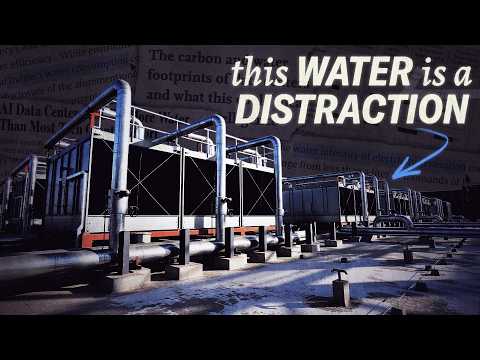
We Calculated How Much Water Data Centers Actually Use. The Total Will Shock You.
Build separate benchmarks for training and inference
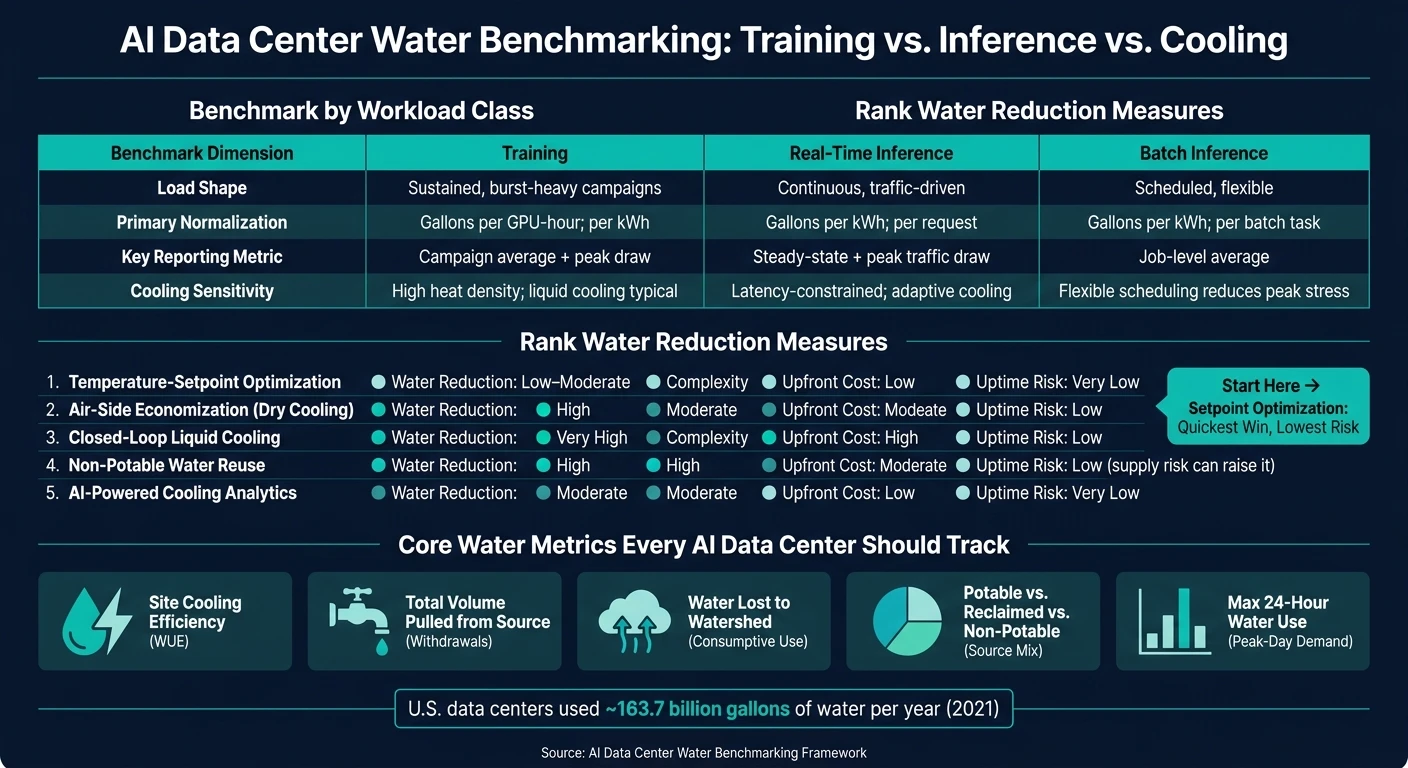
AI Data Center Water Benchmarking: Training vs. Inference vs. Cooling Options
Once WUE, source mix, and reporting rules are locked in, the next step is simple: split benchmarks by workload class. Training and inference should not sit under one blended metric. If they do, efficient inference can mask water-heavy training, or the opposite can happen.
Training benchmarks for high-density, burst-heavy compute
Training runs are long, dense, and sustained. GPU workload power-profile studies show that training jobs have only about 3% power oversubscription headroom because large synchronous compute peaks hit at the same time[6]. That small margin matters. It tells you training clusters leave little room for error when power, cooling, and water demand all spike together.
For training, report water use at the cluster, room, and site levels. Use:
gallons per GPU-hour
gallons per kWh
total water
source water
consumptive use
peak 15-minute or daily draw by rack power band
That mix gives a clearer picture of what’s happening. A site may look calm on average, but the peak draw can tell a very different story.
Inference benchmarks for steady and latency-sensitive demand
Inference behaves differently. These workloads are steadier than training. They usually run at 15–60 kW per rack[4][5] on a continuous basis, tied to service-level agreements instead of batch completion. In plain terms, demand rises and falls with user traffic, so heat loads follow user activity, not a planned job queue.
Real-time and batch inference should be benchmarked separately. That split matters more than it may seem at first glance. Real-time inference has to keep latency low, so operators hold reserve headroom. Batch inference has more breathing room and can often be scheduled to cut peak water demand. Tail latency constraints at the 95th/99th percentile latency often mean real-time inference runs at utilization levels well below what batch jobs can sustain[1][2][3].
Put both into one benchmark, and you blur the cause of high water intensity. Is the issue always-on serving capacity? Or is it periodic batch work that could be moved to a better time window? Without the split, you can’t tell.
Benchmark Dimension | Training | Real-Time Inference | Batch Inference |
|---|---|---|---|
Load Shape | Sustained, burst-heavy campaigns | Continuous, traffic-driven | Scheduled, flexible |
Primary Normalization | Gallons per GPU-hour; per kWh | Gallons per kWh; per request | Gallons per kWh; per batch task |
Key Reporting Metric | Campaign average + peak draw | Steady-state + peak traffic draw | Job-level average |
Cooling Sensitivity | High heat density; liquid cooling typical | Latency-constrained; adaptive cooling | Flexible scheduling reduces peak stress |
Use these workload splits to compare cooling options and siting risk.
Compare cooling options and siting risk
Once you've split training from inference, the next screen is physical design and location. That's where many benchmarks fall short. They often miss two big drivers of water demand: the cooling system and the site itself.
Cooling architectures and their water use
Each cooling setup should be benchmarked on its own, with a close look at site water use, consumptive use, and uptime impact. Air cooling uses little or no on-site water. That sounds like a clear win, but there's a trade-off. In hot climates, it can drive up energy use, and it tends to suit lower-density deployments more than dense AI clusters. As rack density climbs, the list of workable cooling choices gets shorter. In many cases, that pushes benchmarks toward liquid or hybrid systems.
A cooling system can look efficient on paper and still miss the mark if the facility sits in a water-stressed area.
Climate, water stress, and permit risk in benchmark design
Location risk needs to be benchmarked alongside facility efficiency. A site with low direct water use can still carry high risk if it relies on stressed basins, drought-prone sources, limited reuse access, or an uncertain long-term supply. Seasonal stress matters. Groundwater dependence matters. Community opposition matters too, especially when permits are on the line.
In water-stressed regions, the benchmark should apply a penalty to sites that depend on evaporative systems or potable-only supply.
Risk tiers help turn that into something usable. They can set tighter consumptive-use thresholds and stricter source-water reporting for high-risk sites. Those tiers also set the floor for the reduction measures that come next.
Reduce water use without weakening uptime
Once you’ve set risk tiers and cooling benchmarks, the job shifts from finding water-saving options to ranking them. The point isn’t to chase the biggest cut on paper. It’s to weigh water savings against implementation effort and any risk to uptime.
Design and operating changes with the most water impact
A few measures tend to stand out.
Temperature-setpoint optimization is usually the first move. Raising cooling setpoints can trim evaporative cooling demand with very little operational risk. It’s low-cost, simple to track, and often the fastest path to a measurable result.
Dry cooling removes on-site cooling water use altogether. The tradeoff is climate. It works best in moderate conditions, so site weather matters a lot.
Closed-loop liquid cooling can reduce water use in a big way, but it asks more from the project team. Upfront cost is higher, and installation is more involved.
Non-potable water reuse cuts potable water draw. But there’s a catch: the source has to be dependable. A backup source only helps if it’s there when you need it, so source reliability has to be benchmarked, not assumed.
How to rank measures by water savings, complexity, and uptime risk
There’s no one-size-fits-all answer here. The right rollout depends on the cooling setup at each site, the climate zone, and how much uptime risk the operation can accept. What matters most is using the same ranking method across locations so teams are comparing apples to apples.
Measure | Water Reduction | Complexity | Upfront Cost | Uptime Risk |
|---|---|---|---|---|
Temperature-Setpoint Optimization | Low–Moderate | Low | Low | Very Low |
Air-Side Economization (Dry Cooling) | High | Moderate | Moderate | Low (climate-dependent) |
Closed-Loop Liquid Cooling | Very High | High | High | Low |
Non-Potable Water Reuse | High | High | Moderate | Low; supply risk can raise it |
AI-Powered Cooling Analytics | Moderate | Moderate | Low | Very Low |
In most cases, setpoint optimization should come first. It’s the quickest win and carries the least risk. From there, teams can add economization, liquid cooling, or non-potable reuse based on local climate, cooling architecture, and source dependability.
Conclusion: What a sound AI water benchmark should include
A sound benchmark links every measure back to workload type, cooling design, and local water stress. It starts with clear metrics: WUE, site water, source water, and consumptive use, each defined well enough to audit. It separates training from inference, since those workloads have very different thermal profiles and water demand patterns.
It also uses one reporting basis across the board - gallons per GPU-hour, peak-day draw, source mix, and consumptive use - so results hold together from site to site. Cooling systems should be judged on water use, uptime effect, and climate fit, not on efficiency alone. Thresholds also need to shift with local water stress, seasonal risk, and source reliability.
The goal is plain: a benchmark that helps teams make site, cooling, and uptime decisions with confidence. That means deciding where to build, which cooling system to use, which conservation steps to move on first, and how to report progress in a way that stands up to scrutiny. That’s the kind of benchmark teams can use.
FAQs
Why isn’t WUE enough on its own?
WUE only tells part of the story. It gives a snapshot of water use, but it can miss the moments that matter most. Annual averages, for instance, can smooth over the toughest stretch of the year - those hot, dry periods when cooling demand climbs and local communities are also using more water.
That blind spot matters. A data center might post an acceptable yearly number while still putting heavy pressure on water supplies during the exact time those supplies are under the most strain.
WUE also doesn’t account for indirect water use tied to electricity generation. And it skips site-level conditions that can change the picture in a big way, including:
the staying power of the local water source
drought risk
pressure on local utilities
pressure on nearby residents
Taken on its own, WUE can make a water profile look simpler than it is.
How should training and inference be benchmarked differently?
Benchmark training and inference separately because they put very different demands on a system. Training tends to run as a steady, high-intensity compute workload. Inference is different. It often comes in waves, with quieter periods followed by sharp spikes. If you lump them together, you miss what’s actually happening on the ground. A good benchmark should track both average water demand and peak water demand, since each tells a different part of the story.
Cooling assumptions also need to tie back to the site’s local watershed context. That connection matters. Water use doesn’t happen in a vacuum, and neither do power decisions. When teams make the water-energy tradeoff clear, they can manage it in plain view and still protect uptime.
Which water-saving steps best protect uptime?
To protect uptime while cutting water use, teams should focus on cooling and infrastructure choices that keep systems stable under load.
That usually starts with direct-to-chip cooling and AI-optimized distribution systems, which can move cooling where it’s needed most instead of wasting capacity across the whole setup. In plain terms, you’re cooling the hot spots, not the entire room like it’s one giant oven.
Water source and cooling method matter too. Many teams are moving toward non-potable water, closed-loop systems, or dry air-based cooling. Each path comes with trade-offs, especially around reliability, cost, and performance during peak demand, so those risks need to be weighed early in the design phase rather than patched later.
A couple of nuts-and-bolts steps round this out:
Leak detection to catch problems before they turn into downtime or water loss
Proactive efficiency upgrades to improve cooling performance without putting operations at risk
Related Blog Posts
Latest Articles
©2026
Narrative Change and Power Building: The Missing Half of Advocacy
Narrative change is the process of disrupting dominant narratives that normalize inequity and advancing new narratives from historically marginalized communities.
Funding Resilience Without Federal Grants
BRIC is unreliable and FEMA is shrinking. Here's how cities fund climate resilience with dedicated revenue, blended finance, and a coordinating authority.

The ESG Blind Spot: How AI Is Finding Risks in Companies Nobody Else Is Watching
Norway's sovereign wealth fund uses AI to screen 7,200 portfolio companies for forced labor and corruption within 24 hours. The real story is the emerging-market coverage gap that traditional ESG data vendors miss — and what it means for any company with a global supply chain.
Narrative Change and Power Building: The Missing Half of Advocacy
Narrative change is the process of disrupting dominant narratives that normalize inequity and advancing new narratives from historically marginalized communities.
Funding Resilience Without Federal Grants
BRIC is unreliable and FEMA is shrinking. Here's how cities fund climate resilience with dedicated revenue, blended finance, and a coordinating authority.
The ESG Blind Spot: How AI Is Finding Risks in Companies Nobody Else Is Watching
Norway's sovereign wealth fund uses AI to screen 7,200 portfolio companies for forced labor and corruption within 24 hours. The real story is the emerging-market coverage gap that traditional ESG data vendors miss — and what it means for any company with a global supply chain.
FAQ
01
What does it really mean to “redefine profit”?
02
What makes Council Fire different?
03
Who does Council Fire work with?
04
What does working with Council Fire actually look like?
05
How does Council Fire help organizations turn big goals into action?
06
How does Council Fire define and measure success?
07
How does technology fit into Council Fire’s work?
Sep 16, 2026
Water Benchmarking for AI Data Centers
Sustainability Strategy
In This Article
Compare WUE, withdrawals, consumptive use, and source mix across training, real-time and batch inference to expose site and cooling risk.
Water Benchmarking for AI Data Centers
AI data centers can burn through water fast, and a single yearly average will not tell you where the risk is. I’d track four things first: WUE, withdrawals, consumptive use, and source mix - then split the numbers by training, real-time inference, and batch inference.
Here’s the short version:
U.S. data centers used about 163.7 billion gallons of water per year as of 2021
AI racks often run far above older data center density ranges, which shifts cooling demand fast
A good benchmark should show:
gallons per MWh or kWh
gallons per GPU-hour
peak-day water demand
potable vs. reclaimed/non-potable supply
water consumed vs. water returned
Training and inference should not share one blended benchmark
Cooling choice and site location matter as much as efficiency numbers
Drought limits, source reliability, and local water stress should be part of the score
If I were setting this up, I’d use one reporting system for normal load, one for peak days, and one for annual source mix. I’d also rank water cuts by water saved, cost, complexity, and uptime risk so teams can act on the data instead of just filing it away.
Quick comparison
Area | What I’d check | Why it matters |
|---|---|---|
Core metrics | WUE, withdrawals, consumptive use, source mix | One metric alone misses too much |
AI workload units | Gallons per GPU-hour, per rack, per kWh | AI density skews old baseline methods |
Training | Cluster average, total water, peak draw | Long, dense runs can push short-term spikes |
Real-time inference | Steady-state use, peak traffic draw | Latency needs keep spare capacity online |
Batch inference | Water per job/task, schedule window | Jobs can sometimes shift away from peak demand |
Cooling | Air, dry cooling, liquid, reuse options | Water use changes by design and climate |
Siting risk | Drought, basin stress, potable dependence | Low site water use can still mean high risk |
Reduction plan | Setpoints, dry cooling, liquid loops, reuse | Some cuts are simple; others need more time and cost |
The main point is simple: I would treat water benchmarking for AI as a workload, cooling, and site-risk system - not just a facility efficiency score.
Water benchmarking basics for AI workloads
Define WUE, site water, source water, and consumptive use
Water Usage Effectiveness (WUE) is the site metric most teams start with. It measures cooling efficiency at the facility level. That said, WUE on its own can point you in the wrong direction, so it needs to be read next to three other measures.
Site water refers to water used on site for cooling and day-to-day operations. Withdrawals capture the total volume pulled from a source. Source water shows where that water comes from, while source mix shows how much comes from potable, reclaimed, and non-potable supplies. Consumptive use measures the share that does not return to the watershed.
Each metric shows one piece of the picture. A site can post a strong WUE and still depend too much on potable water. Another facility might show low consumptive use but still put pressure on local pipes and treatment systems because its withdrawal volume is so high.
Metric | What It Measures | What It Misses Alone |
|---|---|---|
WUE | Site cooling efficiency | Indirect water use from power grid; local watershed stress |
Withdrawals | Total water taken from source | Consumptive use (evaporation) vs. returned water |
Consumptive Use | Water lost to the watershed | Total infrastructure strain from high-volume withdrawals |
Source Mix | Share of potable, reclaimed, and non-potable supply | On-site cooling efficiency and technology choices |
Peak-Day Demand | Maximum water use in 24 hours | Long-term sustainability and annual volume trends |
These definitions give you the starting line for comparing training and inference loads.
Choose AI-specific normalization units
Most data center water benchmarks normalize against IT energy use in kilowatt-hours. That makes sense for general enterprise workloads. With AI, though, it falls apart fast. Two sites can report the same WUE and still run very different hardware at very different utilization rates.
For AI workloads, teams should track gallons per GPU-hour and gallons per rack alongside gallons per kWh. GPU-hour normalization makes cross-site comparison more useful across hardware generations and cluster sizes. Rack-level normalization brings density into view. A 100 kW rack and a 10 kW rack do not create the same cooling challenge, and treating them as if they do skews the benchmark.
For longer-range planning, it also helps to track water per million inference requests or per training run.
Those units make workload-level comparison possible before teams split out training and inference benchmarks.
Set baseline, peak, and annual reporting rules
AI workloads are uneven by nature. A large training campaign can drive peak water demand for days at a time. Inference loads, by contrast, tend to create a steadier baseline draw. Reporting rules should match that pattern instead of smoothing it over.
Use three reporting layers:
Baseline figures, reported monthly and annually, show normal operating efficiency.
Peak-day figures, captured during heatwaves or heavy training bursts, show how hard the site pushes local water systems at its worst.
Annual source mix reporting tracks the share of potable, reclaimed, and non-potable water used over the year.
Metric Type | Reporting Frequency | Purpose |
|---|---|---|
Baseline | Annual / Monthly | Shows normal operating efficiency under typical AI loads |
Peak-Day | Event-based | Captures maximum stress on local infrastructure during heatwaves or training bursts |
Indirect Water | Annual | Accounts for water used in electricity generation |
Source Mix | Annual | Tracks the ratio of potable vs. reclaimed/non-potable water used |
Keep baseline and peak reporting separate so burst loads stay visible. That split matters in the next step, because training and inference need different benchmarks.
We Calculated How Much Water Data Centers Actually Use. The Total Will Shock You.
Build separate benchmarks for training and inference
AI Data Center Water Benchmarking: Training vs. Inference vs. Cooling Options
Once WUE, source mix, and reporting rules are locked in, the next step is simple: split benchmarks by workload class. Training and inference should not sit under one blended metric. If they do, efficient inference can mask water-heavy training, or the opposite can happen.
Training benchmarks for high-density, burst-heavy compute
Training runs are long, dense, and sustained. GPU workload power-profile studies show that training jobs have only about 3% power oversubscription headroom because large synchronous compute peaks hit at the same time[6]. That small margin matters. It tells you training clusters leave little room for error when power, cooling, and water demand all spike together.
For training, report water use at the cluster, room, and site levels. Use:
gallons per GPU-hour
gallons per kWh
total water
source water
consumptive use
peak 15-minute or daily draw by rack power band
That mix gives a clearer picture of what’s happening. A site may look calm on average, but the peak draw can tell a very different story.
Inference benchmarks for steady and latency-sensitive demand
Inference behaves differently. These workloads are steadier than training. They usually run at 15–60 kW per rack[4][5] on a continuous basis, tied to service-level agreements instead of batch completion. In plain terms, demand rises and falls with user traffic, so heat loads follow user activity, not a planned job queue.
Real-time and batch inference should be benchmarked separately. That split matters more than it may seem at first glance. Real-time inference has to keep latency low, so operators hold reserve headroom. Batch inference has more breathing room and can often be scheduled to cut peak water demand. Tail latency constraints at the 95th/99th percentile latency often mean real-time inference runs at utilization levels well below what batch jobs can sustain[1][2][3].
Put both into one benchmark, and you blur the cause of high water intensity. Is the issue always-on serving capacity? Or is it periodic batch work that could be moved to a better time window? Without the split, you can’t tell.
Benchmark Dimension | Training | Real-Time Inference | Batch Inference |
|---|---|---|---|
Load Shape | Sustained, burst-heavy campaigns | Continuous, traffic-driven | Scheduled, flexible |
Primary Normalization | Gallons per GPU-hour; per kWh | Gallons per kWh; per request | Gallons per kWh; per batch task |
Key Reporting Metric | Campaign average + peak draw | Steady-state + peak traffic draw | Job-level average |
Cooling Sensitivity | High heat density; liquid cooling typical | Latency-constrained; adaptive cooling | Flexible scheduling reduces peak stress |
Use these workload splits to compare cooling options and siting risk.
Compare cooling options and siting risk
Once you've split training from inference, the next screen is physical design and location. That's where many benchmarks fall short. They often miss two big drivers of water demand: the cooling system and the site itself.
Cooling architectures and their water use
Each cooling setup should be benchmarked on its own, with a close look at site water use, consumptive use, and uptime impact. Air cooling uses little or no on-site water. That sounds like a clear win, but there's a trade-off. In hot climates, it can drive up energy use, and it tends to suit lower-density deployments more than dense AI clusters. As rack density climbs, the list of workable cooling choices gets shorter. In many cases, that pushes benchmarks toward liquid or hybrid systems.
A cooling system can look efficient on paper and still miss the mark if the facility sits in a water-stressed area.
Climate, water stress, and permit risk in benchmark design
Location risk needs to be benchmarked alongside facility efficiency. A site with low direct water use can still carry high risk if it relies on stressed basins, drought-prone sources, limited reuse access, or an uncertain long-term supply. Seasonal stress matters. Groundwater dependence matters. Community opposition matters too, especially when permits are on the line.
In water-stressed regions, the benchmark should apply a penalty to sites that depend on evaporative systems or potable-only supply.
Risk tiers help turn that into something usable. They can set tighter consumptive-use thresholds and stricter source-water reporting for high-risk sites. Those tiers also set the floor for the reduction measures that come next.
Reduce water use without weakening uptime
Once you’ve set risk tiers and cooling benchmarks, the job shifts from finding water-saving options to ranking them. The point isn’t to chase the biggest cut on paper. It’s to weigh water savings against implementation effort and any risk to uptime.
Design and operating changes with the most water impact
A few measures tend to stand out.
Temperature-setpoint optimization is usually the first move. Raising cooling setpoints can trim evaporative cooling demand with very little operational risk. It’s low-cost, simple to track, and often the fastest path to a measurable result.
Dry cooling removes on-site cooling water use altogether. The tradeoff is climate. It works best in moderate conditions, so site weather matters a lot.
Closed-loop liquid cooling can reduce water use in a big way, but it asks more from the project team. Upfront cost is higher, and installation is more involved.
Non-potable water reuse cuts potable water draw. But there’s a catch: the source has to be dependable. A backup source only helps if it’s there when you need it, so source reliability has to be benchmarked, not assumed.
How to rank measures by water savings, complexity, and uptime risk
There’s no one-size-fits-all answer here. The right rollout depends on the cooling setup at each site, the climate zone, and how much uptime risk the operation can accept. What matters most is using the same ranking method across locations so teams are comparing apples to apples.
Measure | Water Reduction | Complexity | Upfront Cost | Uptime Risk |
|---|---|---|---|---|
Temperature-Setpoint Optimization | Low–Moderate | Low | Low | Very Low |
Air-Side Economization (Dry Cooling) | High | Moderate | Moderate | Low (climate-dependent) |
Closed-Loop Liquid Cooling | Very High | High | High | Low |
Non-Potable Water Reuse | High | High | Moderate | Low; supply risk can raise it |
AI-Powered Cooling Analytics | Moderate | Moderate | Low | Very Low |
In most cases, setpoint optimization should come first. It’s the quickest win and carries the least risk. From there, teams can add economization, liquid cooling, or non-potable reuse based on local climate, cooling architecture, and source dependability.
Conclusion: What a sound AI water benchmark should include
A sound benchmark links every measure back to workload type, cooling design, and local water stress. It starts with clear metrics: WUE, site water, source water, and consumptive use, each defined well enough to audit. It separates training from inference, since those workloads have very different thermal profiles and water demand patterns.
It also uses one reporting basis across the board - gallons per GPU-hour, peak-day draw, source mix, and consumptive use - so results hold together from site to site. Cooling systems should be judged on water use, uptime effect, and climate fit, not on efficiency alone. Thresholds also need to shift with local water stress, seasonal risk, and source reliability.
The goal is plain: a benchmark that helps teams make site, cooling, and uptime decisions with confidence. That means deciding where to build, which cooling system to use, which conservation steps to move on first, and how to report progress in a way that stands up to scrutiny. That’s the kind of benchmark teams can use.
FAQs
Why isn’t WUE enough on its own?
WUE only tells part of the story. It gives a snapshot of water use, but it can miss the moments that matter most. Annual averages, for instance, can smooth over the toughest stretch of the year - those hot, dry periods when cooling demand climbs and local communities are also using more water.
That blind spot matters. A data center might post an acceptable yearly number while still putting heavy pressure on water supplies during the exact time those supplies are under the most strain.
WUE also doesn’t account for indirect water use tied to electricity generation. And it skips site-level conditions that can change the picture in a big way, including:
the staying power of the local water source
drought risk
pressure on local utilities
pressure on nearby residents
Taken on its own, WUE can make a water profile look simpler than it is.
How should training and inference be benchmarked differently?
Benchmark training and inference separately because they put very different demands on a system. Training tends to run as a steady, high-intensity compute workload. Inference is different. It often comes in waves, with quieter periods followed by sharp spikes. If you lump them together, you miss what’s actually happening on the ground. A good benchmark should track both average water demand and peak water demand, since each tells a different part of the story.
Cooling assumptions also need to tie back to the site’s local watershed context. That connection matters. Water use doesn’t happen in a vacuum, and neither do power decisions. When teams make the water-energy tradeoff clear, they can manage it in plain view and still protect uptime.
Which water-saving steps best protect uptime?
To protect uptime while cutting water use, teams should focus on cooling and infrastructure choices that keep systems stable under load.
That usually starts with direct-to-chip cooling and AI-optimized distribution systems, which can move cooling where it’s needed most instead of wasting capacity across the whole setup. In plain terms, you’re cooling the hot spots, not the entire room like it’s one giant oven.
Water source and cooling method matter too. Many teams are moving toward non-potable water, closed-loop systems, or dry air-based cooling. Each path comes with trade-offs, especially around reliability, cost, and performance during peak demand, so those risks need to be weighed early in the design phase rather than patched later.
A couple of nuts-and-bolts steps round this out:
Leak detection to catch problems before they turn into downtime or water loss
Proactive efficiency upgrades to improve cooling performance without putting operations at risk
Related Blog Posts
Latest Articles
©2026
Narrative Change and Power Building: The Missing Half of Advocacy
Narrative change is the process of disrupting dominant narratives that normalize inequity and advancing new narratives from historically marginalized communities.
Funding Resilience Without Federal Grants
BRIC is unreliable and FEMA is shrinking. Here's how cities fund climate resilience with dedicated revenue, blended finance, and a coordinating authority.
The ESG Blind Spot: How AI Is Finding Risks in Companies Nobody Else Is Watching
Norway's sovereign wealth fund uses AI to screen 7,200 portfolio companies for forced labor and corruption within 24 hours. The real story is the emerging-market coverage gap that traditional ESG data vendors miss — and what it means for any company with a global supply chain.
FAQ
01
What does it really mean to “redefine profit”?
02
What makes Council Fire different?
03
Who does Council Fire work with?
04
What does working with Council Fire actually look like?
05
How does Council Fire help organizations turn big goals into action?
06
How does Council Fire define and measure success?
07
How does technology fit into Council Fire’s work?
Sep 16, 2026
Water Benchmarking for AI Data Centers
Sustainability Strategy
In This Article
Compare WUE, withdrawals, consumptive use, and source mix across training, real-time and batch inference to expose site and cooling risk.
Water Benchmarking for AI Data Centers
AI data centers can burn through water fast, and a single yearly average will not tell you where the risk is. I’d track four things first: WUE, withdrawals, consumptive use, and source mix - then split the numbers by training, real-time inference, and batch inference.
Here’s the short version:
U.S. data centers used about 163.7 billion gallons of water per year as of 2021
AI racks often run far above older data center density ranges, which shifts cooling demand fast
A good benchmark should show:
gallons per MWh or kWh
gallons per GPU-hour
peak-day water demand
potable vs. reclaimed/non-potable supply
water consumed vs. water returned
Training and inference should not share one blended benchmark
Cooling choice and site location matter as much as efficiency numbers
Drought limits, source reliability, and local water stress should be part of the score
If I were setting this up, I’d use one reporting system for normal load, one for peak days, and one for annual source mix. I’d also rank water cuts by water saved, cost, complexity, and uptime risk so teams can act on the data instead of just filing it away.
Quick comparison
Area | What I’d check | Why it matters |
|---|---|---|
Core metrics | WUE, withdrawals, consumptive use, source mix | One metric alone misses too much |
AI workload units | Gallons per GPU-hour, per rack, per kWh | AI density skews old baseline methods |
Training | Cluster average, total water, peak draw | Long, dense runs can push short-term spikes |
Real-time inference | Steady-state use, peak traffic draw | Latency needs keep spare capacity online |
Batch inference | Water per job/task, schedule window | Jobs can sometimes shift away from peak demand |
Cooling | Air, dry cooling, liquid, reuse options | Water use changes by design and climate |
Siting risk | Drought, basin stress, potable dependence | Low site water use can still mean high risk |
Reduction plan | Setpoints, dry cooling, liquid loops, reuse | Some cuts are simple; others need more time and cost |
The main point is simple: I would treat water benchmarking for AI as a workload, cooling, and site-risk system - not just a facility efficiency score.
Water benchmarking basics for AI workloads
Define WUE, site water, source water, and consumptive use
Water Usage Effectiveness (WUE) is the site metric most teams start with. It measures cooling efficiency at the facility level. That said, WUE on its own can point you in the wrong direction, so it needs to be read next to three other measures.
Site water refers to water used on site for cooling and day-to-day operations. Withdrawals capture the total volume pulled from a source. Source water shows where that water comes from, while source mix shows how much comes from potable, reclaimed, and non-potable supplies. Consumptive use measures the share that does not return to the watershed.
Each metric shows one piece of the picture. A site can post a strong WUE and still depend too much on potable water. Another facility might show low consumptive use but still put pressure on local pipes and treatment systems because its withdrawal volume is so high.
Metric | What It Measures | What It Misses Alone |
|---|---|---|
WUE | Site cooling efficiency | Indirect water use from power grid; local watershed stress |
Withdrawals | Total water taken from source | Consumptive use (evaporation) vs. returned water |
Consumptive Use | Water lost to the watershed | Total infrastructure strain from high-volume withdrawals |
Source Mix | Share of potable, reclaimed, and non-potable supply | On-site cooling efficiency and technology choices |
Peak-Day Demand | Maximum water use in 24 hours | Long-term sustainability and annual volume trends |
These definitions give you the starting line for comparing training and inference loads.
Choose AI-specific normalization units
Most data center water benchmarks normalize against IT energy use in kilowatt-hours. That makes sense for general enterprise workloads. With AI, though, it falls apart fast. Two sites can report the same WUE and still run very different hardware at very different utilization rates.
For AI workloads, teams should track gallons per GPU-hour and gallons per rack alongside gallons per kWh. GPU-hour normalization makes cross-site comparison more useful across hardware generations and cluster sizes. Rack-level normalization brings density into view. A 100 kW rack and a 10 kW rack do not create the same cooling challenge, and treating them as if they do skews the benchmark.
For longer-range planning, it also helps to track water per million inference requests or per training run.
Those units make workload-level comparison possible before teams split out training and inference benchmarks.
Set baseline, peak, and annual reporting rules
AI workloads are uneven by nature. A large training campaign can drive peak water demand for days at a time. Inference loads, by contrast, tend to create a steadier baseline draw. Reporting rules should match that pattern instead of smoothing it over.
Use three reporting layers:
Baseline figures, reported monthly and annually, show normal operating efficiency.
Peak-day figures, captured during heatwaves or heavy training bursts, show how hard the site pushes local water systems at its worst.
Annual source mix reporting tracks the share of potable, reclaimed, and non-potable water used over the year.
Metric Type | Reporting Frequency | Purpose |
|---|---|---|
Baseline | Annual / Monthly | Shows normal operating efficiency under typical AI loads |
Peak-Day | Event-based | Captures maximum stress on local infrastructure during heatwaves or training bursts |
Indirect Water | Annual | Accounts for water used in electricity generation |
Source Mix | Annual | Tracks the ratio of potable vs. reclaimed/non-potable water used |
Keep baseline and peak reporting separate so burst loads stay visible. That split matters in the next step, because training and inference need different benchmarks.
We Calculated How Much Water Data Centers Actually Use. The Total Will Shock You.
Build separate benchmarks for training and inference
AI Data Center Water Benchmarking: Training vs. Inference vs. Cooling Options
Once WUE, source mix, and reporting rules are locked in, the next step is simple: split benchmarks by workload class. Training and inference should not sit under one blended metric. If they do, efficient inference can mask water-heavy training, or the opposite can happen.
Training benchmarks for high-density, burst-heavy compute
Training runs are long, dense, and sustained. GPU workload power-profile studies show that training jobs have only about 3% power oversubscription headroom because large synchronous compute peaks hit at the same time[6]. That small margin matters. It tells you training clusters leave little room for error when power, cooling, and water demand all spike together.
For training, report water use at the cluster, room, and site levels. Use:
gallons per GPU-hour
gallons per kWh
total water
source water
consumptive use
peak 15-minute or daily draw by rack power band
That mix gives a clearer picture of what’s happening. A site may look calm on average, but the peak draw can tell a very different story.
Inference benchmarks for steady and latency-sensitive demand
Inference behaves differently. These workloads are steadier than training. They usually run at 15–60 kW per rack[4][5] on a continuous basis, tied to service-level agreements instead of batch completion. In plain terms, demand rises and falls with user traffic, so heat loads follow user activity, not a planned job queue.
Real-time and batch inference should be benchmarked separately. That split matters more than it may seem at first glance. Real-time inference has to keep latency low, so operators hold reserve headroom. Batch inference has more breathing room and can often be scheduled to cut peak water demand. Tail latency constraints at the 95th/99th percentile latency often mean real-time inference runs at utilization levels well below what batch jobs can sustain[1][2][3].
Put both into one benchmark, and you blur the cause of high water intensity. Is the issue always-on serving capacity? Or is it periodic batch work that could be moved to a better time window? Without the split, you can’t tell.
Benchmark Dimension | Training | Real-Time Inference | Batch Inference |
|---|---|---|---|
Load Shape | Sustained, burst-heavy campaigns | Continuous, traffic-driven | Scheduled, flexible |
Primary Normalization | Gallons per GPU-hour; per kWh | Gallons per kWh; per request | Gallons per kWh; per batch task |
Key Reporting Metric | Campaign average + peak draw | Steady-state + peak traffic draw | Job-level average |
Cooling Sensitivity | High heat density; liquid cooling typical | Latency-constrained; adaptive cooling | Flexible scheduling reduces peak stress |
Use these workload splits to compare cooling options and siting risk.
Compare cooling options and siting risk
Once you've split training from inference, the next screen is physical design and location. That's where many benchmarks fall short. They often miss two big drivers of water demand: the cooling system and the site itself.
Cooling architectures and their water use
Each cooling setup should be benchmarked on its own, with a close look at site water use, consumptive use, and uptime impact. Air cooling uses little or no on-site water. That sounds like a clear win, but there's a trade-off. In hot climates, it can drive up energy use, and it tends to suit lower-density deployments more than dense AI clusters. As rack density climbs, the list of workable cooling choices gets shorter. In many cases, that pushes benchmarks toward liquid or hybrid systems.
A cooling system can look efficient on paper and still miss the mark if the facility sits in a water-stressed area.
Climate, water stress, and permit risk in benchmark design
Location risk needs to be benchmarked alongside facility efficiency. A site with low direct water use can still carry high risk if it relies on stressed basins, drought-prone sources, limited reuse access, or an uncertain long-term supply. Seasonal stress matters. Groundwater dependence matters. Community opposition matters too, especially when permits are on the line.
In water-stressed regions, the benchmark should apply a penalty to sites that depend on evaporative systems or potable-only supply.
Risk tiers help turn that into something usable. They can set tighter consumptive-use thresholds and stricter source-water reporting for high-risk sites. Those tiers also set the floor for the reduction measures that come next.
Reduce water use without weakening uptime
Once you’ve set risk tiers and cooling benchmarks, the job shifts from finding water-saving options to ranking them. The point isn’t to chase the biggest cut on paper. It’s to weigh water savings against implementation effort and any risk to uptime.
Design and operating changes with the most water impact
A few measures tend to stand out.
Temperature-setpoint optimization is usually the first move. Raising cooling setpoints can trim evaporative cooling demand with very little operational risk. It’s low-cost, simple to track, and often the fastest path to a measurable result.
Dry cooling removes on-site cooling water use altogether. The tradeoff is climate. It works best in moderate conditions, so site weather matters a lot.
Closed-loop liquid cooling can reduce water use in a big way, but it asks more from the project team. Upfront cost is higher, and installation is more involved.
Non-potable water reuse cuts potable water draw. But there’s a catch: the source has to be dependable. A backup source only helps if it’s there when you need it, so source reliability has to be benchmarked, not assumed.
How to rank measures by water savings, complexity, and uptime risk
There’s no one-size-fits-all answer here. The right rollout depends on the cooling setup at each site, the climate zone, and how much uptime risk the operation can accept. What matters most is using the same ranking method across locations so teams are comparing apples to apples.
Measure | Water Reduction | Complexity | Upfront Cost | Uptime Risk |
|---|---|---|---|---|
Temperature-Setpoint Optimization | Low–Moderate | Low | Low | Very Low |
Air-Side Economization (Dry Cooling) | High | Moderate | Moderate | Low (climate-dependent) |
Closed-Loop Liquid Cooling | Very High | High | High | Low |
Non-Potable Water Reuse | High | High | Moderate | Low; supply risk can raise it |
AI-Powered Cooling Analytics | Moderate | Moderate | Low | Very Low |
In most cases, setpoint optimization should come first. It’s the quickest win and carries the least risk. From there, teams can add economization, liquid cooling, or non-potable reuse based on local climate, cooling architecture, and source dependability.
Conclusion: What a sound AI water benchmark should include
A sound benchmark links every measure back to workload type, cooling design, and local water stress. It starts with clear metrics: WUE, site water, source water, and consumptive use, each defined well enough to audit. It separates training from inference, since those workloads have very different thermal profiles and water demand patterns.
It also uses one reporting basis across the board - gallons per GPU-hour, peak-day draw, source mix, and consumptive use - so results hold together from site to site. Cooling systems should be judged on water use, uptime effect, and climate fit, not on efficiency alone. Thresholds also need to shift with local water stress, seasonal risk, and source reliability.
The goal is plain: a benchmark that helps teams make site, cooling, and uptime decisions with confidence. That means deciding where to build, which cooling system to use, which conservation steps to move on first, and how to report progress in a way that stands up to scrutiny. That’s the kind of benchmark teams can use.
FAQs
Why isn’t WUE enough on its own?
WUE only tells part of the story. It gives a snapshot of water use, but it can miss the moments that matter most. Annual averages, for instance, can smooth over the toughest stretch of the year - those hot, dry periods when cooling demand climbs and local communities are also using more water.
That blind spot matters. A data center might post an acceptable yearly number while still putting heavy pressure on water supplies during the exact time those supplies are under the most strain.
WUE also doesn’t account for indirect water use tied to electricity generation. And it skips site-level conditions that can change the picture in a big way, including:
the staying power of the local water source
drought risk
pressure on local utilities
pressure on nearby residents
Taken on its own, WUE can make a water profile look simpler than it is.
How should training and inference be benchmarked differently?
Benchmark training and inference separately because they put very different demands on a system. Training tends to run as a steady, high-intensity compute workload. Inference is different. It often comes in waves, with quieter periods followed by sharp spikes. If you lump them together, you miss what’s actually happening on the ground. A good benchmark should track both average water demand and peak water demand, since each tells a different part of the story.
Cooling assumptions also need to tie back to the site’s local watershed context. That connection matters. Water use doesn’t happen in a vacuum, and neither do power decisions. When teams make the water-energy tradeoff clear, they can manage it in plain view and still protect uptime.
Which water-saving steps best protect uptime?
To protect uptime while cutting water use, teams should focus on cooling and infrastructure choices that keep systems stable under load.
That usually starts with direct-to-chip cooling and AI-optimized distribution systems, which can move cooling where it’s needed most instead of wasting capacity across the whole setup. In plain terms, you’re cooling the hot spots, not the entire room like it’s one giant oven.
Water source and cooling method matter too. Many teams are moving toward non-potable water, closed-loop systems, or dry air-based cooling. Each path comes with trade-offs, especially around reliability, cost, and performance during peak demand, so those risks need to be weighed early in the design phase rather than patched later.
A couple of nuts-and-bolts steps round this out:
Leak detection to catch problems before they turn into downtime or water loss
Proactive efficiency upgrades to improve cooling performance without putting operations at risk
Related Blog Posts
Latest Articles
©2026
Narrative Change and Power Building: The Missing Half of Advocacy
Narrative change is the process of disrupting dominant narratives that normalize inequity and advancing new narratives from historically marginalized communities.
Funding Resilience Without Federal Grants
BRIC is unreliable and FEMA is shrinking. Here's how cities fund climate resilience with dedicated revenue, blended finance, and a coordinating authority.
The ESG Blind Spot: How AI Is Finding Risks in Companies Nobody Else Is Watching
Norway's sovereign wealth fund uses AI to screen 7,200 portfolio companies for forced labor and corruption within 24 hours. The real story is the emerging-market coverage gap that traditional ESG data vendors miss — and what it means for any company with a global supply chain.
FAQ
What does it really mean to “redefine profit”?
What makes Council Fire different?
Who does Council Fire work with?
What does working with Council Fire actually look like?
How does Council Fire help organizations turn big goals into action?
How does Council Fire define and measure success?
How does technology fit into Council Fire’s work?