
Sep 24, 2026
Transit Data Standards: Guide for Agencies
Governance
In This Article
Practical GTFS guide: publish one authoritative schedule, keep stable IDs, align realtime, assign owners, and monitor feed freshness.
Transit Data Standards: Guide for Agencies
If your transit data is late, broken, or mismatched, riders feel it first. For most agencies, the fix comes down to five things: publish one current GTFS Schedule feed, keep IDs stable, match Realtime to static data, assign clear owners, and monitor feed age like a service issue.
I’d sum up the article this way:
GTFS Schedule handles planned service like routes, stops, trips, stop times, calendars, fares, shapes, and pathways.
GTFS Realtime handles short-notice changes through Trip Updates, Vehicle Positions, and Service Alerts.
GTFS Flex covers demand-response service such as microtransit, dial-a-ride, and paratransit.
If a change is known 7+ days ahead, I’d put it in the static feed. If not, I’d publish it through Realtime.
IDs like
stop_id,route_id, andtrip_idshould stay stable across releases, or downstream tools can fail.Static feeds should keep at least 7 days of future coverage, with 30 days as the better target.
Realtime feed age should stay under 90 seconds for Trip Updates and Vehicle Positions, and under 10 minutes for Service Alerts, with refreshes at least every 30 seconds.
Feed quality is more than validator pass/fail. I’d also check accuracy, timeliness, availability, consistency, and whether rider tools can use the data as published.
A few points stand out. The article ties data standards to daily service, not just IT work. It also shows that feed failures usually come from weak handoffs between scheduling, dispatch, facilities, accessibility, and customer information teams - not from one bad file alone.
If I were an agency reading this, my takeaway would be simple: treat transit data like rider service infrastructure. That means one public URL, one release process, named owners, staging before publication, version history, and post-release checks to confirm the feed still matches the service on the street.
This section gives a plain-language map of what each GTFS standard does, where agencies run into trouble, and how to move from basic publication to a controlled, rider-focused data program.
Understanding GTFS: An intro and overview
The core transit data standards agencies use
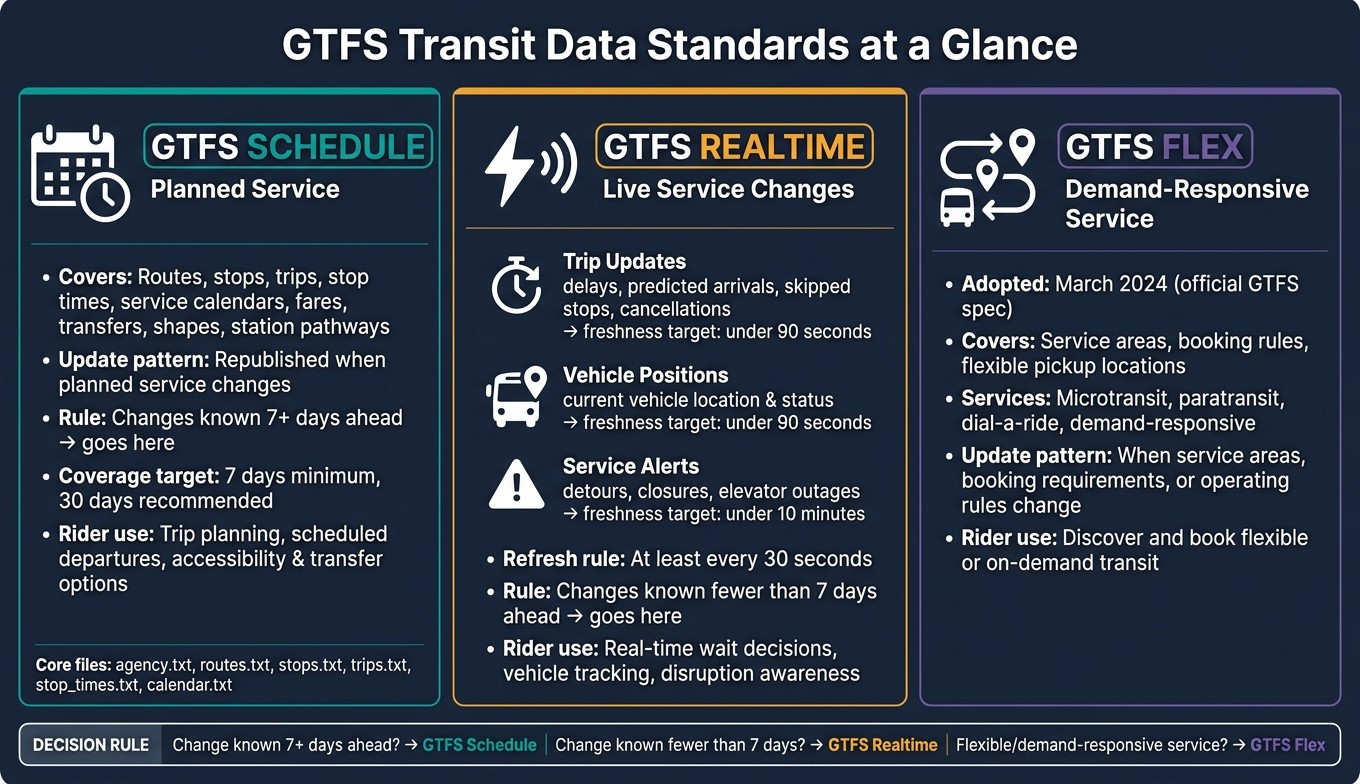
GTFS Standards Comparison: Schedule vs Realtime vs Flex
Most agencies rely on three GTFS standards: GTFS Schedule, GTFS Realtime, and GTFS Flex. Each one covers a different part of day-to-day service, and together they support trip planning, live rider info, and flexible service.
Standard or feed | Information covered | Update pattern | Primary passenger use |
|---|---|---|---|
GTFS Schedule | Agencies, routes, stops, trips, stop times, service calendars, fares, transfers, shapes, and station pathways | Republished when planned service changes | Plan trips, view scheduled departures, estimate accessibility and transfer options |
GTFS Realtime - Trip Updates | Delays, predicted arrivals, skipped stops, and cancellations | Updated continuously during service | Decide whether to wait, leave later, or switch routes |
GTFS Realtime - Vehicle Positions | Current or recent vehicle location and operating status | Updated continuously during service | Track a bus or train on a map |
GTFS Realtime - Service Alerts | Detours, closures, suspensions, elevator outages, and major disruptions | Updated as conditions change | Understand a disruption and what to do next |
GTFS Flex | Demand-responsive service areas, booking rules, and flexible pickup locations | Updated when service areas, booking requirements, or operating rules change | Discover and book microtransit or dial-a-ride service |
In practice, agencies usually start with the static schedule feed, then add Realtime and Flex where live service changes or booking rules need to be shown.
GTFS Schedule for planned service
GTFS Schedule defines planned service for a given service period. The core files - agency.txt, routes.txt, stops.txt, trips.txt, stop_times.txt, calendar.txt, and calendar_dates.txt - work like a chain. Routes connect to trips, trips connect to stop times, and calendars determine when each trip runs.[4][1]
A couple of files fill in station details. pathways.txt describes how people move through a station, including corridors, stairs, escalators, and elevators, while levels.txt names each floor.[7] If elevator pathways are included, levels.txt becomes conditionally required.[7]
GTFS Realtime and GTFS Flex for service changes
The day-to-day rule is simple: if a service change can be published at least seven days before it takes effect, put it in the static feed. If not, use Realtime.[2] That split keeps planned service in one place and short-notice changes in another.
Within GTFS Realtime, each feed has a clear job. Trip Updates report lateness, skipped stops, and cancellations. Vehicle Positions show where the vehicle is now. Service Alerts explain detours, closures, and outages.[3]
GTFS Flex solves a different issue. Fixed-route timetables can't describe service that depends on reservations or flexible service areas. Officially adopted into the GTFS specification in March 2024, Flex supports microtransit, paratransit, dial-a-ride, and other demand-responsive services by describing service areas, booking rules, and eligible pickup locations.[5] If riders need service-area details or booking rules that a fixed timetable can't show, Flex is the right fit.
The next step is keeping these feeds aligned through shared IDs and a single source of truth.
How to build a complete and interoperable feed
A feed is only complete when its files point to each other the right way. If they don't, rider apps can't connect trips, stops, and live service. That’s when trip planners start showing the wrong thing - or nothing at all.
The table below shows how static schedule, realtime, and facility data differ in ownership, refresh timing, and where things usually go wrong:
Data category | Purpose | Responsible data owner | Refresh expectation | Common failure points |
|---|---|---|---|---|
Static schedule data | Planned service data | Scheduling or service-planning team | Reissue whenever approved service changes occur; maintain at least seven days of valid future coverage, ideally 30 days [8] | Broken foreign keys, expired calendars, unstable IDs, or publishing separate current and future feeds that consumers can't merge |
Realtime data | Live service changes | Dispatch, operations-control, and communications teams | Continuously refresh during service; monitor timestamp age and endpoint availability | Realtime references a |
Facility and accessibility data | Stops, entrances, pathways, and accessibility details | Facilities, accessibility, and maintenance teams | Update after construction, asset changes, or inspections; publish temporary closures via realtime alerts promptly | Station centroid used instead of actual boarding location, outdated elevator status, or accessibility claims not verified in the field |
These ownership and refresh rules help keep schedule, realtime, and facility data in sync. Start with identifiers first, because every later quality check rests on them.
Keep IDs and file relationships consistent
Treat GTFS Schedule like linked records in one system, not a pile of separate files. Every stop_times.txt row needs to match a valid trip_id and stop_id, and stop_sequence plus time values need to stay in order. When one of those links is missing or wrong, the whole chain snaps [4].
Identifier changes during planned updates are a common source of trouble. If a stop's timetable changes but the stop itself is still the same stop, keep the same stop_id. Create a new ID only when the stop is actually different. GTFS best practices are clear on this point: keep stop_id, route_id, and agency_id values persistent across feed revisions [8]. Swapping them out for no good reason breaks downstream apps, historical reporting, and realtime matching.
Realtime IDs and feed versions also need to line up with the current static feed. If the static file says one thing and the live feed points somewhere else, rider tools can't stitch the two together. The same logic applies to route geometry. Shapes should follow the path the vehicle actually takes, so trip planners show the route riders ride - not a straight-line shortcut that looks neat on a map but falls apart on the street. GTFS best practices recommend that alignments in shapes.txt stay within 100 meters of the stops served [8].
That kind of consistency is what lets downstream systems read the feed without manual cleanup.
Use a governed source-of-truth process
Most feed quality issues don't come from one bad file. They come from disconnected systems and handoffs. One team updates stops, another team edits alerts, and a third changes accessibility details. Without one release process, those changes drift apart fast.
Set up one controlled release process with clear owners across scheduling, operations, facilities, accessibility, and customer information. A solid workflow usually includes:
Staging each change
Running automated checks
Reconciling shared fields across teams
Reviewing and approving updates
Versioning and publishing before release
Publish the feed at a permanent, public, direct-download URL so apps and aggregators can pull it automatically.
That controlled workflow is what makes publication rules and quality checks work in practice.
Publication rules, governance, and feed quality checks
Release rules help keep the public feed stable, easy to find, and up to date. Publish one current, authoritative feed at a stable URL, and remove expired service. Don’t put dates or version numbers in the URL, because trip-planning apps depend on recurring automatic downloads.[8]
For planned service changes, try to publish the updated static feed three to four weeks before the effective date.[2][10] If a change takes effect in seven days or fewer, use GTFS Realtime Service Alerts or Trip Updates instead of waiting for a static feed update.[8]
The publication page and feed_info.txt should list the agency, feed version or validity period, license terms, update frequency, and a named technical contact with an email address. The license should plainly allow the intended reuse. A compliant feed is stable, valid, openly licensed, and accepted by major trip planners.[9]
These rules make releases more predictable. The next job is to check whether the feed works for riders in practice.
Use this checklist before and after each release:
Governance area | What to confirm |
|---|---|
Data ownership | Every feed component has a named accountable owner |
Release approval | An authorized reviewer has signed off on effective dates, routes, stops, trips, fares, accessibility information, and rider-facing notices |
Change management | Changes are documented with effective dates, affected routes and stops, and a rollback plan |
Incident escalation | Severity levels, response targets, and on-call contacts are defined for stale, missing, incorrect, or unavailable feeds |
Version control | Released files are archived with timestamps, validation reports, and approval records |
Consumer notification | Trip planners, regional partners, vendors, and internal customer-service teams are notified of material changes or outages |
Post-release monitoring | The public URL works, the feed matches the service being operated, and realtime timestamps and entities continue updating |
Validate quality beyond technical compliance
Once the feed is published, quality checks should measure rider impact, not just file structure. The GTFS validator is the floor, not the finish. Review quality across six dimensions: completeness, accuracy, consistency, timeliness, availability, and interoperability.
The table below separates the three kinds of findings agencies run into and shows who should act on each:
Category | Symptom | Likely cause | Rider impact | Owner | Corrective action |
|---|---|---|---|---|---|
Validation error | Required file missing, field invalid, or ZIP unparseable | Broken export, schema violation, or missing source data | Feed may be rejected by trip-planning apps entirely | Feed engineering or contractor | Block release, fix the export, rerun validation, and get re-approval |
Data-quality warning | Unusual stop spacing, duplicate names, long transfer times, or unexpected calendar patterns | Incomplete business rules or weak source-system mapping | Directions may confuse riders even if ingestion succeeds | Data owner with operations review | Investigate against operational records; document an accepted exception or correct the source |
Operational defect | Canceled trip shown as running, stop location wrong, or realtime data stale | Incorrect operational input, failed sync, or outage | Riders may miss service, wait at the wrong location, or receive inaccessible guidance | Operational owner and technical publisher | Escalate by severity, publish a correction or realtime alert, notify consumers, and record root cause |
A release shouldn’t be approved just because the validator shows no errors. Warnings need a documented disposition, and defects should be ranked by rider impact - especially when accessibility or immediate travel decisions are on the line. For realtime feeds, GTFS guidance sets firm freshness targets: keep Trip Updates and Vehicle Positions under 90 seconds old, Service Alerts under 10 minutes, and refresh at least every 30 seconds.[6] Treat those thresholds as operating commitments, not suggestions.
A step-by-step improvement plan for agencies
Once governance and quality rules are set, the next job is simple in theory and hard in practice: turn those rules into day-to-day work. The cleanest way to do that is to build the program in three stages - inventory, ownership, and controlled releases.
Start with the first priorities
Start with an inventory. Write down every system that creates, edits, approves, or publishes passenger information. That includes scheduling and planning tools; CAD/AVL, dispatch, and vehicle-location systems; stop, facility, fare, and alert platforms; contractor feeds; and external publishing channels. For each source, record the data owner, the technical steward, update frequency, known limits, and downstream users. Then map how a service change moves from planning into GTFS, rider channels, and third-party planners. That map makes one thing plain: ownership has to be set before any feed changes start.
Assign named owners for the full data program and for each major area: Schedule, Realtime, stops, alerts, and accessibility information. After that, set stable identifiers for agencies, routes, stops, trips, service patterns, shapes, blocks, and fare products before changing any files. Keep a crosswalk between scheduling-system IDs, vehicle or dispatch IDs, stop IDs, and public GTFS IDs. Map dependencies so a stop or route change doesn't quietly break schedules, transfers, accessibility fields, or realtime trip updates. Test planned changes in a staging environment to catch broken references before release, and document a rollback procedure for every release.
Once the system map is in place, the next step is to check whether the feed is making rider information better in the real world.
Measure progress through rider-facing outcomes
Use the static Schedule feed as the baseline. Expand realtime only after it lines up with what is happening in service. Publish the feed at a stable, automatically retrievable URL, and treat each release as a versioned product.
Roll out GTFS Realtime in a controlled way. Start with what the agency can keep accurate over time - Trip Updates for predicted arrivals and cancellations, Service Alerts for disruptions and accessibility outages, and Vehicle Positions when location data is accurate enough. Then add more coverage as source-system quality gets better. A small pilot helps here. Start with one route or one garage, compare predictions with observed arrivals, and fix identifier and timestamp issues before going broader.
Track progress using the rider-facing measures that matter most:
Feed availability
Realtime latency
Identifier match rate
Prediction accuracy
Review these every month with operations, customer service, communications, and technology teams. When something breaks, trace the problem back to the source system instead of patching the exported file.
Conclusion: Better standards lead to better rider information
The table below turns the plan into a simple progression agencies can manage.
Maturity stage | Expected capabilities | Required controls | Measurable indicators |
|---|---|---|---|
Foundational | Complete inventory; named owners; usable GTFS Schedule feed; documented IDs and dependencies; basic service alerts | Stable public URL; manual approval; validator run before publication | Feed availability; validator error count; percentage of required files present; unresolved identifier mismatches; planned changes published on time |
Managed | Governed source of truth; consistent IDs across Schedule and Realtime; predictable updates; Trip Updates, Vehicle Positions, or Service Alerts for priority services; controlled changes for stops, accessibility, and fares | Automated validation; staging environment; role-based approvals; monitoring and incident response; documented service-level targets | Update latency; Realtime coverage; minutes with stale data; alert resolution time; Schedule–Realtime match rate; prediction accuracy; percentage of releases passing without critical errors |
Advanced | Integrated planning, dispatch, vehicle location, customer information, accessibility, and demand-responsive systems; GTFS Flex where appropriate; problems detected before riders report them; performance data drives continuous improvement | Automated publication pipelines; contract and vendor data requirements; anomaly detection; tested disaster recovery; formal change governance | Availability and freshness by feed; coverage by route and vehicle; field-to-feed match rate; prediction error by stop and time period; alerts correctly reflected across channels; complaint reduction; successful trip plans |
GTFS Schedule, GTFS Realtime, and GTFS Flex are shared structures. But shared structure alone does not produce accurate information. What turns standards into rider information people can count on is a managed lifecycle: clear ownership, stable IDs, controlled releases, and steady validation.
FAQs
How do we know when to use static data versus Realtime?
Use static data for information that changes infrequently and covers steady reference details like stop locations, routes, schedules, and aggregated history.
Use realtime data for current conditions and performance, like arrival-time updates and service disruptions. If the information needs to be accurate right now for an immediate operating decision or rider guidance, use realtime.
What happens if GTFS IDs change between feed releases?
When GTFS IDs change from one feed release to the next, you lose continuity over time. Historical records no longer line up cleanly with current updates, which makes trend analysis and performance tracking much harder.
The damage doesn’t stop there. Downstream systems can break, and riders may see gaps or mismatches in transit information. That chips away at trust. To protect data integrity, keep IDs consistent across releases.
Which team should own GTFS quality and feed monitoring?
GTFS quality and feed monitoring should sit with a named data owner or a data stewardship team inside the transit agency. When no one owns the feed, small issues tend to pile up. A missing stop update here, a bad route ID there, and before long the data starts to slip.
That ownership needs clear, written collection protocols and validation controls. Think basic but strict checks: range checks, consistency reviews, and routine QA steps that catch problems before they spread. This helps prevent data drift and makes accountability clear across the agency.
Related Blog Posts
Latest Articles
©2025

Narrative Change and Power Building: The Missing Half of Advocacy
Narrative change is the process of disrupting dominant narratives that normalize inequity and advancing new narratives from historically marginalized communities.

Funding Resilience Without Federal Grants
BRIC is unreliable and FEMA is shrinking. Here's how cities fund climate resilience with dedicated revenue, blended finance, and a coordinating authority.

The ESG Blind Spot: How AI Is Finding Risks in Companies Nobody Else Is Watching
Norway's sovereign wealth fund uses AI to screen 7,200 portfolio companies for forced labor and corruption within 24 hours. The real story is the emerging-market coverage gap that traditional ESG data vendors miss — and what it means for any company with a global supply chain.
Narrative Change and Power Building: The Missing Half of Advocacy
Narrative change is the process of disrupting dominant narratives that normalize inequity and advancing new narratives from historically marginalized communities.
Funding Resilience Without Federal Grants
BRIC is unreliable and FEMA is shrinking. Here's how cities fund climate resilience with dedicated revenue, blended finance, and a coordinating authority.
The ESG Blind Spot: How AI Is Finding Risks in Companies Nobody Else Is Watching
Norway's sovereign wealth fund uses AI to screen 7,200 portfolio companies for forced labor and corruption within 24 hours. The real story is the emerging-market coverage gap that traditional ESG data vendors miss — and what it means for any company with a global supply chain.
FAQ
01
What does it really mean to “redefine profit”?
02
What makes Council Fire different?
03
Who does Council Fire work with?
04
What does working with Council Fire actually look like?
05
How does Council Fire help organizations turn big goals into action?
06
How does Council Fire define and measure success?
Sep 24, 2026
Transit Data Standards: Guide for Agencies
Governance
In This Article
Practical GTFS guide: publish one authoritative schedule, keep stable IDs, align realtime, assign owners, and monitor feed freshness.
Transit Data Standards: Guide for Agencies
If your transit data is late, broken, or mismatched, riders feel it first. For most agencies, the fix comes down to five things: publish one current GTFS Schedule feed, keep IDs stable, match Realtime to static data, assign clear owners, and monitor feed age like a service issue.
I’d sum up the article this way:
GTFS Schedule handles planned service like routes, stops, trips, stop times, calendars, fares, shapes, and pathways.
GTFS Realtime handles short-notice changes through Trip Updates, Vehicle Positions, and Service Alerts.
GTFS Flex covers demand-response service such as microtransit, dial-a-ride, and paratransit.
If a change is known 7+ days ahead, I’d put it in the static feed. If not, I’d publish it through Realtime.
IDs like
stop_id,route_id, andtrip_idshould stay stable across releases, or downstream tools can fail.Static feeds should keep at least 7 days of future coverage, with 30 days as the better target.
Realtime feed age should stay under 90 seconds for Trip Updates and Vehicle Positions, and under 10 minutes for Service Alerts, with refreshes at least every 30 seconds.
Feed quality is more than validator pass/fail. I’d also check accuracy, timeliness, availability, consistency, and whether rider tools can use the data as published.
A few points stand out. The article ties data standards to daily service, not just IT work. It also shows that feed failures usually come from weak handoffs between scheduling, dispatch, facilities, accessibility, and customer information teams - not from one bad file alone.
If I were an agency reading this, my takeaway would be simple: treat transit data like rider service infrastructure. That means one public URL, one release process, named owners, staging before publication, version history, and post-release checks to confirm the feed still matches the service on the street.
This section gives a plain-language map of what each GTFS standard does, where agencies run into trouble, and how to move from basic publication to a controlled, rider-focused data program.
Understanding GTFS: An intro and overview
The core transit data standards agencies use
GTFS Standards Comparison: Schedule vs Realtime vs Flex
Most agencies rely on three GTFS standards: GTFS Schedule, GTFS Realtime, and GTFS Flex. Each one covers a different part of day-to-day service, and together they support trip planning, live rider info, and flexible service.
Standard or feed | Information covered | Update pattern | Primary passenger use |
|---|---|---|---|
GTFS Schedule | Agencies, routes, stops, trips, stop times, service calendars, fares, transfers, shapes, and station pathways | Republished when planned service changes | Plan trips, view scheduled departures, estimate accessibility and transfer options |
GTFS Realtime - Trip Updates | Delays, predicted arrivals, skipped stops, and cancellations | Updated continuously during service | Decide whether to wait, leave later, or switch routes |
GTFS Realtime - Vehicle Positions | Current or recent vehicle location and operating status | Updated continuously during service | Track a bus or train on a map |
GTFS Realtime - Service Alerts | Detours, closures, suspensions, elevator outages, and major disruptions | Updated as conditions change | Understand a disruption and what to do next |
GTFS Flex | Demand-responsive service areas, booking rules, and flexible pickup locations | Updated when service areas, booking requirements, or operating rules change | Discover and book microtransit or dial-a-ride service |
In practice, agencies usually start with the static schedule feed, then add Realtime and Flex where live service changes or booking rules need to be shown.
GTFS Schedule for planned service
GTFS Schedule defines planned service for a given service period. The core files - agency.txt, routes.txt, stops.txt, trips.txt, stop_times.txt, calendar.txt, and calendar_dates.txt - work like a chain. Routes connect to trips, trips connect to stop times, and calendars determine when each trip runs.[4][1]
A couple of files fill in station details. pathways.txt describes how people move through a station, including corridors, stairs, escalators, and elevators, while levels.txt names each floor.[7] If elevator pathways are included, levels.txt becomes conditionally required.[7]
GTFS Realtime and GTFS Flex for service changes
The day-to-day rule is simple: if a service change can be published at least seven days before it takes effect, put it in the static feed. If not, use Realtime.[2] That split keeps planned service in one place and short-notice changes in another.
Within GTFS Realtime, each feed has a clear job. Trip Updates report lateness, skipped stops, and cancellations. Vehicle Positions show where the vehicle is now. Service Alerts explain detours, closures, and outages.[3]
GTFS Flex solves a different issue. Fixed-route timetables can't describe service that depends on reservations or flexible service areas. Officially adopted into the GTFS specification in March 2024, Flex supports microtransit, paratransit, dial-a-ride, and other demand-responsive services by describing service areas, booking rules, and eligible pickup locations.[5] If riders need service-area details or booking rules that a fixed timetable can't show, Flex is the right fit.
The next step is keeping these feeds aligned through shared IDs and a single source of truth.
How to build a complete and interoperable feed
A feed is only complete when its files point to each other the right way. If they don't, rider apps can't connect trips, stops, and live service. That’s when trip planners start showing the wrong thing - or nothing at all.
The table below shows how static schedule, realtime, and facility data differ in ownership, refresh timing, and where things usually go wrong:
Data category | Purpose | Responsible data owner | Refresh expectation | Common failure points |
|---|---|---|---|---|
Static schedule data | Planned service data | Scheduling or service-planning team | Reissue whenever approved service changes occur; maintain at least seven days of valid future coverage, ideally 30 days [8] | Broken foreign keys, expired calendars, unstable IDs, or publishing separate current and future feeds that consumers can't merge |
Realtime data | Live service changes | Dispatch, operations-control, and communications teams | Continuously refresh during service; monitor timestamp age and endpoint availability | Realtime references a |
Facility and accessibility data | Stops, entrances, pathways, and accessibility details | Facilities, accessibility, and maintenance teams | Update after construction, asset changes, or inspections; publish temporary closures via realtime alerts promptly | Station centroid used instead of actual boarding location, outdated elevator status, or accessibility claims not verified in the field |
These ownership and refresh rules help keep schedule, realtime, and facility data in sync. Start with identifiers first, because every later quality check rests on them.
Keep IDs and file relationships consistent
Treat GTFS Schedule like linked records in one system, not a pile of separate files. Every stop_times.txt row needs to match a valid trip_id and stop_id, and stop_sequence plus time values need to stay in order. When one of those links is missing or wrong, the whole chain snaps [4].
Identifier changes during planned updates are a common source of trouble. If a stop's timetable changes but the stop itself is still the same stop, keep the same stop_id. Create a new ID only when the stop is actually different. GTFS best practices are clear on this point: keep stop_id, route_id, and agency_id values persistent across feed revisions [8]. Swapping them out for no good reason breaks downstream apps, historical reporting, and realtime matching.
Realtime IDs and feed versions also need to line up with the current static feed. If the static file says one thing and the live feed points somewhere else, rider tools can't stitch the two together. The same logic applies to route geometry. Shapes should follow the path the vehicle actually takes, so trip planners show the route riders ride - not a straight-line shortcut that looks neat on a map but falls apart on the street. GTFS best practices recommend that alignments in shapes.txt stay within 100 meters of the stops served [8].
That kind of consistency is what lets downstream systems read the feed without manual cleanup.
Use a governed source-of-truth process
Most feed quality issues don't come from one bad file. They come from disconnected systems and handoffs. One team updates stops, another team edits alerts, and a third changes accessibility details. Without one release process, those changes drift apart fast.
Set up one controlled release process with clear owners across scheduling, operations, facilities, accessibility, and customer information. A solid workflow usually includes:
Staging each change
Running automated checks
Reconciling shared fields across teams
Reviewing and approving updates
Versioning and publishing before release
Publish the feed at a permanent, public, direct-download URL so apps and aggregators can pull it automatically.
That controlled workflow is what makes publication rules and quality checks work in practice.
Publication rules, governance, and feed quality checks
Release rules help keep the public feed stable, easy to find, and up to date. Publish one current, authoritative feed at a stable URL, and remove expired service. Don’t put dates or version numbers in the URL, because trip-planning apps depend on recurring automatic downloads.[8]
For planned service changes, try to publish the updated static feed three to four weeks before the effective date.[2][10] If a change takes effect in seven days or fewer, use GTFS Realtime Service Alerts or Trip Updates instead of waiting for a static feed update.[8]
The publication page and feed_info.txt should list the agency, feed version or validity period, license terms, update frequency, and a named technical contact with an email address. The license should plainly allow the intended reuse. A compliant feed is stable, valid, openly licensed, and accepted by major trip planners.[9]
These rules make releases more predictable. The next job is to check whether the feed works for riders in practice.
Use this checklist before and after each release:
Governance area | What to confirm |
|---|---|
Data ownership | Every feed component has a named accountable owner |
Release approval | An authorized reviewer has signed off on effective dates, routes, stops, trips, fares, accessibility information, and rider-facing notices |
Change management | Changes are documented with effective dates, affected routes and stops, and a rollback plan |
Incident escalation | Severity levels, response targets, and on-call contacts are defined for stale, missing, incorrect, or unavailable feeds |
Version control | Released files are archived with timestamps, validation reports, and approval records |
Consumer notification | Trip planners, regional partners, vendors, and internal customer-service teams are notified of material changes or outages |
Post-release monitoring | The public URL works, the feed matches the service being operated, and realtime timestamps and entities continue updating |
Validate quality beyond technical compliance
Once the feed is published, quality checks should measure rider impact, not just file structure. The GTFS validator is the floor, not the finish. Review quality across six dimensions: completeness, accuracy, consistency, timeliness, availability, and interoperability.
The table below separates the three kinds of findings agencies run into and shows who should act on each:
Category | Symptom | Likely cause | Rider impact | Owner | Corrective action |
|---|---|---|---|---|---|
Validation error | Required file missing, field invalid, or ZIP unparseable | Broken export, schema violation, or missing source data | Feed may be rejected by trip-planning apps entirely | Feed engineering or contractor | Block release, fix the export, rerun validation, and get re-approval |
Data-quality warning | Unusual stop spacing, duplicate names, long transfer times, or unexpected calendar patterns | Incomplete business rules or weak source-system mapping | Directions may confuse riders even if ingestion succeeds | Data owner with operations review | Investigate against operational records; document an accepted exception or correct the source |
Operational defect | Canceled trip shown as running, stop location wrong, or realtime data stale | Incorrect operational input, failed sync, or outage | Riders may miss service, wait at the wrong location, or receive inaccessible guidance | Operational owner and technical publisher | Escalate by severity, publish a correction or realtime alert, notify consumers, and record root cause |
A release shouldn’t be approved just because the validator shows no errors. Warnings need a documented disposition, and defects should be ranked by rider impact - especially when accessibility or immediate travel decisions are on the line. For realtime feeds, GTFS guidance sets firm freshness targets: keep Trip Updates and Vehicle Positions under 90 seconds old, Service Alerts under 10 minutes, and refresh at least every 30 seconds.[6] Treat those thresholds as operating commitments, not suggestions.
A step-by-step improvement plan for agencies
Once governance and quality rules are set, the next job is simple in theory and hard in practice: turn those rules into day-to-day work. The cleanest way to do that is to build the program in three stages - inventory, ownership, and controlled releases.
Start with the first priorities
Start with an inventory. Write down every system that creates, edits, approves, or publishes passenger information. That includes scheduling and planning tools; CAD/AVL, dispatch, and vehicle-location systems; stop, facility, fare, and alert platforms; contractor feeds; and external publishing channels. For each source, record the data owner, the technical steward, update frequency, known limits, and downstream users. Then map how a service change moves from planning into GTFS, rider channels, and third-party planners. That map makes one thing plain: ownership has to be set before any feed changes start.
Assign named owners for the full data program and for each major area: Schedule, Realtime, stops, alerts, and accessibility information. After that, set stable identifiers for agencies, routes, stops, trips, service patterns, shapes, blocks, and fare products before changing any files. Keep a crosswalk between scheduling-system IDs, vehicle or dispatch IDs, stop IDs, and public GTFS IDs. Map dependencies so a stop or route change doesn't quietly break schedules, transfers, accessibility fields, or realtime trip updates. Test planned changes in a staging environment to catch broken references before release, and document a rollback procedure for every release.
Once the system map is in place, the next step is to check whether the feed is making rider information better in the real world.
Measure progress through rider-facing outcomes
Use the static Schedule feed as the baseline. Expand realtime only after it lines up with what is happening in service. Publish the feed at a stable, automatically retrievable URL, and treat each release as a versioned product.
Roll out GTFS Realtime in a controlled way. Start with what the agency can keep accurate over time - Trip Updates for predicted arrivals and cancellations, Service Alerts for disruptions and accessibility outages, and Vehicle Positions when location data is accurate enough. Then add more coverage as source-system quality gets better. A small pilot helps here. Start with one route or one garage, compare predictions with observed arrivals, and fix identifier and timestamp issues before going broader.
Track progress using the rider-facing measures that matter most:
Feed availability
Realtime latency
Identifier match rate
Prediction accuracy
Review these every month with operations, customer service, communications, and technology teams. When something breaks, trace the problem back to the source system instead of patching the exported file.
Conclusion: Better standards lead to better rider information
The table below turns the plan into a simple progression agencies can manage.
Maturity stage | Expected capabilities | Required controls | Measurable indicators |
|---|---|---|---|
Foundational | Complete inventory; named owners; usable GTFS Schedule feed; documented IDs and dependencies; basic service alerts | Stable public URL; manual approval; validator run before publication | Feed availability; validator error count; percentage of required files present; unresolved identifier mismatches; planned changes published on time |
Managed | Governed source of truth; consistent IDs across Schedule and Realtime; predictable updates; Trip Updates, Vehicle Positions, or Service Alerts for priority services; controlled changes for stops, accessibility, and fares | Automated validation; staging environment; role-based approvals; monitoring and incident response; documented service-level targets | Update latency; Realtime coverage; minutes with stale data; alert resolution time; Schedule–Realtime match rate; prediction accuracy; percentage of releases passing without critical errors |
Advanced | Integrated planning, dispatch, vehicle location, customer information, accessibility, and demand-responsive systems; GTFS Flex where appropriate; problems detected before riders report them; performance data drives continuous improvement | Automated publication pipelines; contract and vendor data requirements; anomaly detection; tested disaster recovery; formal change governance | Availability and freshness by feed; coverage by route and vehicle; field-to-feed match rate; prediction error by stop and time period; alerts correctly reflected across channels; complaint reduction; successful trip plans |
GTFS Schedule, GTFS Realtime, and GTFS Flex are shared structures. But shared structure alone does not produce accurate information. What turns standards into rider information people can count on is a managed lifecycle: clear ownership, stable IDs, controlled releases, and steady validation.
FAQs
How do we know when to use static data versus Realtime?
Use static data for information that changes infrequently and covers steady reference details like stop locations, routes, schedules, and aggregated history.
Use realtime data for current conditions and performance, like arrival-time updates and service disruptions. If the information needs to be accurate right now for an immediate operating decision or rider guidance, use realtime.
What happens if GTFS IDs change between feed releases?
When GTFS IDs change from one feed release to the next, you lose continuity over time. Historical records no longer line up cleanly with current updates, which makes trend analysis and performance tracking much harder.
The damage doesn’t stop there. Downstream systems can break, and riders may see gaps or mismatches in transit information. That chips away at trust. To protect data integrity, keep IDs consistent across releases.
Which team should own GTFS quality and feed monitoring?
GTFS quality and feed monitoring should sit with a named data owner or a data stewardship team inside the transit agency. When no one owns the feed, small issues tend to pile up. A missing stop update here, a bad route ID there, and before long the data starts to slip.
That ownership needs clear, written collection protocols and validation controls. Think basic but strict checks: range checks, consistency reviews, and routine QA steps that catch problems before they spread. This helps prevent data drift and makes accountability clear across the agency.
Related Blog Posts
Latest Articles
©2025
Narrative Change and Power Building: The Missing Half of Advocacy
Narrative change is the process of disrupting dominant narratives that normalize inequity and advancing new narratives from historically marginalized communities.
Funding Resilience Without Federal Grants
BRIC is unreliable and FEMA is shrinking. Here's how cities fund climate resilience with dedicated revenue, blended finance, and a coordinating authority.
The ESG Blind Spot: How AI Is Finding Risks in Companies Nobody Else Is Watching
Norway's sovereign wealth fund uses AI to screen 7,200 portfolio companies for forced labor and corruption within 24 hours. The real story is the emerging-market coverage gap that traditional ESG data vendors miss — and what it means for any company with a global supply chain.
FAQ
01
What does it really mean to “redefine profit”?
02
What makes Council Fire different?
03
Who does Council Fire work with?
04
What does working with Council Fire actually look like?
05
How does Council Fire help organizations turn big goals into action?
06
How does Council Fire define and measure success?
Sep 24, 2026
Transit Data Standards: Guide for Agencies
Governance
In This Article
Practical GTFS guide: publish one authoritative schedule, keep stable IDs, align realtime, assign owners, and monitor feed freshness.
Transit Data Standards: Guide for Agencies
If your transit data is late, broken, or mismatched, riders feel it first. For most agencies, the fix comes down to five things: publish one current GTFS Schedule feed, keep IDs stable, match Realtime to static data, assign clear owners, and monitor feed age like a service issue.
I’d sum up the article this way:
GTFS Schedule handles planned service like routes, stops, trips, stop times, calendars, fares, shapes, and pathways.
GTFS Realtime handles short-notice changes through Trip Updates, Vehicle Positions, and Service Alerts.
GTFS Flex covers demand-response service such as microtransit, dial-a-ride, and paratransit.
If a change is known 7+ days ahead, I’d put it in the static feed. If not, I’d publish it through Realtime.
IDs like
stop_id,route_id, andtrip_idshould stay stable across releases, or downstream tools can fail.Static feeds should keep at least 7 days of future coverage, with 30 days as the better target.
Realtime feed age should stay under 90 seconds for Trip Updates and Vehicle Positions, and under 10 minutes for Service Alerts, with refreshes at least every 30 seconds.
Feed quality is more than validator pass/fail. I’d also check accuracy, timeliness, availability, consistency, and whether rider tools can use the data as published.
A few points stand out. The article ties data standards to daily service, not just IT work. It also shows that feed failures usually come from weak handoffs between scheduling, dispatch, facilities, accessibility, and customer information teams - not from one bad file alone.
If I were an agency reading this, my takeaway would be simple: treat transit data like rider service infrastructure. That means one public URL, one release process, named owners, staging before publication, version history, and post-release checks to confirm the feed still matches the service on the street.
This section gives a plain-language map of what each GTFS standard does, where agencies run into trouble, and how to move from basic publication to a controlled, rider-focused data program.
Understanding GTFS: An intro and overview
The core transit data standards agencies use
GTFS Standards Comparison: Schedule vs Realtime vs Flex
Most agencies rely on three GTFS standards: GTFS Schedule, GTFS Realtime, and GTFS Flex. Each one covers a different part of day-to-day service, and together they support trip planning, live rider info, and flexible service.
Standard or feed | Information covered | Update pattern | Primary passenger use |
|---|---|---|---|
GTFS Schedule | Agencies, routes, stops, trips, stop times, service calendars, fares, transfers, shapes, and station pathways | Republished when planned service changes | Plan trips, view scheduled departures, estimate accessibility and transfer options |
GTFS Realtime - Trip Updates | Delays, predicted arrivals, skipped stops, and cancellations | Updated continuously during service | Decide whether to wait, leave later, or switch routes |
GTFS Realtime - Vehicle Positions | Current or recent vehicle location and operating status | Updated continuously during service | Track a bus or train on a map |
GTFS Realtime - Service Alerts | Detours, closures, suspensions, elevator outages, and major disruptions | Updated as conditions change | Understand a disruption and what to do next |
GTFS Flex | Demand-responsive service areas, booking rules, and flexible pickup locations | Updated when service areas, booking requirements, or operating rules change | Discover and book microtransit or dial-a-ride service |
In practice, agencies usually start with the static schedule feed, then add Realtime and Flex where live service changes or booking rules need to be shown.
GTFS Schedule for planned service
GTFS Schedule defines planned service for a given service period. The core files - agency.txt, routes.txt, stops.txt, trips.txt, stop_times.txt, calendar.txt, and calendar_dates.txt - work like a chain. Routes connect to trips, trips connect to stop times, and calendars determine when each trip runs.[4][1]
A couple of files fill in station details. pathways.txt describes how people move through a station, including corridors, stairs, escalators, and elevators, while levels.txt names each floor.[7] If elevator pathways are included, levels.txt becomes conditionally required.[7]
GTFS Realtime and GTFS Flex for service changes
The day-to-day rule is simple: if a service change can be published at least seven days before it takes effect, put it in the static feed. If not, use Realtime.[2] That split keeps planned service in one place and short-notice changes in another.
Within GTFS Realtime, each feed has a clear job. Trip Updates report lateness, skipped stops, and cancellations. Vehicle Positions show where the vehicle is now. Service Alerts explain detours, closures, and outages.[3]
GTFS Flex solves a different issue. Fixed-route timetables can't describe service that depends on reservations or flexible service areas. Officially adopted into the GTFS specification in March 2024, Flex supports microtransit, paratransit, dial-a-ride, and other demand-responsive services by describing service areas, booking rules, and eligible pickup locations.[5] If riders need service-area details or booking rules that a fixed timetable can't show, Flex is the right fit.
The next step is keeping these feeds aligned through shared IDs and a single source of truth.
How to build a complete and interoperable feed
A feed is only complete when its files point to each other the right way. If they don't, rider apps can't connect trips, stops, and live service. That’s when trip planners start showing the wrong thing - or nothing at all.
The table below shows how static schedule, realtime, and facility data differ in ownership, refresh timing, and where things usually go wrong:
Data category | Purpose | Responsible data owner | Refresh expectation | Common failure points |
|---|---|---|---|---|
Static schedule data | Planned service data | Scheduling or service-planning team | Reissue whenever approved service changes occur; maintain at least seven days of valid future coverage, ideally 30 days [8] | Broken foreign keys, expired calendars, unstable IDs, or publishing separate current and future feeds that consumers can't merge |
Realtime data | Live service changes | Dispatch, operations-control, and communications teams | Continuously refresh during service; monitor timestamp age and endpoint availability | Realtime references a |
Facility and accessibility data | Stops, entrances, pathways, and accessibility details | Facilities, accessibility, and maintenance teams | Update after construction, asset changes, or inspections; publish temporary closures via realtime alerts promptly | Station centroid used instead of actual boarding location, outdated elevator status, or accessibility claims not verified in the field |
These ownership and refresh rules help keep schedule, realtime, and facility data in sync. Start with identifiers first, because every later quality check rests on them.
Keep IDs and file relationships consistent
Treat GTFS Schedule like linked records in one system, not a pile of separate files. Every stop_times.txt row needs to match a valid trip_id and stop_id, and stop_sequence plus time values need to stay in order. When one of those links is missing or wrong, the whole chain snaps [4].
Identifier changes during planned updates are a common source of trouble. If a stop's timetable changes but the stop itself is still the same stop, keep the same stop_id. Create a new ID only when the stop is actually different. GTFS best practices are clear on this point: keep stop_id, route_id, and agency_id values persistent across feed revisions [8]. Swapping them out for no good reason breaks downstream apps, historical reporting, and realtime matching.
Realtime IDs and feed versions also need to line up with the current static feed. If the static file says one thing and the live feed points somewhere else, rider tools can't stitch the two together. The same logic applies to route geometry. Shapes should follow the path the vehicle actually takes, so trip planners show the route riders ride - not a straight-line shortcut that looks neat on a map but falls apart on the street. GTFS best practices recommend that alignments in shapes.txt stay within 100 meters of the stops served [8].
That kind of consistency is what lets downstream systems read the feed without manual cleanup.
Use a governed source-of-truth process
Most feed quality issues don't come from one bad file. They come from disconnected systems and handoffs. One team updates stops, another team edits alerts, and a third changes accessibility details. Without one release process, those changes drift apart fast.
Set up one controlled release process with clear owners across scheduling, operations, facilities, accessibility, and customer information. A solid workflow usually includes:
Staging each change
Running automated checks
Reconciling shared fields across teams
Reviewing and approving updates
Versioning and publishing before release
Publish the feed at a permanent, public, direct-download URL so apps and aggregators can pull it automatically.
That controlled workflow is what makes publication rules and quality checks work in practice.
Publication rules, governance, and feed quality checks
Release rules help keep the public feed stable, easy to find, and up to date. Publish one current, authoritative feed at a stable URL, and remove expired service. Don’t put dates or version numbers in the URL, because trip-planning apps depend on recurring automatic downloads.[8]
For planned service changes, try to publish the updated static feed three to four weeks before the effective date.[2][10] If a change takes effect in seven days or fewer, use GTFS Realtime Service Alerts or Trip Updates instead of waiting for a static feed update.[8]
The publication page and feed_info.txt should list the agency, feed version or validity period, license terms, update frequency, and a named technical contact with an email address. The license should plainly allow the intended reuse. A compliant feed is stable, valid, openly licensed, and accepted by major trip planners.[9]
These rules make releases more predictable. The next job is to check whether the feed works for riders in practice.
Use this checklist before and after each release:
Governance area | What to confirm |
|---|---|
Data ownership | Every feed component has a named accountable owner |
Release approval | An authorized reviewer has signed off on effective dates, routes, stops, trips, fares, accessibility information, and rider-facing notices |
Change management | Changes are documented with effective dates, affected routes and stops, and a rollback plan |
Incident escalation | Severity levels, response targets, and on-call contacts are defined for stale, missing, incorrect, or unavailable feeds |
Version control | Released files are archived with timestamps, validation reports, and approval records |
Consumer notification | Trip planners, regional partners, vendors, and internal customer-service teams are notified of material changes or outages |
Post-release monitoring | The public URL works, the feed matches the service being operated, and realtime timestamps and entities continue updating |
Validate quality beyond technical compliance
Once the feed is published, quality checks should measure rider impact, not just file structure. The GTFS validator is the floor, not the finish. Review quality across six dimensions: completeness, accuracy, consistency, timeliness, availability, and interoperability.
The table below separates the three kinds of findings agencies run into and shows who should act on each:
Category | Symptom | Likely cause | Rider impact | Owner | Corrective action |
|---|---|---|---|---|---|
Validation error | Required file missing, field invalid, or ZIP unparseable | Broken export, schema violation, or missing source data | Feed may be rejected by trip-planning apps entirely | Feed engineering or contractor | Block release, fix the export, rerun validation, and get re-approval |
Data-quality warning | Unusual stop spacing, duplicate names, long transfer times, or unexpected calendar patterns | Incomplete business rules or weak source-system mapping | Directions may confuse riders even if ingestion succeeds | Data owner with operations review | Investigate against operational records; document an accepted exception or correct the source |
Operational defect | Canceled trip shown as running, stop location wrong, or realtime data stale | Incorrect operational input, failed sync, or outage | Riders may miss service, wait at the wrong location, or receive inaccessible guidance | Operational owner and technical publisher | Escalate by severity, publish a correction or realtime alert, notify consumers, and record root cause |
A release shouldn’t be approved just because the validator shows no errors. Warnings need a documented disposition, and defects should be ranked by rider impact - especially when accessibility or immediate travel decisions are on the line. For realtime feeds, GTFS guidance sets firm freshness targets: keep Trip Updates and Vehicle Positions under 90 seconds old, Service Alerts under 10 minutes, and refresh at least every 30 seconds.[6] Treat those thresholds as operating commitments, not suggestions.
A step-by-step improvement plan for agencies
Once governance and quality rules are set, the next job is simple in theory and hard in practice: turn those rules into day-to-day work. The cleanest way to do that is to build the program in three stages - inventory, ownership, and controlled releases.
Start with the first priorities
Start with an inventory. Write down every system that creates, edits, approves, or publishes passenger information. That includes scheduling and planning tools; CAD/AVL, dispatch, and vehicle-location systems; stop, facility, fare, and alert platforms; contractor feeds; and external publishing channels. For each source, record the data owner, the technical steward, update frequency, known limits, and downstream users. Then map how a service change moves from planning into GTFS, rider channels, and third-party planners. That map makes one thing plain: ownership has to be set before any feed changes start.
Assign named owners for the full data program and for each major area: Schedule, Realtime, stops, alerts, and accessibility information. After that, set stable identifiers for agencies, routes, stops, trips, service patterns, shapes, blocks, and fare products before changing any files. Keep a crosswalk between scheduling-system IDs, vehicle or dispatch IDs, stop IDs, and public GTFS IDs. Map dependencies so a stop or route change doesn't quietly break schedules, transfers, accessibility fields, or realtime trip updates. Test planned changes in a staging environment to catch broken references before release, and document a rollback procedure for every release.
Once the system map is in place, the next step is to check whether the feed is making rider information better in the real world.
Measure progress through rider-facing outcomes
Use the static Schedule feed as the baseline. Expand realtime only after it lines up with what is happening in service. Publish the feed at a stable, automatically retrievable URL, and treat each release as a versioned product.
Roll out GTFS Realtime in a controlled way. Start with what the agency can keep accurate over time - Trip Updates for predicted arrivals and cancellations, Service Alerts for disruptions and accessibility outages, and Vehicle Positions when location data is accurate enough. Then add more coverage as source-system quality gets better. A small pilot helps here. Start with one route or one garage, compare predictions with observed arrivals, and fix identifier and timestamp issues before going broader.
Track progress using the rider-facing measures that matter most:
Feed availability
Realtime latency
Identifier match rate
Prediction accuracy
Review these every month with operations, customer service, communications, and technology teams. When something breaks, trace the problem back to the source system instead of patching the exported file.
Conclusion: Better standards lead to better rider information
The table below turns the plan into a simple progression agencies can manage.
Maturity stage | Expected capabilities | Required controls | Measurable indicators |
|---|---|---|---|
Foundational | Complete inventory; named owners; usable GTFS Schedule feed; documented IDs and dependencies; basic service alerts | Stable public URL; manual approval; validator run before publication | Feed availability; validator error count; percentage of required files present; unresolved identifier mismatches; planned changes published on time |
Managed | Governed source of truth; consistent IDs across Schedule and Realtime; predictable updates; Trip Updates, Vehicle Positions, or Service Alerts for priority services; controlled changes for stops, accessibility, and fares | Automated validation; staging environment; role-based approvals; monitoring and incident response; documented service-level targets | Update latency; Realtime coverage; minutes with stale data; alert resolution time; Schedule–Realtime match rate; prediction accuracy; percentage of releases passing without critical errors |
Advanced | Integrated planning, dispatch, vehicle location, customer information, accessibility, and demand-responsive systems; GTFS Flex where appropriate; problems detected before riders report them; performance data drives continuous improvement | Automated publication pipelines; contract and vendor data requirements; anomaly detection; tested disaster recovery; formal change governance | Availability and freshness by feed; coverage by route and vehicle; field-to-feed match rate; prediction error by stop and time period; alerts correctly reflected across channels; complaint reduction; successful trip plans |
GTFS Schedule, GTFS Realtime, and GTFS Flex are shared structures. But shared structure alone does not produce accurate information. What turns standards into rider information people can count on is a managed lifecycle: clear ownership, stable IDs, controlled releases, and steady validation.
FAQs
How do we know when to use static data versus Realtime?
Use static data for information that changes infrequently and covers steady reference details like stop locations, routes, schedules, and aggregated history.
Use realtime data for current conditions and performance, like arrival-time updates and service disruptions. If the information needs to be accurate right now for an immediate operating decision or rider guidance, use realtime.
What happens if GTFS IDs change between feed releases?
When GTFS IDs change from one feed release to the next, you lose continuity over time. Historical records no longer line up cleanly with current updates, which makes trend analysis and performance tracking much harder.
The damage doesn’t stop there. Downstream systems can break, and riders may see gaps or mismatches in transit information. That chips away at trust. To protect data integrity, keep IDs consistent across releases.
Which team should own GTFS quality and feed monitoring?
GTFS quality and feed monitoring should sit with a named data owner or a data stewardship team inside the transit agency. When no one owns the feed, small issues tend to pile up. A missing stop update here, a bad route ID there, and before long the data starts to slip.
That ownership needs clear, written collection protocols and validation controls. Think basic but strict checks: range checks, consistency reviews, and routine QA steps that catch problems before they spread. This helps prevent data drift and makes accountability clear across the agency.
Related Blog Posts
Latest Articles
©2025
Narrative Change and Power Building: The Missing Half of Advocacy
Narrative change is the process of disrupting dominant narratives that normalize inequity and advancing new narratives from historically marginalized communities.
Funding Resilience Without Federal Grants
BRIC is unreliable and FEMA is shrinking. Here's how cities fund climate resilience with dedicated revenue, blended finance, and a coordinating authority.
The ESG Blind Spot: How AI Is Finding Risks in Companies Nobody Else Is Watching
Norway's sovereign wealth fund uses AI to screen 7,200 portfolio companies for forced labor and corruption within 24 hours. The real story is the emerging-market coverage gap that traditional ESG data vendors miss — and what it means for any company with a global supply chain.
FAQ
What does it really mean to “redefine profit”?
What makes Council Fire different?
Who does Council Fire work with?
What does working with Council Fire actually look like?
How does Council Fire help organizations turn big goals into action?
How does Council Fire define and measure success?