
Sep 6, 2026
Real-Time ESG Tracking: Peer Benchmarks Guide
ESG Strategy
In This Article
Real-time ESG is an operating system: track material KPIs live, benchmark peers, alert on drift, and lock month-end data.
Real-Time ESG Tracking: Peer Benchmarks Guide
If your ESG numbers update only after month-end or year-end, you’re reacting too late. I’d sum up this guide in one line: track a small set of material KPIs live, compare them with the right peer group, trigger alerts when results drift, and use a frozen month-end record to decide what to do next.
Here’s the core idea in plain English:
Pick 15–30 KPIs that match impact, finance, and reporting needs.
Define each KPI clearly: formula, boundary, owner, unit, and conversion rules.
Build a peer group of 10–30 companies by sector, size, and business model.
Use peer median and quartiles to label results as lagging, on par, or leading.
Show actual, target, and peer band together on every dashboard view.
Match refresh speed to the metric: streaming, hourly, daily, or monthly.
Set two alert types: hard limits for compliance and moving thresholds for drift.
Review three gaps each month: plan vs. actual, actual vs. peer, and actual vs. permit.
Freeze month-end data so reports and decisions use one locked record.
A few numbers stand out. 96% of G250 companies now report on sustainability, and 79% of institutions want real-time ESG access through digital platforms. That tells me the issue is no longer whether to report, but how fast you can turn data into action.
What I like about this approach is that it keeps the system simple. You’re not watching raw numbers in isolation. You’re asking: Are we off track, compared with plan, peers, or limits - and who needs to act now?
Area | What to set up | What it tells you |
|---|---|---|
KPIs | Clear definitions, units, owners | What you are measuring |
Peer benchmarks | Median, 25th, 75th percentile | Whether performance is weak, average, or strong |
Dashboards | Views for site teams, managers, and executives | Who needs which level of detail |
Live feeds | Sensors, HR, ERP, EHS, procurement | What changed today |
Alerts | Static and dynamic thresholds | When drift turns into risk |
Monthly review | Variance analysis and action log | What to fix next |
Frozen reporting | Locked month-end dataset | Which numbers count as official |
In short: I’d treat real-time ESG tracking as a sustainability management system, not just a reporting task. The article shows how to build that system from metric design through peer comparison, alert rules, variance reviews, and locked monthly reporting.
GRESB's REAL Benchmarks demo
Define your ESG metrics, peer group, and threshold bands
Before any dashboard or alert does its job, you need agreement on three things: what you’re measuring, who you’re measuring against, and what “good enough” looks like.
Select material KPIs with clear definitions and units
Start with a materiality assessment that weighs impact and financial relevance. The goal is simple: figure out whether a topic affects people or the environment, and whether it creates financial risk or upside for the organization. If a topic matters on either side, it earns a place as a KPI candidate. If not, leave it out of the core dashboard.
From there, map each material topic to a known framework. Use SASB for investor-focused metrics and GRI for broader stakeholder disclosures. Your KPI definitions should also match your reporting duties. In practice, most organizations trim the list to 15–30 KPIs that tie straight to strategy and reporting.
For each KPI, document the basics and don’t leave room for guesswork:
Definition
Boundary
Method
Owner
Unit
Conversion factors
Lock these inputs early. If you don’t, live comparisons start to drift, and the dashboard turns into a debate instead of a decision tool.
For a U.S. manufacturer, core environmental KPIs often include Scope 1 and 2 GHG emissions, electricity consumption, water withdrawal in gallons, and waste diversion rate. On the social side, OSHA’s Total Recordable Incident Rate (TRIR) is a practical anchor. The formula is (recordable incidents × 200,000) / total hours worked [2][3]. Pair TRIR with voluntary turnover rate, average training hours per employee, and a pay equity ratio, and you have a social pillar that can be measured and compared. On the governance side, common KPIs include board independence and ESG-linked executive compensation.
Build peer benchmarks that can guide action
A peer group helps only when the comparison is fair. Start with sector, then narrow by size, then by operating model. Use revenue or headcount bands so intensity metrics line up properly. Split manufacturers from service firms. For U.S. companies, a domestic core peer set keeps the regulatory backdrop consistent. A second international peer set can show where global best practice sits without blurring the main benchmark.
Most organizations land on about 10–30 peers, using data from public sustainability reports, CDP disclosures, and GRI indexes.
Once the peer data is in place, calculate the median, 25th percentile, and 75th percentile for each KPI [1][4][5][6]. Those three figures create your threshold bands:
Band | Definition | Example (Waste Diversion Rate) |
|---|---|---|
Lagging | Below peer median | Below 65% |
On Par | Between peer median and 75th percentile | 65%–80% |
Leading | At or above 75th percentile | Above 80% |
Intensity metrics make these comparisons more honest, especially when companies differ in size. Express emissions as lb CO2e per $1,000 of revenue and energy as kWh per square foot of conditioned space. It also helps to segment intensity benchmarks by facility type. A warehouse and a production plant don’t run the same way, so they shouldn’t be judged as if they do. These bands then become the base layer for dashboard views and alert rules.
Design a dashboard that shows live performance against peers
Once your KPIs and benchmark bands are in place, the dashboard needs to show live performance in a way each audience can use. Operators, managers, and executives are not looking for the same thing, and trying to serve all three on one screen usually turns into noise. The better move is simple: keep one shared data model, then shape three role-based views around the same threshold bands.
Use role-based views for operations, managers, and executives
The operations view should stay close to the ground. It needs near-real-time facility metrics that teams can act on right away, including energy use, water use, and safety incidents. Weather and production overlays should appear only when they help explain movement, not as default clutter.[7][15]
The management view should pull back to the business-unit level. Managers need to see variance by unit, including plan vs. actual, peer median, and the factors behind underperformance. Financial overlays in USD, such as energy cost per unit and estimated cost of incidents, help connect ESG gaps to budget discussions in plain terms.[9][10]
The executive view should work like a strategic cockpit. Keep it tight: 10–15 KPIs, a peer-rank panel, and progress bars tied to long-term targets. For each top KPI, the screen should show whether performance sits above, within, or below the peer band.[8][14]
Make benchmark context visible in every KPI view
Every KPI should show actual, target, and peer band in the same visual frame. No matter which view a tile appears in, it should answer three questions at a glance: What is our actual? What is our target? Where do peers sit? A clean way to do that is to use three visual layers:
A solid line for actuals
A dashed line for the internal target
Shaded color bands for peer quartile ranges
Use green for at or above the peer median, yellow for the middle range, and red for below the 25th percentile.[11][12]
Keep benchmark labels and confidence notes in the legend and tooltips, not inside the chart. A small badge like Measured or Estimated beside the KPI value, paired with a tooltip that shows the benchmark method - for example, based on 150 U.S. companies, FY2025 data, updated quarterly - keeps the screen clean while still giving users the context they need.[13]
Chart choice should follow the decision, not personal taste. Use line charts for trends, bar charts for peer ranking, bullet charts for status, waterfall charts for variance, and heatmaps for facility hotspots.
On time axes, use MM/YYYY or MM/DD/YYYY. Show financial variances in $ thousands or $ millions so the dashboard lines up with standard U.S. reporting practice. Across the full dashboard, stick to no more than five colors.[11][12]
Connect live data feeds and set up alert logic
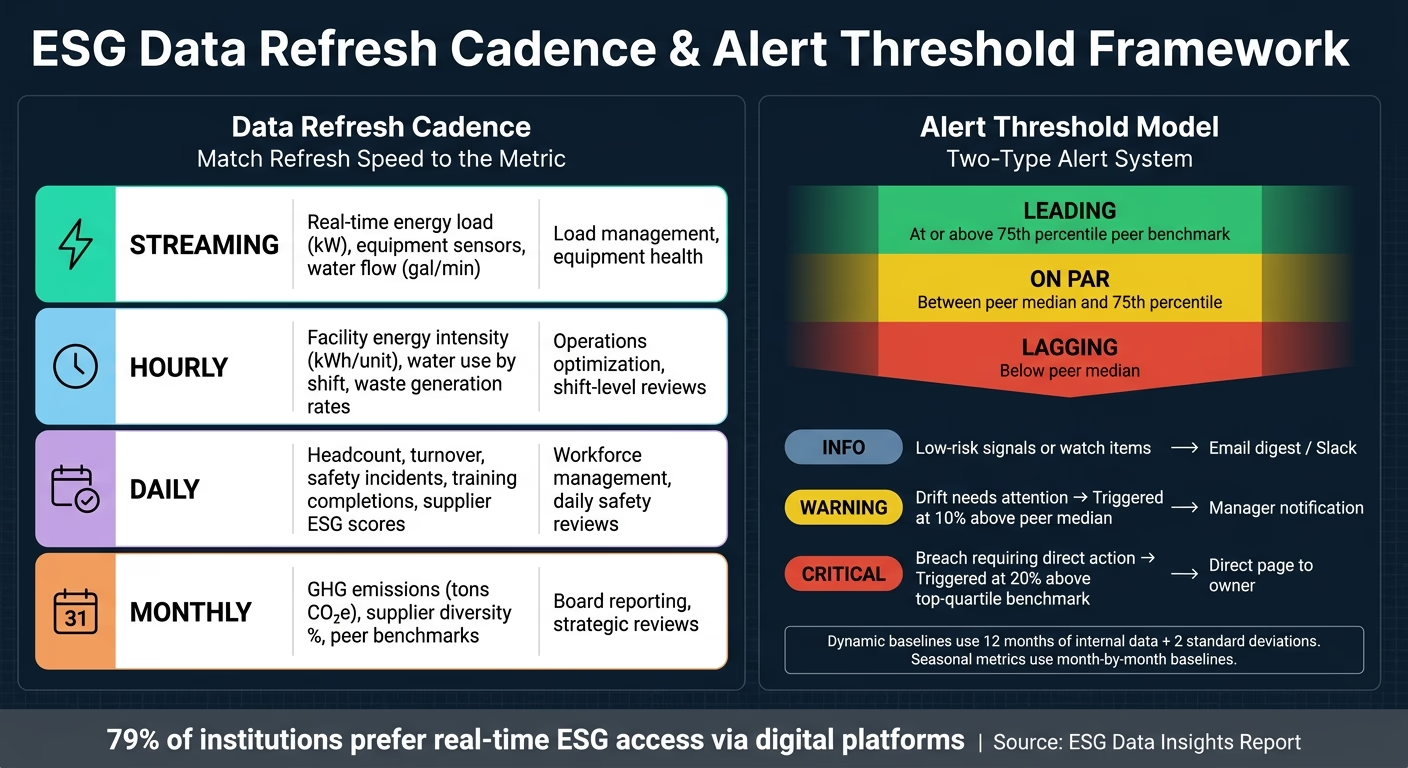
ESG Dashboard Alert Thresholds & Refresh Cadence Guide
After the dashboard is mapped out, the next step is simple in theory and messy in practice: get reliable live data into it. Pull ESG data from sensors, HR, ERP, procurement, and EHS systems into a single ingestion layer. Before anything hits the warehouse or the dashboard, standardize units, normalize number formats, and line up timestamps. Clean time data and standard units make live results easier to compare against peer bands.
Choose refresh cycles that fit each metric
Refresh timing should match how fast a team needs to act. If a metric supports minute-by-minute decisions, update it that way. If it feeds board reviews, a monthly cycle makes more sense.
Update Cadence | Typical ESG Metrics | When to Use | Use Cases |
|---|---|---|---|
Streaming | Real-time energy load (kW), equipment sensors, indoor temperature (°F), water flow (gallons/min) | Immediate visibility; catches anomalies as they occur | Load management, equipment health, critical environmental controls |
Hourly | Facility energy intensity (kWh per unit output), water use by shift, waste generation rates | Good balance of freshness and stability; supports same-day adjustments | Operations optimization, shift-level performance reviews |
Daily | Headcount, turnover, safety incidents, training completions, supplier ESG scores | Aligns with HR and supply chain processes; manageable data volumes | Workforce management, daily safety reviews, supplier risk tracking |
Monthly | GHG emissions summaries (tons CO₂e), supplier diversity %, compliance aggregates, peer benchmarks | Stable, reconciled data; aligns with financial close and board cycles | Board reporting, peer benchmark analysis, strategic reviews |
Once cadence is in place, alerts can watch for both compliance breaches and slower performance drift.
For U.S. organizations that work across more than one time zone, store all event timestamps in UTC at the ingestion layer to avoid daylight saving confusion. [18][19] Dashboards should show time in each user's local time zone, while calculations run on UTC behind the scenes. For daily totals, like facility energy use, define the day by local calendar time - midnight to 11:59 PM local - so operations teams see patterns that match their actual shifts.
Set static and dynamic thresholds for alerts
Use two kinds of thresholds: static and dynamic. Static thresholds fit hard compliance limits. That includes permit caps, OSHA-related workplace thresholds, and wastewater discharge limits. If a value crosses the line, it should trigger a critical alert right away, log the incident, and start escalation. Internal performance targets work a little differently. An annual drop target for kWh per square foot, for example, should trigger a warning when results start to drift, before the issue turns into a breach.
Dynamic thresholds shift based on peer benchmarks or past performance. Alerts should trigger when a KPI moves from normal benchmark variance into operational risk. Set a warning at 10% above the peer median and a critical alert at 20% above the top-quartile benchmark. [16][17][20] Rolling baselines, built from 12 months of the organization's own data plus two standard deviations, help catch odd swings without punishing facilities that simply run at higher volume. For seasonal metrics, like summer peak electricity demand or cooling tower water use, use month-by-month baselines so alerts catch abnormal use, not normal seasonal patterns. [16][17][20]
A simple three-level alert model usually works best:
Info for low-risk signals or watch items
Warning for drift that needs attention
Critical for breaches that need direct action
Route each level to the right person and channel. Operational anomalies can go to Slack or email digests. Critical compliance breaches should page the owner directly. [21] Also flag missing data, mark backfills, and record every threshold, rule, window, and owner in an ESG control register.
These alerts feed the monthly variance review, where exceptions become decisions.
Review variances and turn monthly reporting into decisions
Alerts tell you something went wrong. The monthly review tells you what to do next.
That distinction matters. A live alert can point to an exception in the moment, but the monthly review gives the team space to explain the variance, sort out the cause, and assign action. Three variance types deserve a standing place on the monthly agenda because each one drives a different kind of decision.
Variance Type | Example Metric | Likely Root Causes | Recommended Response |
|---|---|---|---|
Plan vs. Actual | Scope 2 emissions (metric tons CO₂e) vs. annual target | Heat wave pushing cooling loads above forecast, equipment inefficiency, higher production volume | Review facility-level logs; trigger maintenance, efficiency retrofits, or revised forecasts if intensity stays above threshold |
Actual vs. Peer | Energy cost ($/MWh) vs. sector median | Outdated technology, less favorable utility contracts, resource efficiency gaps | Conduct a gap analysis of operational practices; evaluate capital investment or renegotiate energy supply agreements |
Actual vs. Permit Limit | Water discharge vs. permit limit | Permit limit shifts, delayed maintenance, process changes | Immediate root-cause review; implement corrective actions to avoid fines; engage regulators if limits are being revised |
Use these three variance types as the standing monthly agenda.
Run monthly variance reviews
Keep the review tight with three roles: data owner, operational lead, and sustainability lead.
The data owner confirms the month-end numbers before the meeting starts. The operational lead reviews the last 30, 60, and 90 days by facility and business unit, then ties variances to what actually happened on the ground: a compressor went offline, production jumped, or a stretch of cold weather changed load patterns. The sustainability lead adds the outside view, tying those findings to peer benchmarks, rule changes, and long-term decarbonization commitments.
For the period 08/01/2026–08/31/2026, a standard agenda might move through performance vs. plan, peers, and permit limits, then shift into a facility-level drill-down, root-cause classification, and corrective action assignments with named owners and due dates. Every material variance should be logged with its metric, magnitude, root-cause category - weather, volume or mix, equipment, behavior, data, or policy - and a short narrative backed by evidence such as weather charts, production logs, or regulatory change notices. [23][24]
For each corrective action, track the expected impact in terms that connect straight to funding decisions: $/MWh saved, $/metric ton CO₂e avoided, or $/metric ton of waste diverted. That way, teams can see which fixes deserve attention first instead of arguing in the abstract. [22][24]
Publish monthly reports from frozen data
Once the review is done, lock the month-end record so everyone works from the same set of numbers.
Before any report goes out, the data owner should freeze the month-end dataset. For 08/01/2026–08/31/2026, set a firm cut-off - for example, 09/05/2026 at 11:59 p.m. local time - after which any data change requires a formal adjustment. [25] The live dashboard can keep moving, and it should, but the frozen dataset stays locked as the official decision record. Use a bridge report to document late invoices, meter corrections, and methodology updates, along with timestamps and approvals.
Monthly reports should show trends, not just a single-month snapshot. Put the month’s result, the frozen baseline, and the peer trend in one view. Frozen monthly scorecards should show each KPI’s trend against the peer median.
Conclusion: Build one system for ESG tracking and reporting
Once the dashboard, alerts, and monthly review are set up, the last move is to tie them together in one operating loop. Real-time ESG tracking works best when metrics, peer comparisons, live monitoring, alerts, and monthly reviews all run on the same data model. In plain terms, that means defining the right metrics, comparing performance to peers, tracking changes as they happen, flagging variance, and reviewing results each month. On their own, these parts only go so far. Put together, they become an ESG operating system that moves at the speed of the business rather than the slow rhythm of annual reporting.
The business case is straightforward. An ESG data insights report found that 79% of institutions prefer real-time access to ESG information via digital platforms [26]. That kind of access cuts lag, sharpens decisions, and makes reporting more useful in day-to-day work.
What you get is a reporting system built for action, not only disclosure. Strong governance matters here. Each KPI needs a clear owner, and each monthly review should lead into a real decision forum where people act on what the data shows. That’s how live ESG tracking can support decarbonization, circular economy programs, and climate resilience planning - by making sustainability part of daily management, not a once-a-year exercise. Turn metrics into benchmarks, then turn benchmarks into decisions.
FAQs
How do we choose the right ESG KPIs?
Start with a materiality assessment to pinpoint the ESG issues that carry the most financial and operational weight for your sector. Once you know what matters most, map those topics to recognized frameworks like GRI and SASB/ISSB so your definitions stay standardized and comparable.
From there, focus on KPIs that help people make business decisions, not just fill out reports. Use both absolute metrics and intensity metrics so you can track total impact and compare performance across peers. And for each KPI, assign a named owner. That simple step goes a long way toward consistency, auditability, and data quality.
What makes a peer benchmark group reliable?
A solid peer benchmark group starts with clear, relevant filters: industry classification, company size, geography, and a similar business model. If you compare companies that operate in very different ways, the results can get skewed fast. That’s why it often makes sense to use different peer groups for different metrics.
Reliability also depends on using normalized metrics, such as intensity ratios, along with consistent data from reputable public reports, industry databases, or standardized frameworks.
How should teams use live data and frozen month-end reports together?
Use live data to track performance, flag anomalies, and manage risk all month long. Live dashboards help teams improve as they go, not weeks later. If energy use suddenly jumps, managers can see it in real time and act before the issue grows.
Use frozen month-end reports for formal disclosure and audit cycles. Once the month closes, lock that reporting period so year-end disclosures stay in line with the figures already reviewed and approved internally and by auditors.
Related Blog Posts
Latest Articles
©2026

Narrative Change and Power Building: The Missing Half of Advocacy
Narrative change is the process of disrupting dominant narratives that normalize inequity and advancing new narratives from historically marginalized communities.

Funding Resilience Without Federal Grants
BRIC is unreliable and FEMA is shrinking. Here's how cities fund climate resilience with dedicated revenue, blended finance, and a coordinating authority.

The ESG Blind Spot: How AI Is Finding Risks in Companies Nobody Else Is Watching
Norway's sovereign wealth fund uses AI to screen 7,200 portfolio companies for forced labor and corruption within 24 hours. The real story is the emerging-market coverage gap that traditional ESG data vendors miss — and what it means for any company with a global supply chain.
Narrative Change and Power Building: The Missing Half of Advocacy
Narrative change is the process of disrupting dominant narratives that normalize inequity and advancing new narratives from historically marginalized communities.
Funding Resilience Without Federal Grants
BRIC is unreliable and FEMA is shrinking. Here's how cities fund climate resilience with dedicated revenue, blended finance, and a coordinating authority.
The ESG Blind Spot: How AI Is Finding Risks in Companies Nobody Else Is Watching
Norway's sovereign wealth fund uses AI to screen 7,200 portfolio companies for forced labor and corruption within 24 hours. The real story is the emerging-market coverage gap that traditional ESG data vendors miss — and what it means for any company with a global supply chain.
FAQ
01
What does it really mean to “redefine profit”?
02
What makes Council Fire different?
03
Who does Council Fire work with?
04
What does working with Council Fire actually look like?
05
How does Council Fire help organizations turn big goals into action?
06
How does Council Fire define and measure success?
07
How does technology fit into Council Fire’s work?
Sep 6, 2026
Real-Time ESG Tracking: Peer Benchmarks Guide
ESG Strategy
In This Article
Real-time ESG is an operating system: track material KPIs live, benchmark peers, alert on drift, and lock month-end data.
Real-Time ESG Tracking: Peer Benchmarks Guide
If your ESG numbers update only after month-end or year-end, you’re reacting too late. I’d sum up this guide in one line: track a small set of material KPIs live, compare them with the right peer group, trigger alerts when results drift, and use a frozen month-end record to decide what to do next.
Here’s the core idea in plain English:
Pick 15–30 KPIs that match impact, finance, and reporting needs.
Define each KPI clearly: formula, boundary, owner, unit, and conversion rules.
Build a peer group of 10–30 companies by sector, size, and business model.
Use peer median and quartiles to label results as lagging, on par, or leading.
Show actual, target, and peer band together on every dashboard view.
Match refresh speed to the metric: streaming, hourly, daily, or monthly.
Set two alert types: hard limits for compliance and moving thresholds for drift.
Review three gaps each month: plan vs. actual, actual vs. peer, and actual vs. permit.
Freeze month-end data so reports and decisions use one locked record.
A few numbers stand out. 96% of G250 companies now report on sustainability, and 79% of institutions want real-time ESG access through digital platforms. That tells me the issue is no longer whether to report, but how fast you can turn data into action.
What I like about this approach is that it keeps the system simple. You’re not watching raw numbers in isolation. You’re asking: Are we off track, compared with plan, peers, or limits - and who needs to act now?
Area | What to set up | What it tells you |
|---|---|---|
KPIs | Clear definitions, units, owners | What you are measuring |
Peer benchmarks | Median, 25th, 75th percentile | Whether performance is weak, average, or strong |
Dashboards | Views for site teams, managers, and executives | Who needs which level of detail |
Live feeds | Sensors, HR, ERP, EHS, procurement | What changed today |
Alerts | Static and dynamic thresholds | When drift turns into risk |
Monthly review | Variance analysis and action log | What to fix next |
Frozen reporting | Locked month-end dataset | Which numbers count as official |
In short: I’d treat real-time ESG tracking as a sustainability management system, not just a reporting task. The article shows how to build that system from metric design through peer comparison, alert rules, variance reviews, and locked monthly reporting.
GRESB's REAL Benchmarks demo
Define your ESG metrics, peer group, and threshold bands
Before any dashboard or alert does its job, you need agreement on three things: what you’re measuring, who you’re measuring against, and what “good enough” looks like.
Select material KPIs with clear definitions and units
Start with a materiality assessment that weighs impact and financial relevance. The goal is simple: figure out whether a topic affects people or the environment, and whether it creates financial risk or upside for the organization. If a topic matters on either side, it earns a place as a KPI candidate. If not, leave it out of the core dashboard.
From there, map each material topic to a known framework. Use SASB for investor-focused metrics and GRI for broader stakeholder disclosures. Your KPI definitions should also match your reporting duties. In practice, most organizations trim the list to 15–30 KPIs that tie straight to strategy and reporting.
For each KPI, document the basics and don’t leave room for guesswork:
Definition
Boundary
Method
Owner
Unit
Conversion factors
Lock these inputs early. If you don’t, live comparisons start to drift, and the dashboard turns into a debate instead of a decision tool.
For a U.S. manufacturer, core environmental KPIs often include Scope 1 and 2 GHG emissions, electricity consumption, water withdrawal in gallons, and waste diversion rate. On the social side, OSHA’s Total Recordable Incident Rate (TRIR) is a practical anchor. The formula is (recordable incidents × 200,000) / total hours worked [2][3]. Pair TRIR with voluntary turnover rate, average training hours per employee, and a pay equity ratio, and you have a social pillar that can be measured and compared. On the governance side, common KPIs include board independence and ESG-linked executive compensation.
Build peer benchmarks that can guide action
A peer group helps only when the comparison is fair. Start with sector, then narrow by size, then by operating model. Use revenue or headcount bands so intensity metrics line up properly. Split manufacturers from service firms. For U.S. companies, a domestic core peer set keeps the regulatory backdrop consistent. A second international peer set can show where global best practice sits without blurring the main benchmark.
Most organizations land on about 10–30 peers, using data from public sustainability reports, CDP disclosures, and GRI indexes.
Once the peer data is in place, calculate the median, 25th percentile, and 75th percentile for each KPI [1][4][5][6]. Those three figures create your threshold bands:
Band | Definition | Example (Waste Diversion Rate) |
|---|---|---|
Lagging | Below peer median | Below 65% |
On Par | Between peer median and 75th percentile | 65%–80% |
Leading | At or above 75th percentile | Above 80% |
Intensity metrics make these comparisons more honest, especially when companies differ in size. Express emissions as lb CO2e per $1,000 of revenue and energy as kWh per square foot of conditioned space. It also helps to segment intensity benchmarks by facility type. A warehouse and a production plant don’t run the same way, so they shouldn’t be judged as if they do. These bands then become the base layer for dashboard views and alert rules.
Design a dashboard that shows live performance against peers
Once your KPIs and benchmark bands are in place, the dashboard needs to show live performance in a way each audience can use. Operators, managers, and executives are not looking for the same thing, and trying to serve all three on one screen usually turns into noise. The better move is simple: keep one shared data model, then shape three role-based views around the same threshold bands.
Use role-based views for operations, managers, and executives
The operations view should stay close to the ground. It needs near-real-time facility metrics that teams can act on right away, including energy use, water use, and safety incidents. Weather and production overlays should appear only when they help explain movement, not as default clutter.[7][15]
The management view should pull back to the business-unit level. Managers need to see variance by unit, including plan vs. actual, peer median, and the factors behind underperformance. Financial overlays in USD, such as energy cost per unit and estimated cost of incidents, help connect ESG gaps to budget discussions in plain terms.[9][10]
The executive view should work like a strategic cockpit. Keep it tight: 10–15 KPIs, a peer-rank panel, and progress bars tied to long-term targets. For each top KPI, the screen should show whether performance sits above, within, or below the peer band.[8][14]
Make benchmark context visible in every KPI view
Every KPI should show actual, target, and peer band in the same visual frame. No matter which view a tile appears in, it should answer three questions at a glance: What is our actual? What is our target? Where do peers sit? A clean way to do that is to use three visual layers:
A solid line for actuals
A dashed line for the internal target
Shaded color bands for peer quartile ranges
Use green for at or above the peer median, yellow for the middle range, and red for below the 25th percentile.[11][12]
Keep benchmark labels and confidence notes in the legend and tooltips, not inside the chart. A small badge like Measured or Estimated beside the KPI value, paired with a tooltip that shows the benchmark method - for example, based on 150 U.S. companies, FY2025 data, updated quarterly - keeps the screen clean while still giving users the context they need.[13]
Chart choice should follow the decision, not personal taste. Use line charts for trends, bar charts for peer ranking, bullet charts for status, waterfall charts for variance, and heatmaps for facility hotspots.
On time axes, use MM/YYYY or MM/DD/YYYY. Show financial variances in $ thousands or $ millions so the dashboard lines up with standard U.S. reporting practice. Across the full dashboard, stick to no more than five colors.[11][12]
Connect live data feeds and set up alert logic
ESG Dashboard Alert Thresholds & Refresh Cadence Guide
After the dashboard is mapped out, the next step is simple in theory and messy in practice: get reliable live data into it. Pull ESG data from sensors, HR, ERP, procurement, and EHS systems into a single ingestion layer. Before anything hits the warehouse or the dashboard, standardize units, normalize number formats, and line up timestamps. Clean time data and standard units make live results easier to compare against peer bands.
Choose refresh cycles that fit each metric
Refresh timing should match how fast a team needs to act. If a metric supports minute-by-minute decisions, update it that way. If it feeds board reviews, a monthly cycle makes more sense.
Update Cadence | Typical ESG Metrics | When to Use | Use Cases |
|---|---|---|---|
Streaming | Real-time energy load (kW), equipment sensors, indoor temperature (°F), water flow (gallons/min) | Immediate visibility; catches anomalies as they occur | Load management, equipment health, critical environmental controls |
Hourly | Facility energy intensity (kWh per unit output), water use by shift, waste generation rates | Good balance of freshness and stability; supports same-day adjustments | Operations optimization, shift-level performance reviews |
Daily | Headcount, turnover, safety incidents, training completions, supplier ESG scores | Aligns with HR and supply chain processes; manageable data volumes | Workforce management, daily safety reviews, supplier risk tracking |
Monthly | GHG emissions summaries (tons CO₂e), supplier diversity %, compliance aggregates, peer benchmarks | Stable, reconciled data; aligns with financial close and board cycles | Board reporting, peer benchmark analysis, strategic reviews |
Once cadence is in place, alerts can watch for both compliance breaches and slower performance drift.
For U.S. organizations that work across more than one time zone, store all event timestamps in UTC at the ingestion layer to avoid daylight saving confusion. [18][19] Dashboards should show time in each user's local time zone, while calculations run on UTC behind the scenes. For daily totals, like facility energy use, define the day by local calendar time - midnight to 11:59 PM local - so operations teams see patterns that match their actual shifts.
Set static and dynamic thresholds for alerts
Use two kinds of thresholds: static and dynamic. Static thresholds fit hard compliance limits. That includes permit caps, OSHA-related workplace thresholds, and wastewater discharge limits. If a value crosses the line, it should trigger a critical alert right away, log the incident, and start escalation. Internal performance targets work a little differently. An annual drop target for kWh per square foot, for example, should trigger a warning when results start to drift, before the issue turns into a breach.
Dynamic thresholds shift based on peer benchmarks or past performance. Alerts should trigger when a KPI moves from normal benchmark variance into operational risk. Set a warning at 10% above the peer median and a critical alert at 20% above the top-quartile benchmark. [16][17][20] Rolling baselines, built from 12 months of the organization's own data plus two standard deviations, help catch odd swings without punishing facilities that simply run at higher volume. For seasonal metrics, like summer peak electricity demand or cooling tower water use, use month-by-month baselines so alerts catch abnormal use, not normal seasonal patterns. [16][17][20]
A simple three-level alert model usually works best:
Info for low-risk signals or watch items
Warning for drift that needs attention
Critical for breaches that need direct action
Route each level to the right person and channel. Operational anomalies can go to Slack or email digests. Critical compliance breaches should page the owner directly. [21] Also flag missing data, mark backfills, and record every threshold, rule, window, and owner in an ESG control register.
These alerts feed the monthly variance review, where exceptions become decisions.
Review variances and turn monthly reporting into decisions
Alerts tell you something went wrong. The monthly review tells you what to do next.
That distinction matters. A live alert can point to an exception in the moment, but the monthly review gives the team space to explain the variance, sort out the cause, and assign action. Three variance types deserve a standing place on the monthly agenda because each one drives a different kind of decision.
Variance Type | Example Metric | Likely Root Causes | Recommended Response |
|---|---|---|---|
Plan vs. Actual | Scope 2 emissions (metric tons CO₂e) vs. annual target | Heat wave pushing cooling loads above forecast, equipment inefficiency, higher production volume | Review facility-level logs; trigger maintenance, efficiency retrofits, or revised forecasts if intensity stays above threshold |
Actual vs. Peer | Energy cost ($/MWh) vs. sector median | Outdated technology, less favorable utility contracts, resource efficiency gaps | Conduct a gap analysis of operational practices; evaluate capital investment or renegotiate energy supply agreements |
Actual vs. Permit Limit | Water discharge vs. permit limit | Permit limit shifts, delayed maintenance, process changes | Immediate root-cause review; implement corrective actions to avoid fines; engage regulators if limits are being revised |
Use these three variance types as the standing monthly agenda.
Run monthly variance reviews
Keep the review tight with three roles: data owner, operational lead, and sustainability lead.
The data owner confirms the month-end numbers before the meeting starts. The operational lead reviews the last 30, 60, and 90 days by facility and business unit, then ties variances to what actually happened on the ground: a compressor went offline, production jumped, or a stretch of cold weather changed load patterns. The sustainability lead adds the outside view, tying those findings to peer benchmarks, rule changes, and long-term decarbonization commitments.
For the period 08/01/2026–08/31/2026, a standard agenda might move through performance vs. plan, peers, and permit limits, then shift into a facility-level drill-down, root-cause classification, and corrective action assignments with named owners and due dates. Every material variance should be logged with its metric, magnitude, root-cause category - weather, volume or mix, equipment, behavior, data, or policy - and a short narrative backed by evidence such as weather charts, production logs, or regulatory change notices. [23][24]
For each corrective action, track the expected impact in terms that connect straight to funding decisions: $/MWh saved, $/metric ton CO₂e avoided, or $/metric ton of waste diverted. That way, teams can see which fixes deserve attention first instead of arguing in the abstract. [22][24]
Publish monthly reports from frozen data
Once the review is done, lock the month-end record so everyone works from the same set of numbers.
Before any report goes out, the data owner should freeze the month-end dataset. For 08/01/2026–08/31/2026, set a firm cut-off - for example, 09/05/2026 at 11:59 p.m. local time - after which any data change requires a formal adjustment. [25] The live dashboard can keep moving, and it should, but the frozen dataset stays locked as the official decision record. Use a bridge report to document late invoices, meter corrections, and methodology updates, along with timestamps and approvals.
Monthly reports should show trends, not just a single-month snapshot. Put the month’s result, the frozen baseline, and the peer trend in one view. Frozen monthly scorecards should show each KPI’s trend against the peer median.
Conclusion: Build one system for ESG tracking and reporting
Once the dashboard, alerts, and monthly review are set up, the last move is to tie them together in one operating loop. Real-time ESG tracking works best when metrics, peer comparisons, live monitoring, alerts, and monthly reviews all run on the same data model. In plain terms, that means defining the right metrics, comparing performance to peers, tracking changes as they happen, flagging variance, and reviewing results each month. On their own, these parts only go so far. Put together, they become an ESG operating system that moves at the speed of the business rather than the slow rhythm of annual reporting.
The business case is straightforward. An ESG data insights report found that 79% of institutions prefer real-time access to ESG information via digital platforms [26]. That kind of access cuts lag, sharpens decisions, and makes reporting more useful in day-to-day work.
What you get is a reporting system built for action, not only disclosure. Strong governance matters here. Each KPI needs a clear owner, and each monthly review should lead into a real decision forum where people act on what the data shows. That’s how live ESG tracking can support decarbonization, circular economy programs, and climate resilience planning - by making sustainability part of daily management, not a once-a-year exercise. Turn metrics into benchmarks, then turn benchmarks into decisions.
FAQs
How do we choose the right ESG KPIs?
Start with a materiality assessment to pinpoint the ESG issues that carry the most financial and operational weight for your sector. Once you know what matters most, map those topics to recognized frameworks like GRI and SASB/ISSB so your definitions stay standardized and comparable.
From there, focus on KPIs that help people make business decisions, not just fill out reports. Use both absolute metrics and intensity metrics so you can track total impact and compare performance across peers. And for each KPI, assign a named owner. That simple step goes a long way toward consistency, auditability, and data quality.
What makes a peer benchmark group reliable?
A solid peer benchmark group starts with clear, relevant filters: industry classification, company size, geography, and a similar business model. If you compare companies that operate in very different ways, the results can get skewed fast. That’s why it often makes sense to use different peer groups for different metrics.
Reliability also depends on using normalized metrics, such as intensity ratios, along with consistent data from reputable public reports, industry databases, or standardized frameworks.
How should teams use live data and frozen month-end reports together?
Use live data to track performance, flag anomalies, and manage risk all month long. Live dashboards help teams improve as they go, not weeks later. If energy use suddenly jumps, managers can see it in real time and act before the issue grows.
Use frozen month-end reports for formal disclosure and audit cycles. Once the month closes, lock that reporting period so year-end disclosures stay in line with the figures already reviewed and approved internally and by auditors.
Related Blog Posts
Latest Articles
©2026
Narrative Change and Power Building: The Missing Half of Advocacy
Narrative change is the process of disrupting dominant narratives that normalize inequity and advancing new narratives from historically marginalized communities.
Funding Resilience Without Federal Grants
BRIC is unreliable and FEMA is shrinking. Here's how cities fund climate resilience with dedicated revenue, blended finance, and a coordinating authority.
The ESG Blind Spot: How AI Is Finding Risks in Companies Nobody Else Is Watching
Norway's sovereign wealth fund uses AI to screen 7,200 portfolio companies for forced labor and corruption within 24 hours. The real story is the emerging-market coverage gap that traditional ESG data vendors miss — and what it means for any company with a global supply chain.
FAQ
01
What does it really mean to “redefine profit”?
02
What makes Council Fire different?
03
Who does Council Fire work with?
04
What does working with Council Fire actually look like?
05
How does Council Fire help organizations turn big goals into action?
06
How does Council Fire define and measure success?
07
How does technology fit into Council Fire’s work?
Sep 6, 2026
Real-Time ESG Tracking: Peer Benchmarks Guide
ESG Strategy
In This Article
Real-time ESG is an operating system: track material KPIs live, benchmark peers, alert on drift, and lock month-end data.
Real-Time ESG Tracking: Peer Benchmarks Guide
If your ESG numbers update only after month-end or year-end, you’re reacting too late. I’d sum up this guide in one line: track a small set of material KPIs live, compare them with the right peer group, trigger alerts when results drift, and use a frozen month-end record to decide what to do next.
Here’s the core idea in plain English:
Pick 15–30 KPIs that match impact, finance, and reporting needs.
Define each KPI clearly: formula, boundary, owner, unit, and conversion rules.
Build a peer group of 10–30 companies by sector, size, and business model.
Use peer median and quartiles to label results as lagging, on par, or leading.
Show actual, target, and peer band together on every dashboard view.
Match refresh speed to the metric: streaming, hourly, daily, or monthly.
Set two alert types: hard limits for compliance and moving thresholds for drift.
Review three gaps each month: plan vs. actual, actual vs. peer, and actual vs. permit.
Freeze month-end data so reports and decisions use one locked record.
A few numbers stand out. 96% of G250 companies now report on sustainability, and 79% of institutions want real-time ESG access through digital platforms. That tells me the issue is no longer whether to report, but how fast you can turn data into action.
What I like about this approach is that it keeps the system simple. You’re not watching raw numbers in isolation. You’re asking: Are we off track, compared with plan, peers, or limits - and who needs to act now?
Area | What to set up | What it tells you |
|---|---|---|
KPIs | Clear definitions, units, owners | What you are measuring |
Peer benchmarks | Median, 25th, 75th percentile | Whether performance is weak, average, or strong |
Dashboards | Views for site teams, managers, and executives | Who needs which level of detail |
Live feeds | Sensors, HR, ERP, EHS, procurement | What changed today |
Alerts | Static and dynamic thresholds | When drift turns into risk |
Monthly review | Variance analysis and action log | What to fix next |
Frozen reporting | Locked month-end dataset | Which numbers count as official |
In short: I’d treat real-time ESG tracking as a sustainability management system, not just a reporting task. The article shows how to build that system from metric design through peer comparison, alert rules, variance reviews, and locked monthly reporting.
GRESB's REAL Benchmarks demo
Define your ESG metrics, peer group, and threshold bands
Before any dashboard or alert does its job, you need agreement on three things: what you’re measuring, who you’re measuring against, and what “good enough” looks like.
Select material KPIs with clear definitions and units
Start with a materiality assessment that weighs impact and financial relevance. The goal is simple: figure out whether a topic affects people or the environment, and whether it creates financial risk or upside for the organization. If a topic matters on either side, it earns a place as a KPI candidate. If not, leave it out of the core dashboard.
From there, map each material topic to a known framework. Use SASB for investor-focused metrics and GRI for broader stakeholder disclosures. Your KPI definitions should also match your reporting duties. In practice, most organizations trim the list to 15–30 KPIs that tie straight to strategy and reporting.
For each KPI, document the basics and don’t leave room for guesswork:
Definition
Boundary
Method
Owner
Unit
Conversion factors
Lock these inputs early. If you don’t, live comparisons start to drift, and the dashboard turns into a debate instead of a decision tool.
For a U.S. manufacturer, core environmental KPIs often include Scope 1 and 2 GHG emissions, electricity consumption, water withdrawal in gallons, and waste diversion rate. On the social side, OSHA’s Total Recordable Incident Rate (TRIR) is a practical anchor. The formula is (recordable incidents × 200,000) / total hours worked [2][3]. Pair TRIR with voluntary turnover rate, average training hours per employee, and a pay equity ratio, and you have a social pillar that can be measured and compared. On the governance side, common KPIs include board independence and ESG-linked executive compensation.
Build peer benchmarks that can guide action
A peer group helps only when the comparison is fair. Start with sector, then narrow by size, then by operating model. Use revenue or headcount bands so intensity metrics line up properly. Split manufacturers from service firms. For U.S. companies, a domestic core peer set keeps the regulatory backdrop consistent. A second international peer set can show where global best practice sits without blurring the main benchmark.
Most organizations land on about 10–30 peers, using data from public sustainability reports, CDP disclosures, and GRI indexes.
Once the peer data is in place, calculate the median, 25th percentile, and 75th percentile for each KPI [1][4][5][6]. Those three figures create your threshold bands:
Band | Definition | Example (Waste Diversion Rate) |
|---|---|---|
Lagging | Below peer median | Below 65% |
On Par | Between peer median and 75th percentile | 65%–80% |
Leading | At or above 75th percentile | Above 80% |
Intensity metrics make these comparisons more honest, especially when companies differ in size. Express emissions as lb CO2e per $1,000 of revenue and energy as kWh per square foot of conditioned space. It also helps to segment intensity benchmarks by facility type. A warehouse and a production plant don’t run the same way, so they shouldn’t be judged as if they do. These bands then become the base layer for dashboard views and alert rules.
Design a dashboard that shows live performance against peers
Once your KPIs and benchmark bands are in place, the dashboard needs to show live performance in a way each audience can use. Operators, managers, and executives are not looking for the same thing, and trying to serve all three on one screen usually turns into noise. The better move is simple: keep one shared data model, then shape three role-based views around the same threshold bands.
Use role-based views for operations, managers, and executives
The operations view should stay close to the ground. It needs near-real-time facility metrics that teams can act on right away, including energy use, water use, and safety incidents. Weather and production overlays should appear only when they help explain movement, not as default clutter.[7][15]
The management view should pull back to the business-unit level. Managers need to see variance by unit, including plan vs. actual, peer median, and the factors behind underperformance. Financial overlays in USD, such as energy cost per unit and estimated cost of incidents, help connect ESG gaps to budget discussions in plain terms.[9][10]
The executive view should work like a strategic cockpit. Keep it tight: 10–15 KPIs, a peer-rank panel, and progress bars tied to long-term targets. For each top KPI, the screen should show whether performance sits above, within, or below the peer band.[8][14]
Make benchmark context visible in every KPI view
Every KPI should show actual, target, and peer band in the same visual frame. No matter which view a tile appears in, it should answer three questions at a glance: What is our actual? What is our target? Where do peers sit? A clean way to do that is to use three visual layers:
A solid line for actuals
A dashed line for the internal target
Shaded color bands for peer quartile ranges
Use green for at or above the peer median, yellow for the middle range, and red for below the 25th percentile.[11][12]
Keep benchmark labels and confidence notes in the legend and tooltips, not inside the chart. A small badge like Measured or Estimated beside the KPI value, paired with a tooltip that shows the benchmark method - for example, based on 150 U.S. companies, FY2025 data, updated quarterly - keeps the screen clean while still giving users the context they need.[13]
Chart choice should follow the decision, not personal taste. Use line charts for trends, bar charts for peer ranking, bullet charts for status, waterfall charts for variance, and heatmaps for facility hotspots.
On time axes, use MM/YYYY or MM/DD/YYYY. Show financial variances in $ thousands or $ millions so the dashboard lines up with standard U.S. reporting practice. Across the full dashboard, stick to no more than five colors.[11][12]
Connect live data feeds and set up alert logic
ESG Dashboard Alert Thresholds & Refresh Cadence Guide
After the dashboard is mapped out, the next step is simple in theory and messy in practice: get reliable live data into it. Pull ESG data from sensors, HR, ERP, procurement, and EHS systems into a single ingestion layer. Before anything hits the warehouse or the dashboard, standardize units, normalize number formats, and line up timestamps. Clean time data and standard units make live results easier to compare against peer bands.
Choose refresh cycles that fit each metric
Refresh timing should match how fast a team needs to act. If a metric supports minute-by-minute decisions, update it that way. If it feeds board reviews, a monthly cycle makes more sense.
Update Cadence | Typical ESG Metrics | When to Use | Use Cases |
|---|---|---|---|
Streaming | Real-time energy load (kW), equipment sensors, indoor temperature (°F), water flow (gallons/min) | Immediate visibility; catches anomalies as they occur | Load management, equipment health, critical environmental controls |
Hourly | Facility energy intensity (kWh per unit output), water use by shift, waste generation rates | Good balance of freshness and stability; supports same-day adjustments | Operations optimization, shift-level performance reviews |
Daily | Headcount, turnover, safety incidents, training completions, supplier ESG scores | Aligns with HR and supply chain processes; manageable data volumes | Workforce management, daily safety reviews, supplier risk tracking |
Monthly | GHG emissions summaries (tons CO₂e), supplier diversity %, compliance aggregates, peer benchmarks | Stable, reconciled data; aligns with financial close and board cycles | Board reporting, peer benchmark analysis, strategic reviews |
Once cadence is in place, alerts can watch for both compliance breaches and slower performance drift.
For U.S. organizations that work across more than one time zone, store all event timestamps in UTC at the ingestion layer to avoid daylight saving confusion. [18][19] Dashboards should show time in each user's local time zone, while calculations run on UTC behind the scenes. For daily totals, like facility energy use, define the day by local calendar time - midnight to 11:59 PM local - so operations teams see patterns that match their actual shifts.
Set static and dynamic thresholds for alerts
Use two kinds of thresholds: static and dynamic. Static thresholds fit hard compliance limits. That includes permit caps, OSHA-related workplace thresholds, and wastewater discharge limits. If a value crosses the line, it should trigger a critical alert right away, log the incident, and start escalation. Internal performance targets work a little differently. An annual drop target for kWh per square foot, for example, should trigger a warning when results start to drift, before the issue turns into a breach.
Dynamic thresholds shift based on peer benchmarks or past performance. Alerts should trigger when a KPI moves from normal benchmark variance into operational risk. Set a warning at 10% above the peer median and a critical alert at 20% above the top-quartile benchmark. [16][17][20] Rolling baselines, built from 12 months of the organization's own data plus two standard deviations, help catch odd swings without punishing facilities that simply run at higher volume. For seasonal metrics, like summer peak electricity demand or cooling tower water use, use month-by-month baselines so alerts catch abnormal use, not normal seasonal patterns. [16][17][20]
A simple three-level alert model usually works best:
Info for low-risk signals or watch items
Warning for drift that needs attention
Critical for breaches that need direct action
Route each level to the right person and channel. Operational anomalies can go to Slack or email digests. Critical compliance breaches should page the owner directly. [21] Also flag missing data, mark backfills, and record every threshold, rule, window, and owner in an ESG control register.
These alerts feed the monthly variance review, where exceptions become decisions.
Review variances and turn monthly reporting into decisions
Alerts tell you something went wrong. The monthly review tells you what to do next.
That distinction matters. A live alert can point to an exception in the moment, but the monthly review gives the team space to explain the variance, sort out the cause, and assign action. Three variance types deserve a standing place on the monthly agenda because each one drives a different kind of decision.
Variance Type | Example Metric | Likely Root Causes | Recommended Response |
|---|---|---|---|
Plan vs. Actual | Scope 2 emissions (metric tons CO₂e) vs. annual target | Heat wave pushing cooling loads above forecast, equipment inefficiency, higher production volume | Review facility-level logs; trigger maintenance, efficiency retrofits, or revised forecasts if intensity stays above threshold |
Actual vs. Peer | Energy cost ($/MWh) vs. sector median | Outdated technology, less favorable utility contracts, resource efficiency gaps | Conduct a gap analysis of operational practices; evaluate capital investment or renegotiate energy supply agreements |
Actual vs. Permit Limit | Water discharge vs. permit limit | Permit limit shifts, delayed maintenance, process changes | Immediate root-cause review; implement corrective actions to avoid fines; engage regulators if limits are being revised |
Use these three variance types as the standing monthly agenda.
Run monthly variance reviews
Keep the review tight with three roles: data owner, operational lead, and sustainability lead.
The data owner confirms the month-end numbers before the meeting starts. The operational lead reviews the last 30, 60, and 90 days by facility and business unit, then ties variances to what actually happened on the ground: a compressor went offline, production jumped, or a stretch of cold weather changed load patterns. The sustainability lead adds the outside view, tying those findings to peer benchmarks, rule changes, and long-term decarbonization commitments.
For the period 08/01/2026–08/31/2026, a standard agenda might move through performance vs. plan, peers, and permit limits, then shift into a facility-level drill-down, root-cause classification, and corrective action assignments with named owners and due dates. Every material variance should be logged with its metric, magnitude, root-cause category - weather, volume or mix, equipment, behavior, data, or policy - and a short narrative backed by evidence such as weather charts, production logs, or regulatory change notices. [23][24]
For each corrective action, track the expected impact in terms that connect straight to funding decisions: $/MWh saved, $/metric ton CO₂e avoided, or $/metric ton of waste diverted. That way, teams can see which fixes deserve attention first instead of arguing in the abstract. [22][24]
Publish monthly reports from frozen data
Once the review is done, lock the month-end record so everyone works from the same set of numbers.
Before any report goes out, the data owner should freeze the month-end dataset. For 08/01/2026–08/31/2026, set a firm cut-off - for example, 09/05/2026 at 11:59 p.m. local time - after which any data change requires a formal adjustment. [25] The live dashboard can keep moving, and it should, but the frozen dataset stays locked as the official decision record. Use a bridge report to document late invoices, meter corrections, and methodology updates, along with timestamps and approvals.
Monthly reports should show trends, not just a single-month snapshot. Put the month’s result, the frozen baseline, and the peer trend in one view. Frozen monthly scorecards should show each KPI’s trend against the peer median.
Conclusion: Build one system for ESG tracking and reporting
Once the dashboard, alerts, and monthly review are set up, the last move is to tie them together in one operating loop. Real-time ESG tracking works best when metrics, peer comparisons, live monitoring, alerts, and monthly reviews all run on the same data model. In plain terms, that means defining the right metrics, comparing performance to peers, tracking changes as they happen, flagging variance, and reviewing results each month. On their own, these parts only go so far. Put together, they become an ESG operating system that moves at the speed of the business rather than the slow rhythm of annual reporting.
The business case is straightforward. An ESG data insights report found that 79% of institutions prefer real-time access to ESG information via digital platforms [26]. That kind of access cuts lag, sharpens decisions, and makes reporting more useful in day-to-day work.
What you get is a reporting system built for action, not only disclosure. Strong governance matters here. Each KPI needs a clear owner, and each monthly review should lead into a real decision forum where people act on what the data shows. That’s how live ESG tracking can support decarbonization, circular economy programs, and climate resilience planning - by making sustainability part of daily management, not a once-a-year exercise. Turn metrics into benchmarks, then turn benchmarks into decisions.
FAQs
How do we choose the right ESG KPIs?
Start with a materiality assessment to pinpoint the ESG issues that carry the most financial and operational weight for your sector. Once you know what matters most, map those topics to recognized frameworks like GRI and SASB/ISSB so your definitions stay standardized and comparable.
From there, focus on KPIs that help people make business decisions, not just fill out reports. Use both absolute metrics and intensity metrics so you can track total impact and compare performance across peers. And for each KPI, assign a named owner. That simple step goes a long way toward consistency, auditability, and data quality.
What makes a peer benchmark group reliable?
A solid peer benchmark group starts with clear, relevant filters: industry classification, company size, geography, and a similar business model. If you compare companies that operate in very different ways, the results can get skewed fast. That’s why it often makes sense to use different peer groups for different metrics.
Reliability also depends on using normalized metrics, such as intensity ratios, along with consistent data from reputable public reports, industry databases, or standardized frameworks.
How should teams use live data and frozen month-end reports together?
Use live data to track performance, flag anomalies, and manage risk all month long. Live dashboards help teams improve as they go, not weeks later. If energy use suddenly jumps, managers can see it in real time and act before the issue grows.
Use frozen month-end reports for formal disclosure and audit cycles. Once the month closes, lock that reporting period so year-end disclosures stay in line with the figures already reviewed and approved internally and by auditors.
Related Blog Posts
Latest Articles
©2026
Narrative Change and Power Building: The Missing Half of Advocacy
Narrative change is the process of disrupting dominant narratives that normalize inequity and advancing new narratives from historically marginalized communities.
Funding Resilience Without Federal Grants
BRIC is unreliable and FEMA is shrinking. Here's how cities fund climate resilience with dedicated revenue, blended finance, and a coordinating authority.
The ESG Blind Spot: How AI Is Finding Risks in Companies Nobody Else Is Watching
Norway's sovereign wealth fund uses AI to screen 7,200 portfolio companies for forced labor and corruption within 24 hours. The real story is the emerging-market coverage gap that traditional ESG data vendors miss — and what it means for any company with a global supply chain.
FAQ
What does it really mean to “redefine profit”?
What makes Council Fire different?
Who does Council Fire work with?
What does working with Council Fire actually look like?
How does Council Fire help organizations turn big goals into action?
How does Council Fire define and measure success?
How does technology fit into Council Fire’s work?