
Sep 22, 2026
Habitat Mapping for Biodiversity Impact Assessment
Sustainability Strategy
In This Article
Map habitats, rate sensitivity, show uncertainty, and use GIS to guide avoidance, minimization, restoration, and offsets.
Habitat Mapping for Biodiversity Impact Assessment
If the map is weak, the impact review is weak. I’d sum up the whole process this way: map the site, rate what matters, overlay the project, show uncertainty, and use those results to steer avoidance, minimization, restoration, and offsets.
In practice, I use habitat mapping to answer six plain questions fast:
What habitat is on the site?
Where is it?
How much of it is there?
How sensitive is it?
What will the project touch, split, or disturb?
What action should follow?
A solid workflow usually includes:
a mapped project footprint
a mapped zone of influence
field-checked habitat units
a clear classification standard
GIS overlays for risk areas
map outputs that show confidence and data limits
direct links to avoidance, minimization, restoration, and offsets
A few numbers shape the work. Site review often needs mapping around 1:5,000 to 1:25,000, while regional context may sit around 1:50,000 to 1:250,000. For site decisions, imagery or base data at roughly 1–5 meters is often far more useful than 30-meter land-cover data. And where confidence is shown, many systems use simple classes such as high (~90%), medium (~70%), and low (~50%).
What matters most to me is not just making a map. It is making a map that can stand up to review, show where risk sits, and help the team change design early - before habitat loss, corridor breaks, and permit trouble are built into the project.
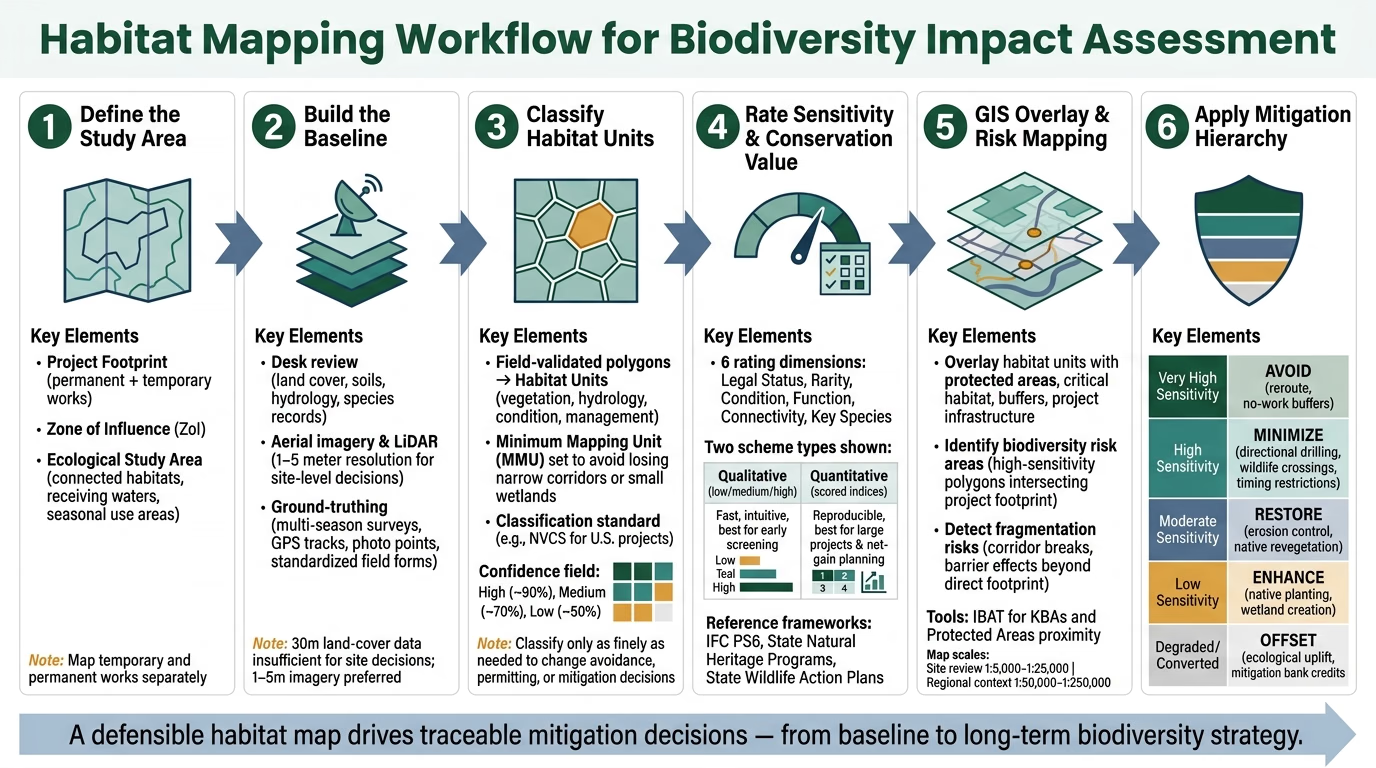
Habitat Mapping Workflow for Biodiversity Impact Assessment
Designing the Baseline: Study Area, Survey Methods, and Classification
Define the Footprint, Zone of Influence, and Baseline Objectives
Once the first habitat map is on the table, the job shifts from broad sketch to decision-ready baseline. A study area drawn only around the construction zone leaves too much risk off the map. To make the baseline hold up under review, separate three things clearly: the project footprint, the zone of influence (ZoI), and the broader ecological study area.
The footprint covers all permanent and temporary works - grading, access roads, laydown yards, borrow areas, utility corridors, and temporary construction compounds. The ZoI reaches past that boundary to account for indirect ecological effects. The ecological study area should also cover connected habitats, receiving waters, and seasonal use areas tied to sensitive species.
Temporary and permanent works should be mapped separately. That sounds like a small drafting choice, but it affects what happens next. A temporary access route may call for seasonal work windows, soil salvage, exclusion fencing, or later restoration, while a permanent feature may need a different mitigation path.
Baseline objectives also need to be set early and tied to the choices the data must support. That step keeps teams from circling back for extra surveys later because the first round did not answer the right questions. It also sets the level of detail needed in the habitat classification.
Choose Survey Frameworks and Habitat Classification Standards
The classification system shapes the rest of the process. It affects sensitivity scoring, impact quantification, and mitigation planning, so it has to work in the field and still support permits and design decisions. The right level of detail is not about mapping everything possible; it is about mapping enough to support the decisions ahead.
In U.S. practice, the National Vegetation Classification System (NVCS) is the accepted national standard for vegetation types, focused on existing vegetation and compatible with federal geospatial standards.[2][3]
A good rule here is simple: classify only as finely as needed to change avoidance, permitting, mitigation, or restoration decisions. If two habitat types would end up with the same impact rating and the same mitigation response, splitting them apart adds cost and little else. But if one area is a high-quality wetland and another is an early successional field, lumping them together would blur a difference that matters.
Combine Desk Data, Aerial Imagery, and Ground-Truthing
Desk review gives you the first draft of the baseline. Fieldwork tests whether that draft is right. Before anyone heads to the site, pull together existing land cover, aerial imagery, hydrology, soils, topography, protected area layers, known species occurrence records, and prior ecological surveys. Those sources help pre-classify likely habitat types, flag possible wetlands or floodplains, and steer field time toward the places with the most uncertainty.[4][5][6][7][8][10][11]
High-resolution aerial imagery and LiDAR are especially useful for drawing riparian corridors, isolated woodland patches, and drainage swales. Sometimes the data layers disagree, and that is where things get interesting. If aerial imagery points to shrubland but soils and hydrology suggest wetland function, that mismatch is a strong cue to send the field team there first.
Ground-truthing turns interpreted map units into habitat polygons that can stand up to review. Surveyors confirm dominant vegetation, hydrologic indicators, disturbance history, edge conditions, and any signs of protected species or other special features. Timing matters more than many teams expect. One season can miss ephemeral wetlands, late-flowering plants, or migratory use, which is why large projects usually need multi-season surveys.[9][10][1]
Data quality control needs to be baked in from the start, not patched on later. That means:
consistent habitat codes across surveyors
GPS tracks and photo points
standardized field forms
clear notes on assumptions in access-limited zones
Those records matter because the baseline will later be used to quantify habitat loss, assign sensitivity scores, and support mitigation ratios. Once the field-validated polygons are set, they can be grouped into habitat units for sensitivity screening.
From Habitat Units to Sensitivity Screening and Risk Areas
Define Habitat Units and Mapping Rules
Start by turning field-checked polygons into habitat units: mapped areas that share similar vegetation, hydrology, condition, and management. Some features don’t fit neatly into polygons. Linear features, like riparian corridors, and small discrete features, like isolated wetlands or vernal pools, are often better mapped as lines or points when they’re too narrow or too small at the chosen scale.
The minimum mapping unit (MMU) sets the smallest area or feature that gets its own mapped unit. Set it too large, and you start losing ecologically important patches. That’s a problem for narrow corridors and small wetlands, which can matter far more than their size suggests. In Rocky Mountain National Park, a 2-hectare MMU severely under-mapped aspen stands, even though aspen supports significant plant, bird, and butterfly diversity.[14][17]
Coding matters here. Use codes that link habitat type, condition, and conservation flags so GIS queries can quickly pull out rare, intact, or protected areas. Just as important, every mapper needs to follow the same written rules for drawing boundaries. Add a confidence field tied to the data source, survey date, and observer experience.
That’s what turns mapped units from simple shapes on a map into inputs you can actually use for sensitivity screening.
Rate Habitat Sensitivity and Conservation Value
Once the habitat units are in place, the next job is to rate what matters most. Sensitivity shows how vulnerable a habitat is to project-related impacts. Conservation value shows how important that habitat is for biodiversity and ecosystem services at the site, landscape, or regional scale.
A solid rating system pulls together six dimensions:
legal status
rarity
condition
function
connectivity
key species
A mature riparian forest that supports listed salmonids, links two large forest blocks, and helps with flood regulation would score high across nearly all six dimensions. In plain terms, that makes it a very high-sensitivity habitat and a clear area to avoid.
Scheme Type | Strengths | Limitations | Best-Use Cases |
|---|---|---|---|
Qualitative (e.g., low/medium/high classes) | Fast, intuitive, easy to communicate | Lower reproducibility; vulnerable to subjective bias | Early screening, small projects, stakeholder workshops |
Quantitative (e.g., scored indices, weighted matrices) | Reproducible; supports scenario analysis and offset design | Higher data demands; can appear falsely precise | Large projects, net-gain planning, biodiversity accounting |
If the ratings need to hold up across teams, time, or review cycles, use a scored matrix. Combine condition, rarity, connectivity, and strategic importance so the logic stays clear and repeatable.
Reference frameworks help keep those ratings anchored. IFC Performance Standard 6 (PS6) defines critical habitat using quantitative thresholds tied to species and ecosystem importance, including criteria based on global population shares and reproductive units.[12] State Natural Heritage Programs provide spatial data on rare ecosystems and imperiled species, and State Wildlife Action Plans identify species of greatest conservation need and their priority habitats. When project-specific ratings line up with these frameworks, classifications are more consistent with regulatory expectations from the start.
Identify Biodiversity Risk Areas with GIS Overlays
Sensitivity ratings become useful when you spatially match them against what the project will actually touch. This is where GIS overlays do the heavy lifting. They turn habitat data into a biodiversity risk layer.
Overlay habitat units with protected areas, buffers, critical habitat, and project infrastructure. If a high-sensitivity habitat polygon overlaps a proposed access road corridor, that intersection becomes a biodiversity risk area. Tools such as IBAT can quickly map proximity to Protected Areas and Key Biodiversity Areas (KBAs).[15][16][18]
Overlays also show fragmentation risks that go past the direct project footprint. When you overlay connectivity corridors with planned infrastructure, you can spot where a road or pipeline would cut a narrow linkage between two large forest blocks. That kind of barrier effect can do more damage than the direct land take itself. These overlays also produce the metrics used later for impact quantification, including affected area, corridor crossings, and high-risk polygons.
These map outputs set up the final products and review layers used in the next step.
Habitat Classification using ArcGIS Pro - Classification Wizard
Producing Decision-Ready Habitat Maps and GIS Outputs
Once habitat units and risk areas are set, the next step is to turn them into map products that designers and regulators can use without extra interpretation.
Prepare Spatial Data and Select Mapping Methods
Before any mapping starts, line up all spatial layers to the same projection, extent, and resolution. For most U.S. projects, an appropriate UTM zone or State Plane projection will do the job. Build the base stack from land cover, elevation, hydrology, soils, protected areas, and project design files.
Resolution matters because it sets the level of detail the map can support. A 30-meter raster is fine for landscape-scale habitat suitability work. Site-level permitting decisions usually need 1–5 meter resolution so parcel lines and smaller features are easy to see. If you mix resolutions and don't call it out, the map can suggest a level of accuracy that just isn't there. That's why resolution choices need to be documented in plain terms.
The mapping method should fit the project scale, the data on hand, and the decision the map needs to support.
Method | Data Needs | Strengths | Limitations | Best Use |
|---|---|---|---|---|
Manual digitizing | High-resolution aerial or satellite imagery (e.g., NAIP), existing base layers, field survey data | Precise boundaries; expert judgment; easy for regulators to trace | Labor-intensive; harder to scale | Small sites, jurisdictional wetlands, permitting-level detail |
Automated classification | Multi-band imagery (Landsat, Sentinel), training data from ground-truth points or polygons | Efficient over large areas; repeatable | Struggles with fine habitat distinctions; accuracy depends on training data | Baseline land cover, regional context maps |
Predictive habitat suitability modeling | Species occurrence records, environmental predictors (elevation, slope, aspect, land cover, distance to water) | Identifies potential habitat beyond surveyed areas; supports risk screening | Probabilistic output; harder for non-specialists to interpret | Sensitivity mapping, indirect impact screening, priority species planning |
The method should match the decision scale. In many cases, the best answer is to combine methods: automated classification for the broad baseline, manual digitizing for sensitive patches, and predictive modeling for risk in areas that haven't been surveyed.
Create Core Map Outputs for Assessment and Review
A full biodiversity impact assessment usually needs six map outputs: footprint, impact area, habitat type, habitat unit, sensitivity, and risk maps. Each one answers a different question. Put together, they create a reviewable path from what exists on the ground to what may be affected.
For project-level review, maps at 1:5,000 to 1:25,000 usually give regulators enough detail to check avoidance and mitigation proposals. Regional context maps at 1:50,000 to 1:250,000 show how the project fits into the surrounding landscape. Community-facing maps should use larger scales and familiar landmarks so residents can connect the map to places they know.
Every map should include:
A clear legend with definitions for each habitat type and sensitivity class
A scale bar and north arrow
Projection information
A metadata summary with data sources, imagery dates, and known limits
Version control matters too. Maps used in permitting need to trace back to a specific dataset, survey date, and method. If someone asks, Which survey did this polygon come from? there should be a clear answer.
Show Confidence, Uncertainty, and Update Needs
Confidence should appear on the map itself, not be buried in supporting files. A simple way to do that is to distinguish field-verified, interpreted, and modeled polygons. The Queensland Biodiversity Assessment and Mapping Methodology formalizes this with an index of confidence tied to qualitative categories: high (~90%), medium (~70%), and low (~50%) certainty.[13] EUSeaMap uses a similar system, rating each mapped habitat type as high (H), moderate (M), or low (L) confidence based on input data quality and threshold uncertainties.[19]
Use GIS symbology to make those confidence levels easy to spot. Reviewers should be able to tell, at a glance, which polygons were checked in the field, which were interpreted from imagery, and which came from modeling. Seasonal limits belong here as well. If winter surveys were not conducted, that gap should show up on the map itself, not only in an appendix. Regulators tend to value that kind of plain dealing because it makes it easier to judge where more survey work may be fair to ask for.
These outputs then support mitigation design by showing where avoidance, minimization, restoration, or offsetting is needed. The maps serve as the evidence base for applying the mitigation hierarchy.
Using Habitat Maps to Guide Mitigation and Long-Term Planning
Apply the Mitigation Hierarchy to Mapped Habitats
Use the map’s sensitivity and risk layers to decide where to avoid impacts, where to cut them down, and where to restore or offset. In practice, the habitat map gives you a clear way to match each sensitivity class to a mitigation response.
Sensitivity Class | Mitigation Objective | Example Measures |
|---|---|---|
Very High | Avoid | Reroute infrastructure, establish no-work buffers, redesign facility layout |
High | Avoid where possible; otherwise minimize | Directional drilling under streams, wildlife crossings, construction timing restrictions |
Moderate | Minimize and restore | Erosion control, topsoil management, native revegetation post-construction |
Low | Restore and enhance | Native planting, wetland creation, pollinator-friendly landscaping |
Degraded or converted | Use for offsets | Ecological uplift tied to corporate or city-level biodiversity and resilience goals |
This kind of structure helps turn a map into a decision tool. A Very High sensitivity area usually points to one answer: stay out. A High sensitivity area may still allow work, but only if the design cuts harm as much as possible. Moderate and Low classes often shift the focus toward repair, site recovery, and habitat improvement after construction. Areas that are already degraded or converted can sometimes serve as offset locations, especially when the goal is ecological uplift tied to company or city biodiversity and resilience plans.
Link Habitat Mapping to Restoration, Offsets, and Resilience Goals
Where impacts still remain, use the same mapped layers to choose restoration and offset sites. The map is not just for avoidance. It also shows where restoration spending and resilience work are likely to do the most good.
When planners combine condition scores, connectivity analysis, and pressure layers such as roads, invasive species, and urban expansion, they can spot pinch points in wildlife corridors. Those spots matter. In many cases, a small restoration project in the right place can reconnect broken habitat and improve gene flow for sensitive species.
For offsets, the spatial baseline is a big deal. Mapped habitats can be cross-referenced with mitigation bank service areas and credit types to confirm that purchased credits match the impacted resource type and fall within the correct watershed.[20] That check helps avoid a common problem: buying credits that look fine on paper but do not line up with the actual impact.
It also helps to layer habitat maps with state wildlife action plans, Important Bird Areas, or climate refugia maps. That extra step can point planners toward offset sites that support regional conservation priorities, not just project-level box checking.
Overlay habitat maps with climate hazard layers to target restoration and resilience investments where biodiversity gains and risk reduction align.
Conclusion: The Full Workflow from Baseline to Mitigation
The workflow in this guide moves from a clearly scoped study area and a defensible baseline, through habitat units and sensitivity ratings, into GIS outputs that support decisions on avoidance, minimization, restoration, and offsets, and then into long-term biodiversity and resilience strategy.
Each part depends on the one before it. A well-defined study area makes the baseline more credible. A credible baseline makes sensitivity ratings easier to defend. Defensible ratings make mitigation decisions traceable. And traceable decisions make monitoring and adaptive management possible over the life of a project.
FAQs
How large should the study area be?
Set the study area with a proportionate, risk-based approach rather than a fixed geographic scale. Begin by mapping your direct operating sites, owned or leased land, and the main regions where your supply chain sources materials.
Because nature-related impacts are local, there’s no need to assess your entire value chain all at once. Focus first on the areas with the highest likely dependencies and impacts, then expand the study area over time.
When is field verification really necessary?
Field verification matters when biodiversity data is patchy, tied to a specific place, or thin in scope. Desktop screenings with tools like IBAT, ENCORE, and the Biodiversity Risk Filter can flag risks and point to priority areas, but they don’t replace primary data.
Field surveys help close data gaps, confirm your baseline, and give you credible, site-specific evidence for a robust biodiversity impact assessment. That’s where the work shifts from a map-based signal to what’s happening on the ground. Council Fire supports this by combining geospatial intelligence with targeted field verification.
How do habitat maps change mitigation decisions?
Habitat maps sharpen mitigation decisions by showing exactly where sensitive habitats, protected areas, and high-risk biodiversity hotspots sit on the landscape. With that view in hand, teams can apply the mitigation hierarchy with more rigor and put avoidance first during site selection and design, rather than trying to fix problems later.
When impacts can’t be avoided, habitat units and condition assessments give teams a clear way to measure what restoration or compensation is needed. That leads to mitigation that is more targeted, measurable, and tied to the site itself.
Related Blog Posts
Latest Articles
©2026

Narrative Change and Power Building: The Missing Half of Advocacy
Narrative change is the process of disrupting dominant narratives that normalize inequity and advancing new narratives from historically marginalized communities.
Funding Resilience Without Federal Grants
BRIC is unreliable and FEMA is shrinking. Here's how cities fund climate resilience with dedicated revenue, blended finance, and a coordinating authority.

The ESG Blind Spot: How AI Is Finding Risks in Companies Nobody Else Is Watching
Norway's sovereign wealth fund uses AI to screen 7,200 portfolio companies for forced labor and corruption within 24 hours. The real story is the emerging-market coverage gap that traditional ESG data vendors miss — and what it means for any company with a global supply chain.
Narrative Change and Power Building: The Missing Half of Advocacy
Narrative change is the process of disrupting dominant narratives that normalize inequity and advancing new narratives from historically marginalized communities.
Funding Resilience Without Federal Grants
BRIC is unreliable and FEMA is shrinking. Here's how cities fund climate resilience with dedicated revenue, blended finance, and a coordinating authority.
The ESG Blind Spot: How AI Is Finding Risks in Companies Nobody Else Is Watching
Norway's sovereign wealth fund uses AI to screen 7,200 portfolio companies for forced labor and corruption within 24 hours. The real story is the emerging-market coverage gap that traditional ESG data vendors miss — and what it means for any company with a global supply chain.
FAQ
01
What does it really mean to “redefine profit”?
02
What makes Council Fire different?
03
Who does Council Fire work with?
04
What does working with Council Fire actually look like?
05
How does Council Fire help organizations turn big goals into action?
06
How does Council Fire define and measure success?
07
How does technology fit into Council Fire’s work?
Sep 22, 2026
Habitat Mapping for Biodiversity Impact Assessment
Sustainability Strategy
In This Article
Map habitats, rate sensitivity, show uncertainty, and use GIS to guide avoidance, minimization, restoration, and offsets.
Habitat Mapping for Biodiversity Impact Assessment
If the map is weak, the impact review is weak. I’d sum up the whole process this way: map the site, rate what matters, overlay the project, show uncertainty, and use those results to steer avoidance, minimization, restoration, and offsets.
In practice, I use habitat mapping to answer six plain questions fast:
What habitat is on the site?
Where is it?
How much of it is there?
How sensitive is it?
What will the project touch, split, or disturb?
What action should follow?
A solid workflow usually includes:
a mapped project footprint
a mapped zone of influence
field-checked habitat units
a clear classification standard
GIS overlays for risk areas
map outputs that show confidence and data limits
direct links to avoidance, minimization, restoration, and offsets
A few numbers shape the work. Site review often needs mapping around 1:5,000 to 1:25,000, while regional context may sit around 1:50,000 to 1:250,000. For site decisions, imagery or base data at roughly 1–5 meters is often far more useful than 30-meter land-cover data. And where confidence is shown, many systems use simple classes such as high (~90%), medium (~70%), and low (~50%).
What matters most to me is not just making a map. It is making a map that can stand up to review, show where risk sits, and help the team change design early - before habitat loss, corridor breaks, and permit trouble are built into the project.
Habitat Mapping Workflow for Biodiversity Impact Assessment
Designing the Baseline: Study Area, Survey Methods, and Classification
Define the Footprint, Zone of Influence, and Baseline Objectives
Once the first habitat map is on the table, the job shifts from broad sketch to decision-ready baseline. A study area drawn only around the construction zone leaves too much risk off the map. To make the baseline hold up under review, separate three things clearly: the project footprint, the zone of influence (ZoI), and the broader ecological study area.
The footprint covers all permanent and temporary works - grading, access roads, laydown yards, borrow areas, utility corridors, and temporary construction compounds. The ZoI reaches past that boundary to account for indirect ecological effects. The ecological study area should also cover connected habitats, receiving waters, and seasonal use areas tied to sensitive species.
Temporary and permanent works should be mapped separately. That sounds like a small drafting choice, but it affects what happens next. A temporary access route may call for seasonal work windows, soil salvage, exclusion fencing, or later restoration, while a permanent feature may need a different mitigation path.
Baseline objectives also need to be set early and tied to the choices the data must support. That step keeps teams from circling back for extra surveys later because the first round did not answer the right questions. It also sets the level of detail needed in the habitat classification.
Choose Survey Frameworks and Habitat Classification Standards
The classification system shapes the rest of the process. It affects sensitivity scoring, impact quantification, and mitigation planning, so it has to work in the field and still support permits and design decisions. The right level of detail is not about mapping everything possible; it is about mapping enough to support the decisions ahead.
In U.S. practice, the National Vegetation Classification System (NVCS) is the accepted national standard for vegetation types, focused on existing vegetation and compatible with federal geospatial standards.[2][3]
A good rule here is simple: classify only as finely as needed to change avoidance, permitting, mitigation, or restoration decisions. If two habitat types would end up with the same impact rating and the same mitigation response, splitting them apart adds cost and little else. But if one area is a high-quality wetland and another is an early successional field, lumping them together would blur a difference that matters.
Combine Desk Data, Aerial Imagery, and Ground-Truthing
Desk review gives you the first draft of the baseline. Fieldwork tests whether that draft is right. Before anyone heads to the site, pull together existing land cover, aerial imagery, hydrology, soils, topography, protected area layers, known species occurrence records, and prior ecological surveys. Those sources help pre-classify likely habitat types, flag possible wetlands or floodplains, and steer field time toward the places with the most uncertainty.[4][5][6][7][8][10][11]
High-resolution aerial imagery and LiDAR are especially useful for drawing riparian corridors, isolated woodland patches, and drainage swales. Sometimes the data layers disagree, and that is where things get interesting. If aerial imagery points to shrubland but soils and hydrology suggest wetland function, that mismatch is a strong cue to send the field team there first.
Ground-truthing turns interpreted map units into habitat polygons that can stand up to review. Surveyors confirm dominant vegetation, hydrologic indicators, disturbance history, edge conditions, and any signs of protected species or other special features. Timing matters more than many teams expect. One season can miss ephemeral wetlands, late-flowering plants, or migratory use, which is why large projects usually need multi-season surveys.[9][10][1]
Data quality control needs to be baked in from the start, not patched on later. That means:
consistent habitat codes across surveyors
GPS tracks and photo points
standardized field forms
clear notes on assumptions in access-limited zones
Those records matter because the baseline will later be used to quantify habitat loss, assign sensitivity scores, and support mitigation ratios. Once the field-validated polygons are set, they can be grouped into habitat units for sensitivity screening.
From Habitat Units to Sensitivity Screening and Risk Areas
Define Habitat Units and Mapping Rules
Start by turning field-checked polygons into habitat units: mapped areas that share similar vegetation, hydrology, condition, and management. Some features don’t fit neatly into polygons. Linear features, like riparian corridors, and small discrete features, like isolated wetlands or vernal pools, are often better mapped as lines or points when they’re too narrow or too small at the chosen scale.
The minimum mapping unit (MMU) sets the smallest area or feature that gets its own mapped unit. Set it too large, and you start losing ecologically important patches. That’s a problem for narrow corridors and small wetlands, which can matter far more than their size suggests. In Rocky Mountain National Park, a 2-hectare MMU severely under-mapped aspen stands, even though aspen supports significant plant, bird, and butterfly diversity.[14][17]
Coding matters here. Use codes that link habitat type, condition, and conservation flags so GIS queries can quickly pull out rare, intact, or protected areas. Just as important, every mapper needs to follow the same written rules for drawing boundaries. Add a confidence field tied to the data source, survey date, and observer experience.
That’s what turns mapped units from simple shapes on a map into inputs you can actually use for sensitivity screening.
Rate Habitat Sensitivity and Conservation Value
Once the habitat units are in place, the next job is to rate what matters most. Sensitivity shows how vulnerable a habitat is to project-related impacts. Conservation value shows how important that habitat is for biodiversity and ecosystem services at the site, landscape, or regional scale.
A solid rating system pulls together six dimensions:
legal status
rarity
condition
function
connectivity
key species
A mature riparian forest that supports listed salmonids, links two large forest blocks, and helps with flood regulation would score high across nearly all six dimensions. In plain terms, that makes it a very high-sensitivity habitat and a clear area to avoid.
Scheme Type | Strengths | Limitations | Best-Use Cases |
|---|---|---|---|
Qualitative (e.g., low/medium/high classes) | Fast, intuitive, easy to communicate | Lower reproducibility; vulnerable to subjective bias | Early screening, small projects, stakeholder workshops |
Quantitative (e.g., scored indices, weighted matrices) | Reproducible; supports scenario analysis and offset design | Higher data demands; can appear falsely precise | Large projects, net-gain planning, biodiversity accounting |
If the ratings need to hold up across teams, time, or review cycles, use a scored matrix. Combine condition, rarity, connectivity, and strategic importance so the logic stays clear and repeatable.
Reference frameworks help keep those ratings anchored. IFC Performance Standard 6 (PS6) defines critical habitat using quantitative thresholds tied to species and ecosystem importance, including criteria based on global population shares and reproductive units.[12] State Natural Heritage Programs provide spatial data on rare ecosystems and imperiled species, and State Wildlife Action Plans identify species of greatest conservation need and their priority habitats. When project-specific ratings line up with these frameworks, classifications are more consistent with regulatory expectations from the start.
Identify Biodiversity Risk Areas with GIS Overlays
Sensitivity ratings become useful when you spatially match them against what the project will actually touch. This is where GIS overlays do the heavy lifting. They turn habitat data into a biodiversity risk layer.
Overlay habitat units with protected areas, buffers, critical habitat, and project infrastructure. If a high-sensitivity habitat polygon overlaps a proposed access road corridor, that intersection becomes a biodiversity risk area. Tools such as IBAT can quickly map proximity to Protected Areas and Key Biodiversity Areas (KBAs).[15][16][18]
Overlays also show fragmentation risks that go past the direct project footprint. When you overlay connectivity corridors with planned infrastructure, you can spot where a road or pipeline would cut a narrow linkage between two large forest blocks. That kind of barrier effect can do more damage than the direct land take itself. These overlays also produce the metrics used later for impact quantification, including affected area, corridor crossings, and high-risk polygons.
These map outputs set up the final products and review layers used in the next step.
Habitat Classification using ArcGIS Pro - Classification Wizard
Producing Decision-Ready Habitat Maps and GIS Outputs
Once habitat units and risk areas are set, the next step is to turn them into map products that designers and regulators can use without extra interpretation.
Prepare Spatial Data and Select Mapping Methods
Before any mapping starts, line up all spatial layers to the same projection, extent, and resolution. For most U.S. projects, an appropriate UTM zone or State Plane projection will do the job. Build the base stack from land cover, elevation, hydrology, soils, protected areas, and project design files.
Resolution matters because it sets the level of detail the map can support. A 30-meter raster is fine for landscape-scale habitat suitability work. Site-level permitting decisions usually need 1–5 meter resolution so parcel lines and smaller features are easy to see. If you mix resolutions and don't call it out, the map can suggest a level of accuracy that just isn't there. That's why resolution choices need to be documented in plain terms.
The mapping method should fit the project scale, the data on hand, and the decision the map needs to support.
Method | Data Needs | Strengths | Limitations | Best Use |
|---|---|---|---|---|
Manual digitizing | High-resolution aerial or satellite imagery (e.g., NAIP), existing base layers, field survey data | Precise boundaries; expert judgment; easy for regulators to trace | Labor-intensive; harder to scale | Small sites, jurisdictional wetlands, permitting-level detail |
Automated classification | Multi-band imagery (Landsat, Sentinel), training data from ground-truth points or polygons | Efficient over large areas; repeatable | Struggles with fine habitat distinctions; accuracy depends on training data | Baseline land cover, regional context maps |
Predictive habitat suitability modeling | Species occurrence records, environmental predictors (elevation, slope, aspect, land cover, distance to water) | Identifies potential habitat beyond surveyed areas; supports risk screening | Probabilistic output; harder for non-specialists to interpret | Sensitivity mapping, indirect impact screening, priority species planning |
The method should match the decision scale. In many cases, the best answer is to combine methods: automated classification for the broad baseline, manual digitizing for sensitive patches, and predictive modeling for risk in areas that haven't been surveyed.
Create Core Map Outputs for Assessment and Review
A full biodiversity impact assessment usually needs six map outputs: footprint, impact area, habitat type, habitat unit, sensitivity, and risk maps. Each one answers a different question. Put together, they create a reviewable path from what exists on the ground to what may be affected.
For project-level review, maps at 1:5,000 to 1:25,000 usually give regulators enough detail to check avoidance and mitigation proposals. Regional context maps at 1:50,000 to 1:250,000 show how the project fits into the surrounding landscape. Community-facing maps should use larger scales and familiar landmarks so residents can connect the map to places they know.
Every map should include:
A clear legend with definitions for each habitat type and sensitivity class
A scale bar and north arrow
Projection information
A metadata summary with data sources, imagery dates, and known limits
Version control matters too. Maps used in permitting need to trace back to a specific dataset, survey date, and method. If someone asks, Which survey did this polygon come from? there should be a clear answer.
Show Confidence, Uncertainty, and Update Needs
Confidence should appear on the map itself, not be buried in supporting files. A simple way to do that is to distinguish field-verified, interpreted, and modeled polygons. The Queensland Biodiversity Assessment and Mapping Methodology formalizes this with an index of confidence tied to qualitative categories: high (~90%), medium (~70%), and low (~50%) certainty.[13] EUSeaMap uses a similar system, rating each mapped habitat type as high (H), moderate (M), or low (L) confidence based on input data quality and threshold uncertainties.[19]
Use GIS symbology to make those confidence levels easy to spot. Reviewers should be able to tell, at a glance, which polygons were checked in the field, which were interpreted from imagery, and which came from modeling. Seasonal limits belong here as well. If winter surveys were not conducted, that gap should show up on the map itself, not only in an appendix. Regulators tend to value that kind of plain dealing because it makes it easier to judge where more survey work may be fair to ask for.
These outputs then support mitigation design by showing where avoidance, minimization, restoration, or offsetting is needed. The maps serve as the evidence base for applying the mitigation hierarchy.
Using Habitat Maps to Guide Mitigation and Long-Term Planning
Apply the Mitigation Hierarchy to Mapped Habitats
Use the map’s sensitivity and risk layers to decide where to avoid impacts, where to cut them down, and where to restore or offset. In practice, the habitat map gives you a clear way to match each sensitivity class to a mitigation response.
Sensitivity Class | Mitigation Objective | Example Measures |
|---|---|---|
Very High | Avoid | Reroute infrastructure, establish no-work buffers, redesign facility layout |
High | Avoid where possible; otherwise minimize | Directional drilling under streams, wildlife crossings, construction timing restrictions |
Moderate | Minimize and restore | Erosion control, topsoil management, native revegetation post-construction |
Low | Restore and enhance | Native planting, wetland creation, pollinator-friendly landscaping |
Degraded or converted | Use for offsets | Ecological uplift tied to corporate or city-level biodiversity and resilience goals |
This kind of structure helps turn a map into a decision tool. A Very High sensitivity area usually points to one answer: stay out. A High sensitivity area may still allow work, but only if the design cuts harm as much as possible. Moderate and Low classes often shift the focus toward repair, site recovery, and habitat improvement after construction. Areas that are already degraded or converted can sometimes serve as offset locations, especially when the goal is ecological uplift tied to company or city biodiversity and resilience plans.
Link Habitat Mapping to Restoration, Offsets, and Resilience Goals
Where impacts still remain, use the same mapped layers to choose restoration and offset sites. The map is not just for avoidance. It also shows where restoration spending and resilience work are likely to do the most good.
When planners combine condition scores, connectivity analysis, and pressure layers such as roads, invasive species, and urban expansion, they can spot pinch points in wildlife corridors. Those spots matter. In many cases, a small restoration project in the right place can reconnect broken habitat and improve gene flow for sensitive species.
For offsets, the spatial baseline is a big deal. Mapped habitats can be cross-referenced with mitigation bank service areas and credit types to confirm that purchased credits match the impacted resource type and fall within the correct watershed.[20] That check helps avoid a common problem: buying credits that look fine on paper but do not line up with the actual impact.
It also helps to layer habitat maps with state wildlife action plans, Important Bird Areas, or climate refugia maps. That extra step can point planners toward offset sites that support regional conservation priorities, not just project-level box checking.
Overlay habitat maps with climate hazard layers to target restoration and resilience investments where biodiversity gains and risk reduction align.
Conclusion: The Full Workflow from Baseline to Mitigation
The workflow in this guide moves from a clearly scoped study area and a defensible baseline, through habitat units and sensitivity ratings, into GIS outputs that support decisions on avoidance, minimization, restoration, and offsets, and then into long-term biodiversity and resilience strategy.
Each part depends on the one before it. A well-defined study area makes the baseline more credible. A credible baseline makes sensitivity ratings easier to defend. Defensible ratings make mitigation decisions traceable. And traceable decisions make monitoring and adaptive management possible over the life of a project.
FAQs
How large should the study area be?
Set the study area with a proportionate, risk-based approach rather than a fixed geographic scale. Begin by mapping your direct operating sites, owned or leased land, and the main regions where your supply chain sources materials.
Because nature-related impacts are local, there’s no need to assess your entire value chain all at once. Focus first on the areas with the highest likely dependencies and impacts, then expand the study area over time.
When is field verification really necessary?
Field verification matters when biodiversity data is patchy, tied to a specific place, or thin in scope. Desktop screenings with tools like IBAT, ENCORE, and the Biodiversity Risk Filter can flag risks and point to priority areas, but they don’t replace primary data.
Field surveys help close data gaps, confirm your baseline, and give you credible, site-specific evidence for a robust biodiversity impact assessment. That’s where the work shifts from a map-based signal to what’s happening on the ground. Council Fire supports this by combining geospatial intelligence with targeted field verification.
How do habitat maps change mitigation decisions?
Habitat maps sharpen mitigation decisions by showing exactly where sensitive habitats, protected areas, and high-risk biodiversity hotspots sit on the landscape. With that view in hand, teams can apply the mitigation hierarchy with more rigor and put avoidance first during site selection and design, rather than trying to fix problems later.
When impacts can’t be avoided, habitat units and condition assessments give teams a clear way to measure what restoration or compensation is needed. That leads to mitigation that is more targeted, measurable, and tied to the site itself.
Related Blog Posts
Latest Articles
©2026
Narrative Change and Power Building: The Missing Half of Advocacy
Narrative change is the process of disrupting dominant narratives that normalize inequity and advancing new narratives from historically marginalized communities.
Funding Resilience Without Federal Grants
BRIC is unreliable and FEMA is shrinking. Here's how cities fund climate resilience with dedicated revenue, blended finance, and a coordinating authority.
The ESG Blind Spot: How AI Is Finding Risks in Companies Nobody Else Is Watching
Norway's sovereign wealth fund uses AI to screen 7,200 portfolio companies for forced labor and corruption within 24 hours. The real story is the emerging-market coverage gap that traditional ESG data vendors miss — and what it means for any company with a global supply chain.
FAQ
01
What does it really mean to “redefine profit”?
02
What makes Council Fire different?
03
Who does Council Fire work with?
04
What does working with Council Fire actually look like?
05
How does Council Fire help organizations turn big goals into action?
06
How does Council Fire define and measure success?
07
How does technology fit into Council Fire’s work?
Sep 22, 2026
Habitat Mapping for Biodiversity Impact Assessment
Sustainability Strategy
In This Article
Map habitats, rate sensitivity, show uncertainty, and use GIS to guide avoidance, minimization, restoration, and offsets.
Habitat Mapping for Biodiversity Impact Assessment
If the map is weak, the impact review is weak. I’d sum up the whole process this way: map the site, rate what matters, overlay the project, show uncertainty, and use those results to steer avoidance, minimization, restoration, and offsets.
In practice, I use habitat mapping to answer six plain questions fast:
What habitat is on the site?
Where is it?
How much of it is there?
How sensitive is it?
What will the project touch, split, or disturb?
What action should follow?
A solid workflow usually includes:
a mapped project footprint
a mapped zone of influence
field-checked habitat units
a clear classification standard
GIS overlays for risk areas
map outputs that show confidence and data limits
direct links to avoidance, minimization, restoration, and offsets
A few numbers shape the work. Site review often needs mapping around 1:5,000 to 1:25,000, while regional context may sit around 1:50,000 to 1:250,000. For site decisions, imagery or base data at roughly 1–5 meters is often far more useful than 30-meter land-cover data. And where confidence is shown, many systems use simple classes such as high (~90%), medium (~70%), and low (~50%).
What matters most to me is not just making a map. It is making a map that can stand up to review, show where risk sits, and help the team change design early - before habitat loss, corridor breaks, and permit trouble are built into the project.
Habitat Mapping Workflow for Biodiversity Impact Assessment
Designing the Baseline: Study Area, Survey Methods, and Classification
Define the Footprint, Zone of Influence, and Baseline Objectives
Once the first habitat map is on the table, the job shifts from broad sketch to decision-ready baseline. A study area drawn only around the construction zone leaves too much risk off the map. To make the baseline hold up under review, separate three things clearly: the project footprint, the zone of influence (ZoI), and the broader ecological study area.
The footprint covers all permanent and temporary works - grading, access roads, laydown yards, borrow areas, utility corridors, and temporary construction compounds. The ZoI reaches past that boundary to account for indirect ecological effects. The ecological study area should also cover connected habitats, receiving waters, and seasonal use areas tied to sensitive species.
Temporary and permanent works should be mapped separately. That sounds like a small drafting choice, but it affects what happens next. A temporary access route may call for seasonal work windows, soil salvage, exclusion fencing, or later restoration, while a permanent feature may need a different mitigation path.
Baseline objectives also need to be set early and tied to the choices the data must support. That step keeps teams from circling back for extra surveys later because the first round did not answer the right questions. It also sets the level of detail needed in the habitat classification.
Choose Survey Frameworks and Habitat Classification Standards
The classification system shapes the rest of the process. It affects sensitivity scoring, impact quantification, and mitigation planning, so it has to work in the field and still support permits and design decisions. The right level of detail is not about mapping everything possible; it is about mapping enough to support the decisions ahead.
In U.S. practice, the National Vegetation Classification System (NVCS) is the accepted national standard for vegetation types, focused on existing vegetation and compatible with federal geospatial standards.[2][3]
A good rule here is simple: classify only as finely as needed to change avoidance, permitting, mitigation, or restoration decisions. If two habitat types would end up with the same impact rating and the same mitigation response, splitting them apart adds cost and little else. But if one area is a high-quality wetland and another is an early successional field, lumping them together would blur a difference that matters.
Combine Desk Data, Aerial Imagery, and Ground-Truthing
Desk review gives you the first draft of the baseline. Fieldwork tests whether that draft is right. Before anyone heads to the site, pull together existing land cover, aerial imagery, hydrology, soils, topography, protected area layers, known species occurrence records, and prior ecological surveys. Those sources help pre-classify likely habitat types, flag possible wetlands or floodplains, and steer field time toward the places with the most uncertainty.[4][5][6][7][8][10][11]
High-resolution aerial imagery and LiDAR are especially useful for drawing riparian corridors, isolated woodland patches, and drainage swales. Sometimes the data layers disagree, and that is where things get interesting. If aerial imagery points to shrubland but soils and hydrology suggest wetland function, that mismatch is a strong cue to send the field team there first.
Ground-truthing turns interpreted map units into habitat polygons that can stand up to review. Surveyors confirm dominant vegetation, hydrologic indicators, disturbance history, edge conditions, and any signs of protected species or other special features. Timing matters more than many teams expect. One season can miss ephemeral wetlands, late-flowering plants, or migratory use, which is why large projects usually need multi-season surveys.[9][10][1]
Data quality control needs to be baked in from the start, not patched on later. That means:
consistent habitat codes across surveyors
GPS tracks and photo points
standardized field forms
clear notes on assumptions in access-limited zones
Those records matter because the baseline will later be used to quantify habitat loss, assign sensitivity scores, and support mitigation ratios. Once the field-validated polygons are set, they can be grouped into habitat units for sensitivity screening.
From Habitat Units to Sensitivity Screening and Risk Areas
Define Habitat Units and Mapping Rules
Start by turning field-checked polygons into habitat units: mapped areas that share similar vegetation, hydrology, condition, and management. Some features don’t fit neatly into polygons. Linear features, like riparian corridors, and small discrete features, like isolated wetlands or vernal pools, are often better mapped as lines or points when they’re too narrow or too small at the chosen scale.
The minimum mapping unit (MMU) sets the smallest area or feature that gets its own mapped unit. Set it too large, and you start losing ecologically important patches. That’s a problem for narrow corridors and small wetlands, which can matter far more than their size suggests. In Rocky Mountain National Park, a 2-hectare MMU severely under-mapped aspen stands, even though aspen supports significant plant, bird, and butterfly diversity.[14][17]
Coding matters here. Use codes that link habitat type, condition, and conservation flags so GIS queries can quickly pull out rare, intact, or protected areas. Just as important, every mapper needs to follow the same written rules for drawing boundaries. Add a confidence field tied to the data source, survey date, and observer experience.
That’s what turns mapped units from simple shapes on a map into inputs you can actually use for sensitivity screening.
Rate Habitat Sensitivity and Conservation Value
Once the habitat units are in place, the next job is to rate what matters most. Sensitivity shows how vulnerable a habitat is to project-related impacts. Conservation value shows how important that habitat is for biodiversity and ecosystem services at the site, landscape, or regional scale.
A solid rating system pulls together six dimensions:
legal status
rarity
condition
function
connectivity
key species
A mature riparian forest that supports listed salmonids, links two large forest blocks, and helps with flood regulation would score high across nearly all six dimensions. In plain terms, that makes it a very high-sensitivity habitat and a clear area to avoid.
Scheme Type | Strengths | Limitations | Best-Use Cases |
|---|---|---|---|
Qualitative (e.g., low/medium/high classes) | Fast, intuitive, easy to communicate | Lower reproducibility; vulnerable to subjective bias | Early screening, small projects, stakeholder workshops |
Quantitative (e.g., scored indices, weighted matrices) | Reproducible; supports scenario analysis and offset design | Higher data demands; can appear falsely precise | Large projects, net-gain planning, biodiversity accounting |
If the ratings need to hold up across teams, time, or review cycles, use a scored matrix. Combine condition, rarity, connectivity, and strategic importance so the logic stays clear and repeatable.
Reference frameworks help keep those ratings anchored. IFC Performance Standard 6 (PS6) defines critical habitat using quantitative thresholds tied to species and ecosystem importance, including criteria based on global population shares and reproductive units.[12] State Natural Heritage Programs provide spatial data on rare ecosystems and imperiled species, and State Wildlife Action Plans identify species of greatest conservation need and their priority habitats. When project-specific ratings line up with these frameworks, classifications are more consistent with regulatory expectations from the start.
Identify Biodiversity Risk Areas with GIS Overlays
Sensitivity ratings become useful when you spatially match them against what the project will actually touch. This is where GIS overlays do the heavy lifting. They turn habitat data into a biodiversity risk layer.
Overlay habitat units with protected areas, buffers, critical habitat, and project infrastructure. If a high-sensitivity habitat polygon overlaps a proposed access road corridor, that intersection becomes a biodiversity risk area. Tools such as IBAT can quickly map proximity to Protected Areas and Key Biodiversity Areas (KBAs).[15][16][18]
Overlays also show fragmentation risks that go past the direct project footprint. When you overlay connectivity corridors with planned infrastructure, you can spot where a road or pipeline would cut a narrow linkage between two large forest blocks. That kind of barrier effect can do more damage than the direct land take itself. These overlays also produce the metrics used later for impact quantification, including affected area, corridor crossings, and high-risk polygons.
These map outputs set up the final products and review layers used in the next step.
Habitat Classification using ArcGIS Pro - Classification Wizard
Producing Decision-Ready Habitat Maps and GIS Outputs
Once habitat units and risk areas are set, the next step is to turn them into map products that designers and regulators can use without extra interpretation.
Prepare Spatial Data and Select Mapping Methods
Before any mapping starts, line up all spatial layers to the same projection, extent, and resolution. For most U.S. projects, an appropriate UTM zone or State Plane projection will do the job. Build the base stack from land cover, elevation, hydrology, soils, protected areas, and project design files.
Resolution matters because it sets the level of detail the map can support. A 30-meter raster is fine for landscape-scale habitat suitability work. Site-level permitting decisions usually need 1–5 meter resolution so parcel lines and smaller features are easy to see. If you mix resolutions and don't call it out, the map can suggest a level of accuracy that just isn't there. That's why resolution choices need to be documented in plain terms.
The mapping method should fit the project scale, the data on hand, and the decision the map needs to support.
Method | Data Needs | Strengths | Limitations | Best Use |
|---|---|---|---|---|
Manual digitizing | High-resolution aerial or satellite imagery (e.g., NAIP), existing base layers, field survey data | Precise boundaries; expert judgment; easy for regulators to trace | Labor-intensive; harder to scale | Small sites, jurisdictional wetlands, permitting-level detail |
Automated classification | Multi-band imagery (Landsat, Sentinel), training data from ground-truth points or polygons | Efficient over large areas; repeatable | Struggles with fine habitat distinctions; accuracy depends on training data | Baseline land cover, regional context maps |
Predictive habitat suitability modeling | Species occurrence records, environmental predictors (elevation, slope, aspect, land cover, distance to water) | Identifies potential habitat beyond surveyed areas; supports risk screening | Probabilistic output; harder for non-specialists to interpret | Sensitivity mapping, indirect impact screening, priority species planning |
The method should match the decision scale. In many cases, the best answer is to combine methods: automated classification for the broad baseline, manual digitizing for sensitive patches, and predictive modeling for risk in areas that haven't been surveyed.
Create Core Map Outputs for Assessment and Review
A full biodiversity impact assessment usually needs six map outputs: footprint, impact area, habitat type, habitat unit, sensitivity, and risk maps. Each one answers a different question. Put together, they create a reviewable path from what exists on the ground to what may be affected.
For project-level review, maps at 1:5,000 to 1:25,000 usually give regulators enough detail to check avoidance and mitigation proposals. Regional context maps at 1:50,000 to 1:250,000 show how the project fits into the surrounding landscape. Community-facing maps should use larger scales and familiar landmarks so residents can connect the map to places they know.
Every map should include:
A clear legend with definitions for each habitat type and sensitivity class
A scale bar and north arrow
Projection information
A metadata summary with data sources, imagery dates, and known limits
Version control matters too. Maps used in permitting need to trace back to a specific dataset, survey date, and method. If someone asks, Which survey did this polygon come from? there should be a clear answer.
Show Confidence, Uncertainty, and Update Needs
Confidence should appear on the map itself, not be buried in supporting files. A simple way to do that is to distinguish field-verified, interpreted, and modeled polygons. The Queensland Biodiversity Assessment and Mapping Methodology formalizes this with an index of confidence tied to qualitative categories: high (~90%), medium (~70%), and low (~50%) certainty.[13] EUSeaMap uses a similar system, rating each mapped habitat type as high (H), moderate (M), or low (L) confidence based on input data quality and threshold uncertainties.[19]
Use GIS symbology to make those confidence levels easy to spot. Reviewers should be able to tell, at a glance, which polygons were checked in the field, which were interpreted from imagery, and which came from modeling. Seasonal limits belong here as well. If winter surveys were not conducted, that gap should show up on the map itself, not only in an appendix. Regulators tend to value that kind of plain dealing because it makes it easier to judge where more survey work may be fair to ask for.
These outputs then support mitigation design by showing where avoidance, minimization, restoration, or offsetting is needed. The maps serve as the evidence base for applying the mitigation hierarchy.
Using Habitat Maps to Guide Mitigation and Long-Term Planning
Apply the Mitigation Hierarchy to Mapped Habitats
Use the map’s sensitivity and risk layers to decide where to avoid impacts, where to cut them down, and where to restore or offset. In practice, the habitat map gives you a clear way to match each sensitivity class to a mitigation response.
Sensitivity Class | Mitigation Objective | Example Measures |
|---|---|---|
Very High | Avoid | Reroute infrastructure, establish no-work buffers, redesign facility layout |
High | Avoid where possible; otherwise minimize | Directional drilling under streams, wildlife crossings, construction timing restrictions |
Moderate | Minimize and restore | Erosion control, topsoil management, native revegetation post-construction |
Low | Restore and enhance | Native planting, wetland creation, pollinator-friendly landscaping |
Degraded or converted | Use for offsets | Ecological uplift tied to corporate or city-level biodiversity and resilience goals |
This kind of structure helps turn a map into a decision tool. A Very High sensitivity area usually points to one answer: stay out. A High sensitivity area may still allow work, but only if the design cuts harm as much as possible. Moderate and Low classes often shift the focus toward repair, site recovery, and habitat improvement after construction. Areas that are already degraded or converted can sometimes serve as offset locations, especially when the goal is ecological uplift tied to company or city biodiversity and resilience plans.
Link Habitat Mapping to Restoration, Offsets, and Resilience Goals
Where impacts still remain, use the same mapped layers to choose restoration and offset sites. The map is not just for avoidance. It also shows where restoration spending and resilience work are likely to do the most good.
When planners combine condition scores, connectivity analysis, and pressure layers such as roads, invasive species, and urban expansion, they can spot pinch points in wildlife corridors. Those spots matter. In many cases, a small restoration project in the right place can reconnect broken habitat and improve gene flow for sensitive species.
For offsets, the spatial baseline is a big deal. Mapped habitats can be cross-referenced with mitigation bank service areas and credit types to confirm that purchased credits match the impacted resource type and fall within the correct watershed.[20] That check helps avoid a common problem: buying credits that look fine on paper but do not line up with the actual impact.
It also helps to layer habitat maps with state wildlife action plans, Important Bird Areas, or climate refugia maps. That extra step can point planners toward offset sites that support regional conservation priorities, not just project-level box checking.
Overlay habitat maps with climate hazard layers to target restoration and resilience investments where biodiversity gains and risk reduction align.
Conclusion: The Full Workflow from Baseline to Mitigation
The workflow in this guide moves from a clearly scoped study area and a defensible baseline, through habitat units and sensitivity ratings, into GIS outputs that support decisions on avoidance, minimization, restoration, and offsets, and then into long-term biodiversity and resilience strategy.
Each part depends on the one before it. A well-defined study area makes the baseline more credible. A credible baseline makes sensitivity ratings easier to defend. Defensible ratings make mitigation decisions traceable. And traceable decisions make monitoring and adaptive management possible over the life of a project.
FAQs
How large should the study area be?
Set the study area with a proportionate, risk-based approach rather than a fixed geographic scale. Begin by mapping your direct operating sites, owned or leased land, and the main regions where your supply chain sources materials.
Because nature-related impacts are local, there’s no need to assess your entire value chain all at once. Focus first on the areas with the highest likely dependencies and impacts, then expand the study area over time.
When is field verification really necessary?
Field verification matters when biodiversity data is patchy, tied to a specific place, or thin in scope. Desktop screenings with tools like IBAT, ENCORE, and the Biodiversity Risk Filter can flag risks and point to priority areas, but they don’t replace primary data.
Field surveys help close data gaps, confirm your baseline, and give you credible, site-specific evidence for a robust biodiversity impact assessment. That’s where the work shifts from a map-based signal to what’s happening on the ground. Council Fire supports this by combining geospatial intelligence with targeted field verification.
How do habitat maps change mitigation decisions?
Habitat maps sharpen mitigation decisions by showing exactly where sensitive habitats, protected areas, and high-risk biodiversity hotspots sit on the landscape. With that view in hand, teams can apply the mitigation hierarchy with more rigor and put avoidance first during site selection and design, rather than trying to fix problems later.
When impacts can’t be avoided, habitat units and condition assessments give teams a clear way to measure what restoration or compensation is needed. That leads to mitigation that is more targeted, measurable, and tied to the site itself.
Related Blog Posts
Latest Articles
©2026
Narrative Change and Power Building: The Missing Half of Advocacy
Narrative change is the process of disrupting dominant narratives that normalize inequity and advancing new narratives from historically marginalized communities.
Funding Resilience Without Federal Grants
BRIC is unreliable and FEMA is shrinking. Here's how cities fund climate resilience with dedicated revenue, blended finance, and a coordinating authority.
The ESG Blind Spot: How AI Is Finding Risks in Companies Nobody Else Is Watching
Norway's sovereign wealth fund uses AI to screen 7,200 portfolio companies for forced labor and corruption within 24 hours. The real story is the emerging-market coverage gap that traditional ESG data vendors miss — and what it means for any company with a global supply chain.
FAQ
What does it really mean to “redefine profit”?
What makes Council Fire different?
Who does Council Fire work with?
What does working with Council Fire actually look like?
How does Council Fire help organizations turn big goals into action?
How does Council Fire define and measure success?
How does technology fit into Council Fire’s work?