In This Article
Match collection capacity to peak demand using 24–36 months of matched records, scenario forecasts, route workloads, fleet sizing, and pilot tests.
Residential Waste Forecasts Guide Collection Planning
I plan residential waste collection around peak demand - not annual averages. I start with 24–36 months of collection records, matched to service addresses, population, and housing data, to estimate the trucks, crews, and facility space each area needs.
My approach connects the forecast to daily service:
Define coverage and check records: Confirm households, boundaries, material streams, and measured weights.
Estimate and test demand: Forecast trash, recycling, and organics separately; compare predictions with actual collections; and build low, baseline, and high-demand scenarios.
Turn estimates into schedules: Check container space, truck payloads, route hours, staffing, facility limits, and costs.
Pilot and review: Test changes with crews and residents, track missed pickups and forecast errors, and update plans before budgeting.
The goal is simple: <u>match collection capacity to the work ahead</u>, then use service results to check whether the plan holds up.
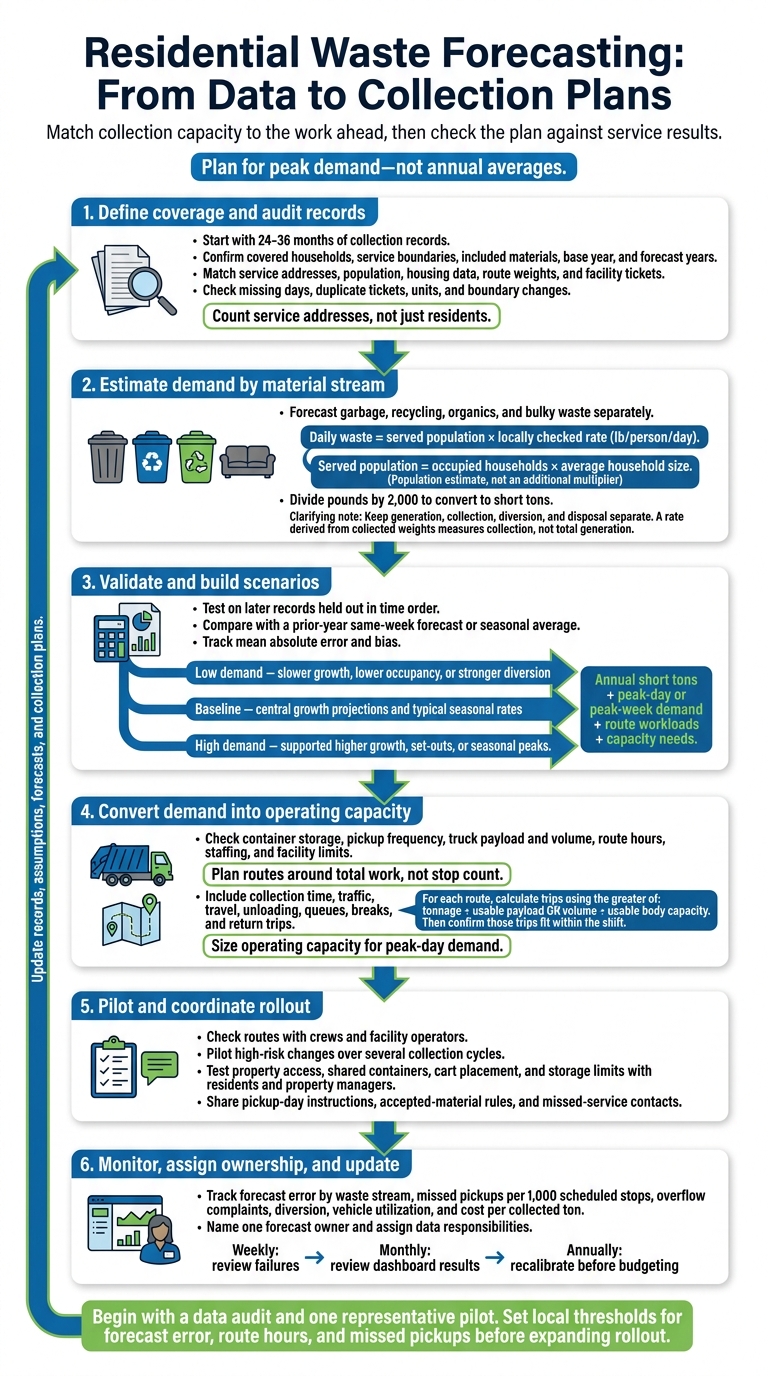
Residential Waste Forecasting: From Data to Collection Plans
How to calculate how much waste is produced in your home
sbb-itb-8baf5f1
1. Set the Forecast Scope and Gather Data
Write a one-page scope statement that identifies covered customers, the service boundary, included and excluded materials, the base year, and forecast years. These choices determine which households, material streams, and years feed the forecast. Include bulky waste and seasonal materials only where they affect service.
Match the forecast to the decision it supports: weekly outputs for route workloads, annual totals for budgets and disposal contracts, and long-range scenarios for fleet and facility planning. A clear scope keeps boundary changes from being mistaken for demand growth.
Gather Population, Household, and Collection Records
Use population estimates for the current baseline and projections for future growth. Document assumptions about births, deaths, and migration.[1] Add household size, occupancy, dwelling type, and expected housing development. Count service addresses, not just residents. Collection is assigned to a dwelling unit or account - a distinction that matters especially in multifamily buildings.
| Input | Source | Time period | Geographic detail | Planning use |
|---|---|---|---|---|
| Population estimates and projections | U.S. Census Bureau; local planning records | Base year and forecast years | Available census geography, allocated to service areas | Estimate population growth[1] |
| Household count, size, occupancy, and dwelling type | American Community Survey; housing and permit records | Annual or multiyear estimates; development schedule | Tract, block group, building, or parcel | Estimate occupied units and service needs[2] |
| Service addresses and cart inventory | Customer information system or GIS | Current snapshot and change history | Address, route, and zone | Confirm covered households and stops |
| Route weights and disposal tickets | Scale-house and collection records | Daily records across available historical years | Route, vehicle, and material stream | Establish collected weights and seasonal patterns |
| Pickup frequency, coverage, and setouts | Schedules, contracts, and operating logs | Current and historical | Route and service zone | Identify actual service demand |
| Vehicle payload and operating limits | Fleet specifications and operating records | Current and planned fleet years | Vehicle and route | Check feasible collection capacity |
| Seasonal and policy changes | Program records, ordinances, and event calendars | Event dates and affected periods | Affected area and material stream | Explain changes unrelated to household growth |
Align Service Areas and Check Data Quality
Link service addresses to census areas, routes, and material streams in GIS. When boundaries differ, use address-level allocation or a documented geographic crosswalk. Keep route histories so boundary shifts do not look like changes in waste generation. Never apply citywide population growth directly to a route without first matching its coverage.
Reconcile route weights with facility tickets. Check scale calibration records, missing collection days, duplicate tickets, inactive accounts, and unusually high payloads. Confirm whether weights are gross, tare, or net, and use consistent units. Document whether the figures represent collected material, delivered material, or estimated generation. Separate residential and commercial loads before calculating residential generation rates.[3]
Assign a named owner to each dataset. Keep a versioned log of source dates, corrections, missing records, coverage changes, and assumptions. Label estimated weights rather than presenting them as measured loads. Also separate periods before and after service expansions, cart changes, or new diversion programs so those shifts remain visible in the baseline used to forecast tonnage from household counts and route history.
2. Estimate Waste and Check Forecast Accuracy
Once the scope and records are set, turn those inputs into waste rates and check the forecasts against actual collections.
Calculate Waste from Population and Household Data
Keep generation, collection, diversion, and disposal separate. Account for generated material through collected residuals, separately collected recyclables and organics, and material from unserved areas.
Daily waste = served population × locally checked rate (lb/person/day). If population data is unavailable, estimate the served population by multiplying occupied households by average household size. Use one denominator - not both. Divide pounds by 2,000 to convert them to short tons.
Calculate the measured collection rate = matched residential pounds ÷ (served population × elapsed days). This rate measures collection, not total generation.
Forecast garbage, recycling, organics, and bulky waste separately, then combine them for fleet and facility planning. Use cart scans, audits, or route observations to adjust rates for dwelling type, occupancy, set-outs, seasonality, and participation.
Choose a Forecasting Method
Choose the simplest method that passes validation. Regression helps measure relationships with population, weather, or participation. Time-series analysis tracks recurring seasonal patterns and trends. Use GIS to map the selected method to neighborhoods and routes. Use machine learning only when held-out tests show that it outperforms a transparent baseline.
| Method | Main inputs | Advantages | Limitations | Planning uses |
|---|---|---|---|---|
| Per-capita | Served population; local lb/person/day | Transparent and easy to explain | Can hide household, housing, and participation differences | Early baseline; long-range screening |
| Per-household | Households; household size; local lb/household/day | Useful when account and cart data are reliable | Sensitive to occupancy and vacancy errors | Cart procurement; neighborhood forecasts |
| Route-based | Route weights; boundaries; dates; stops; service frequency | Directly supports workload and schedule design | Depends on complete, consistent records | Pickup frequency; vehicle and crew planning |
| Machine learning | Historical weights; calendar, weather, housing, and participation data | Can capture complex relationships | Needs large amounts of consistent data and strong validation; difficult to explain | High-volume, detailed service forecasting |
Compare Forecasts with Collection Records
Compare like with like: the same material stream, boundary, dates, frequency, and served population. Investigate unusual loads before changing the model.
Hold out later records for testing so the data stays in time order. Compare results with a prior-year same-week forecast or seasonal average, and track mean absolute error and bias.
Absolute error = |forecast − actual|. Percentage error = absolute error ÷ actual × 100; use this calculation only when actual tonnage is nonzero.
Hypothetical validation figures only.
Period Forecast (short tons) Actual (short tons) Absolute error (short tons) Percentage error Possible cause Week 1 100.0 96.0 4.0 4.2% Lower participation after rain Week 2 105.0 118.0 13.0 11.0% Seasonal yard-trimming surge Week 3 110.0 109.0 1.0 0.9% Normal variation
Use error patterns to set planning ranges. Document uncertainty in population projections, household occupancy, participation, diversion capture, scale-weight error, incomplete coverage, and unusual weather.
Build three scenarios:
Baseline: Central growth projections and typical seasonal rates.
High demand: Supported higher growth, set-outs, or seasonal peaks.
Low demand: Slower growth, lower occupancy, or stronger diversion.
For each stream and scenario, calculate annual short tons, peak-day or peak-week demand, route workloads, and capacity needs. Higher diversion can reduce garbage loads while increasing recycling or organics workloads.
Use the validated baseline and scenario range to set pickup frequency, route loads, staffing, fleet size, and facility capacity.
3. Turn Forecasts into Collection Plans
Set Pickup Frequency and Route Workloads
Turn the validated forecast range into pickup schedules, route loads, and facility limits. Estimate how much material will build up between pickups in each neighborhood and material stream. Convert weight to volume using locally checked densities, and specify whether they apply to loose or compacted material. Plan routes around total work, not stop count. Include collection time, traffic, travel, unloading, queues, breaks, and return trips.[4][7]
| Local threshold | Planning response |
|---|---|
| Cart or container capacity is exceeded before the next pickup | Add frequency, increase container capacity, or provide overflow service |
| Truck payload is reached before body volume | Add a disposal trip, assign a higher-payload vehicle, or split the route |
| Truck volume reaches capacity before payload | Use a larger-volume vehicle or one with more compaction |
| Stops or crew hours exceed the shift | Split the route, adjust boundaries, change frequency, or add a crew |
| Facility queues or closing times create missed trips | Stagger arrivals, revise routes, or extend operating hours |
| Peak or emergency volume exceeds normal capacity | Activate temporary collection, standby vehicles, or contracted capacity |
Reduce pickup frequency only when storage space, overflow risk, and service standards allow it. Check shared containers and properties with limited space separately. Neighborhood averages can mask overflow risks at individual properties.
Plan Fleet, Staffing, and Facility Capacity
With route loads set, calculate vehicle, labor, and facility needs. Use annual tonnage to budget for carts, trucks, labor, maintenance, transfer, processing, and disposal. Size operating capacity for peak-day demand.[5] For each route, calculate trips using the greater of two values: tonnage ÷ usable payload or volume ÷ usable body capacity. Then confirm those trips fit within the shift.[4] Check facility limits against daily throughput, unloading space, queues, and receiving hours - not annual capacity alone.[5]
Use local records to set separate reserve allowances for downtime, absences, seasonal peaks, and facility disruptions rather than applying one blanket percentage. Keep near-term route changes, overtime, and temporary hauling separate from capital spending on trucks, carts, or facilities.
Report annual costs in U.S. dollars, cost per household, and $ per collected ton. Define which costs are included for labor, capital recovery, fuel, maintenance, transfer, processing, disposal, administration, and contingency.
Test Schedules and Coordinate Rollout
Test the plan in the field before full rollout. Use GIS to connect households, multifamily properties, road restrictions, facilities, and projected loads.[6] Check routes with crews and facility operators, then pilot high-risk changes over several collection cycles.
Work with residents and property managers to test gates, alleys, shared containers, cart placement, and storage limits. Compare hours, queues, missed pickups, contamination, complaints, and costs across neighborhoods. Before rollout, share clear pickup-day instructions, accepted-material rules, cart-placement guidance, and missed-service contacts.
Conclusion: Track Results and Update Collection Plans
Treat the forecast as a planning baseline, and update it as service conditions change. Use it to plan pickup frequency, route workloads, fleet needs, staffing, and facility capacity.
After validation, track forecast error by waste stream, missed pickups per 1,000 scheduled stops, overflow complaints, diversion, vehicle utilization, and cost per collected ton. Keep metric definitions consistent across reporting periods.[8]
Make accountability clear: name one forecast owner and assign data responsibilities to operations, finance, customer service, and diversion teams. Review failures weekly and dashboard results monthly. Recalibrate annually before budgeting.
Begin with a data audit and one representative pilot. First, reconcile scale tickets, route records, and service accounts. Then set thresholds for forecast error, route hours, and missed pickups to confirm the forecast is usable before expanding the rollout.
FAQs
How can we forecast waste with limited collection records?
Start with population and household estimates, partial collection records, and waste-stream reports. Check these inputs with spot audits. Use Material Flow Analysis (MFA) to map material flows, then apply Bayesian MFA to quantify uncertainty caused by missing data.
Turn forecast scenarios - such as baseline conditions versus near-term overflow - into plans for pickup frequency, routes, and capacity. Where records are limited, use targeted real-time observations, such as readings from bin fill sensors, to refine assumptions.
How do smaller households affect collection needs?
Smaller households change how much waste communities produce and how it accumulates, affecting collection schedules and capacity needs. Real-time bin sensors let managers track fill levels and skip pickups when bins don’t need emptying.
Paired with predictive analytics and digital tracking, sensor data helps operators time collections around actual waste buildup rather than fixed schedules. That means assigning staff and vehicles where they’re needed as demand shifts.
When should we add trucks instead of adjusting routes?
Add trucks when collection volume exceeds your fleet’s capacity even after route optimization. Before investing, use IoT sensors and real-time data to fine-tune schedules and cut unnecessary trips. These changes can help delay spending on new trucks.
Use scenario modeling to test whether expected demand or recurring surges will consistently create backlogs. If dynamic routing and labor adjustments can’t clear those backlogs, additional trucks are needed to maintain service levels and efficiency.




FAQ